
Property management and field operations
AI agents for real estate: what to build into your software
In real estate software, an agent earns trust by being right about today's listing, not by sounding like a good salesperson.
 Umair MajeedCo-founder and CEO, Datics AI8 min read
In brief
AI agents for real estate software should take on work that depends on live data and repeats all day: answering lead and leasing questions from current listings, booking showings against real calendars, drafting follow-ups on quiet leads and keeping listing records clean. Offers, money, legal notices and any decision that could treat a buyer or renter differently stay with a person. The agent acts as the signed-in user and picks only from a short, fixed list of actions.
On this page
01What AI agents for real estate can do inside your software
The NAR 2025 Technology Survey found that 20 percent of Realtors use AI tools daily and another 22 percent weekly, while 32 percent had not yet used AI in their business. ChatGPT was the most used tool at 58 percent, and 46 percent use AI-generated content, for example for listing descriptions. Much of that happens in general chat tools, with listing details pasted in by hand. The opening for a brokerage CRM, a showing platform or a leasing tool is to do that work where the data is current and the permissions already exist.
Five jobs come up again and again when we scope agents for property and real estate software:
| Job | What the agent does | Data it reads | Who has the final say |
|---|---|---|---|
| Lead and leasing questions | Answers price, availability, fees, pet rules and parking from the live record | Listing and unit records, published policies | The record; anything it does not cover goes to a person |
| Showing and tour booking | Offers open slots and books one, then confirms | Agent or leasing calendars, showing instructions, tour rules | The listing side's rules, which the agent cannot change |
| Follow-up on quiet leads | Drafts a message tied to what changed, such as a price drop | CRM history, last contact, listing changes | The agent or leasing consultant who sends it |
| Document summaries | Summarizes disclosures, HOA rules, leases and inspection reports with page references | Documents uploaded to that transaction | The person, who reads the source before relying on it |
| Listing data quality | Flags missing fields, conflicting square footage, stale status and duplicate units | Listing records and feed rules | The listing owner, who accepts or rejects each fix |
Three of these deserve a closer look.
Answers from the live record. A buyer in Dallas asking at 10 p.m. whether a townhome is still available needs the status from your database, not from a PDF that was indexed last week. The agent should call the same listing service your search page calls. If the record is silent on a question, the agent says so and offers a person instead of guessing.
Booking from real availability. A useful agent reads the showing instructions and the calendar, offers slots that are actually open, books one and sends the confirmation through your existing notification service. It never overrides an instruction such as "24 hours notice" or "seller must approve."
Drafts, not sends, for follow-up. Quiet leads are where a well-timed message helps most, and also where an automated one can do the most damage to a relationship. We have the agent draft the follow-up with a reason ("the condo you saved in Austin dropped its price on Tuesday") and put it in front of the person who owns the lead. Our piece on building an AI email agent covers the drafting and review loop in detail.
02Which actions must stay with people
The test is whether a licensed professional, a property owner or a court would accept that software did it. Our list:
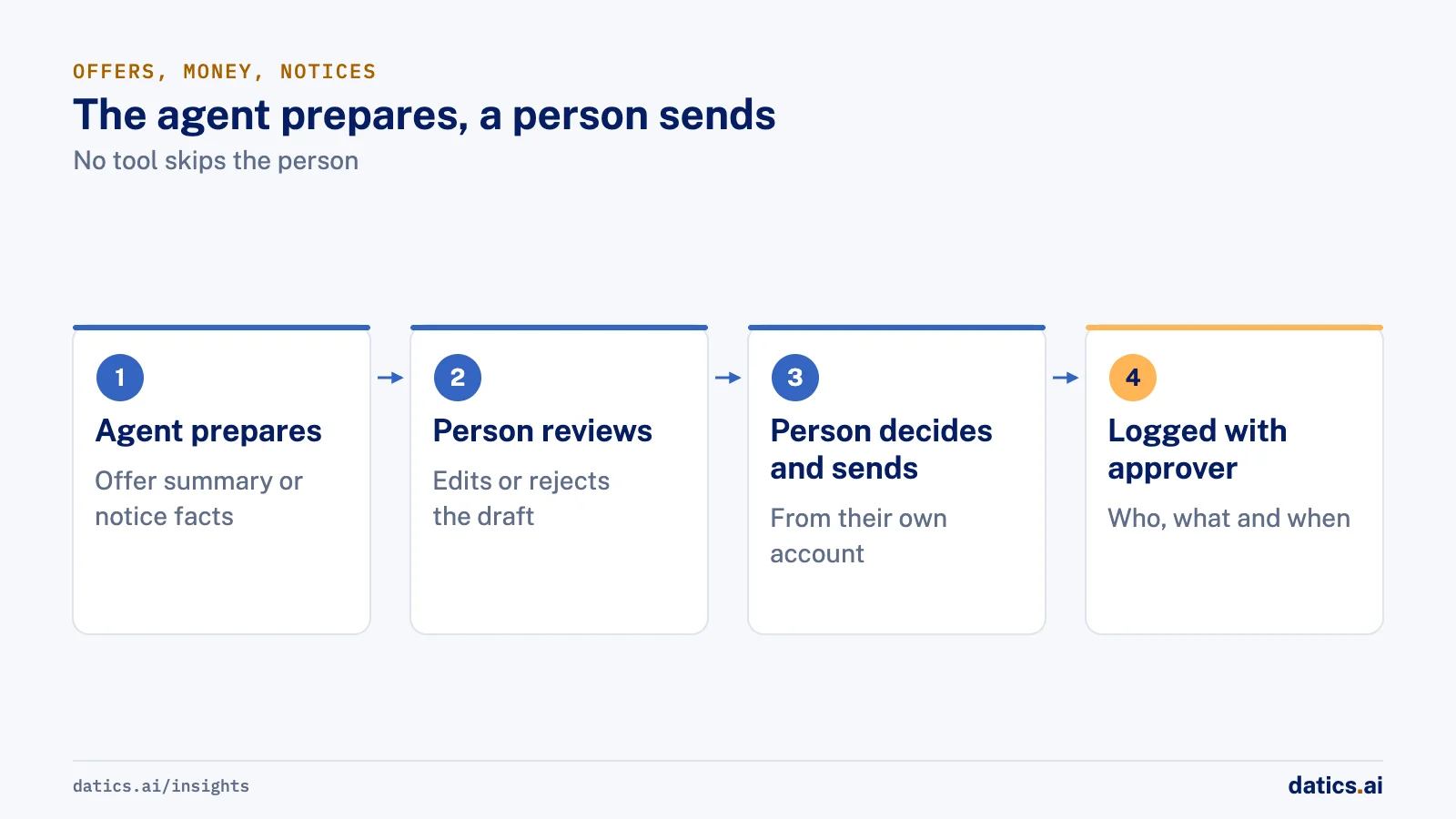
- Offers and negotiation. Writing, sending, accepting or countering an offer, and any pricing or concession decision.
- Anything that moves money. Earnest money, application fees, security deposits, rent payments and refunds.
- Legal notices. Notices to vacate, lease violation notices, rescissions and anything with a statutory deadline.
- Decisions about people. Approving or declining an applicant, choosing which homes to show someone, and how ads reach an audience.
The agent can still help with each of these. It can summarize three offers side by side or assemble the facts a notice needs. A person decides and sends. The cleanest way to enforce this is simple: the agent has no tool that performs these actions, so no prompt can talk it into one. Our article on human in the loop AI covers where approval steps belong.
Fair housing needs particular care. HUD's overview of the Fair Housing Act lists the protected classes as race, color, national origin, religion, sex, familial status and disability, and says the Act applies when people rent or buy a home, get a mortgage or take part in other housing-related activities. The statute itself, 42 U.S.C. 3604, makes it unlawful to publish an advertisement or statement about the sale or rental of a dwelling that indicates a preference, limitation or discrimination based on those characteristics, and to tell someone, because of a protected characteristic, that a dwelling is not available when it is.
For agent design, that points to two rules we hold to. First, listing copy and replies describe the property, not the kind of person it suits. Second, availability answers come from one record and are the same for everyone who asks: the same units, the same open slots, the same fees. The agent should never decide what to show someone based on anything it infers about them.
Teams should also know that in April 2026 HUD published a notice withdrawing eight fair housing guidance documents, including its 2024 guidance on advertising through digital platforms, as NAHRO reported. Withdrawn guidance does not change the statute, and NAHRO's summary notes that conduct which does not comply with the Act remains subject to HUD enforcement. Rules vary by state and city too, so confirm your obligations with your own counsel before an agent talks to the public.
03Give the agent per-user permissions and a fixed list of actions
OWASP's guidance on excessive agency names three root causes of agents doing damage: too much functionality, too many permissions and too much autonomy. Its mitigations read like a design spec: minimum tools, no open-ended tools, actions run in the context of the specific user, approval for high-impact actions, and authorization enforced in downstream systems rather than by the model.
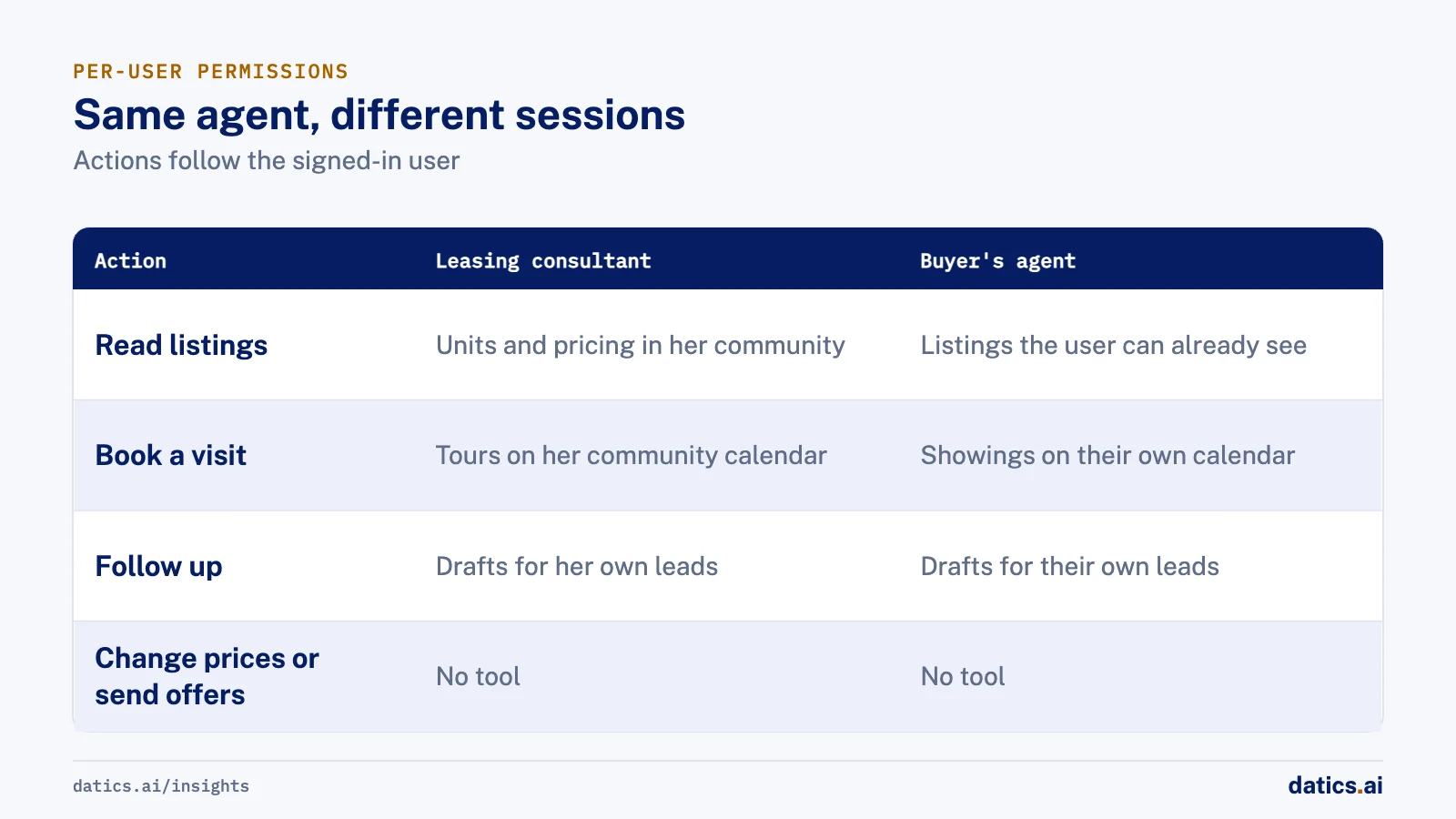
In practice, take Maria, a leasing consultant at a 280-unit community in Phoenix. Her agent session can read units and pricing for her community, book tours on her community's calendar, and draft follow-ups for her leads. It has no tool to change rent, waive a fee, approve an application or read another community's leads. A buyer's agent at a brokerage gets a different session: their own leads, their own calendar, listings their MLS access already allows.
We set this up in five steps:
- 01
List the actions per role.
Write down every action each role may take through the agent, and nothing more. "Search the database" is not an action. "Find available units by bedrooms, price and move-in date" is.
- 02
Make each action a narrow tool on your existing API.
Fixed parameters, typed inputs, no free-form queries.
- 03
Run every call as the signed-in user.
The agent uses the user's session or a token derived from it, so your backend applies the same checks it applies to the web app.
- 04
Mark which tools need a person.
Anything outward facing that cannot be undone waits for approval.
- 05
Log every call.
User, role, tool, inputs, result and approver, so any action can be explained later.
The prompt can describe these rules. Only your backend can enforce them. Our articles on AI agent security and AI agent guardrails go deeper on both, and the guide to adding AI agents to an existing SaaS product covers how to pick the first one.
04What to measure
Measure the agent the way a broker would judge a new hire, then add the checks only software makes possible:
- Time to first response on new leads, split by business hours and after hours.
- Answered from the record: the share of questions the agent answered without a handoff, and how many of those answers matched the listing record when sampled.
- Showings booked per inquiry, plus reschedules and no-shows, so you see whether the slots it offers are real.
- Draft outcomes: follow-ups sent unchanged, edited or discarded. A rising edit rate tells you the drafts are drifting.
- Listing fixes accepted versus rejected by listing owners.
- Handoff rate and time to a person, because a handoff nobody picks up is worse than no agent.
- Consistency reviews: sampled conversations about the same listing checked for the same availability, fees and slots, whoever asked.
- Actions outside the tool list: this should be zero, and your logs should prove it.
05What we see in production
On CleanHaus, a live platform that coordinates short-term rental bookings, cleanings and supplies between owners, cleaner managers and cleaners, the AI assistant has no permissions of its own. It acts only through existing APIs under each user's own login. Cleaners act only on their own jobs, and owners cannot assign cleaners. Each channel and role has its own tool allowlist, so a cleaner's session has no owner tools. Contractor bids wait in the owner's Agent Inbox for approval unless the owner set that job to auto.
For FLZR, a Berlin company that runs point of sale sales services, we built an AI sales assistant that answers from live product data. An admin connects a MySQL or PostgreSQL database, then selects tables or writes a view, and the assistant reads only that. Each chatbot answers only from the documents, links, CSV files and database it is given, and when that knowledge does not cover a question, the chat goes to a human sales agent through an inbox. The same pattern fits listing questions: a defined view of listing data, nothing else, and a person when the data runs out.
Agents depend on clean data first. For RentSpire, a Los Angeles area affordable housing listings venture, the work was data, not an agent. We collected listing data from several large property management websites and added public housing authority data, stored each floor plan as its own unit, separated properties, units and media in the schema, and shaped listings into the XML rental feed format an outside listing portal reads. An agent answering leasing questions is only as reliable as that structure.
If you already know which agent you want, a three-week Build Sprint for $10,000 puts one agent working in your product's staging, and the fee counts toward production. If you are not sure what to build first, a two-week Planning Sprint ranks the options for $5,000.
Frequently asked questions
Can an AI agent talk to buyers and renters directly?
Yes, for factual questions it can answer from your records, such as availability, fees and showing times, and for booking within the listing side's rules. It should hand off anything the record does not cover, and it should never negotiate, take payment or decide who qualifies.
Should an AI agent write listing descriptions?
It can draft them from the listing record and photos, and many agents already do this by hand: NAR found 46 percent of Realtors use AI-generated content, listing descriptions among them. Keep the draft about the property, never about the kind of buyer or renter it suits, and have the listing agent approve it before publishing.
Do we need MLS data access to build a real estate agent?
You need access to whatever data the agent answers from, under the same license your product already holds. If your product already displays MLS listings to a user, the agent may be able to read the same records for that user, but MLS rules on data display and use vary, so confirm with your MLS agreements before you build. Many first agents work entirely on data you own, such as your CRM, calendars and leasing records.
How Datics helps
Building Property Management, rental or field service software? See the AI modules we build for crews, schedules and listings.
›References (5)
- National Association of Realtors: Realtors embrace AI, digital tools to enhance client service, NAR survey finds
- HUD: Housing Discrimination Under the Fair Housing Act
- 42 U.S.C. 3604 (Cornell Legal Information Institute)
- NAHRO: HUD withdraws eight fair housing notices
- OWASP GenAI Security Project: LLM06:2025 Excessive Agency
Related work
Case studies from our projects on the same subject.
CleanHaus
Property Management · Turnover operations SaaS
Hosts and cleaners manage rental turnovers in chat, within each person's permissions
Owners, managers and cleaners all talk in one property chat. Now an AI there acts for each of them, only within that person's role.
FLZR
Other software · AI sales assistant
Shoppers compare products side by side, answered from the seller's live database
Shoppers needed product answers at any hour; now an AI assistant answers from the seller's documents, files and live database, with comparison cards.
RentSpire
Property Management · Affordable housing listings platform
Renters search affordable housing listings built on property data we structured first
A listings site with no listings is no use to renters; we structured the property data first, then built search and an owner dashboard on it.
Related answers
Property management and field operations
AI for property management: where it pays off first
AI for property management pays off first in maintenance triage, turnover scheduling and tenant messages. Keep screening, payments and notices with people.
Umair MajeedReadEdTech
AI in admissions: what enrollment platforms should build
AI in admissions works inside the enrollment platform: answers from each catalog, booked advisor calls, documents pre-filled for staff, and people deciding.
Umair MajeedReadFintech and investment platforms
AI in lending: where it pays off and where people decide
AI in lending pays off in document intake, completeness checks, credit memo drafts and servicing answers. Credit decisions and pricing stay with people.
Umair MajeedReadYour customers already expect AI from your product.
Let us make it real inside the product you run today.