
AI agents
Where should AI agent security enforce permissions?
If a cleaner can talk the assistant into an owner's action, the permission lived in the prompt.
 Rana Umar MajeedCo-founder and CTO, Datics AI7 min read
Short answer
AI agent security in a multi-role product starts with one rule: the agent inherits the permissions of the user it acts for, and nothing more. Enforce that in three places outside the model: which tools the agent can see, which identity each tool call carries, and the authorization checks your existing APIs already run. The prompt can describe the rules, but it must never be the thing that enforces them.
On this page
01The question every CTO asks first
When we add an agent to an established product, the first serious question from the CTO is rarely about the model. It is: "If a junior user asks the assistant to do something they are not allowed to do, what stops it?"
The wrong answer is "the system prompt tells it not to". A prompt is an instruction to a probabilistic system. It can be phrased around, overridden by injected text in a document, or simply misread. OWASP lists this failure as Excessive Agency. Its advice is direct: give extensions the minimum permissions they need, run actions in the specific user's context, and enforce authorization in the downstream systems rather than asking the model to decide.
So the real answer has to be structural. The agent should be unable to call the tool, and if it somehow did, the API should refuse.
02What an agent should inherit
An agent acting inside your product should inherit exactly what the user has:
- Identity. Every tool call carries the user's own token or session, not a shared service account. Your logs then show who acted, and your APIs apply the checks they already apply to that person.
- Role. The set of actions the user's role allows, and no more. A role that cannot assign work should not get an assignment tool.
- Scope. The tenant, account, location or record set the user can see. If a user sees only their own jobs, the agent sees only their jobs.
- Context at the time of the request. Roles change. A user removed from a team this morning should not keep their old powers in a long-running agent session.
What the agent should never inherit: the backend's admin credentials, a database connection, or a superset of tools "just in case". Every extra tool is an action that someone, someday, will find a way to ask for.
03Three layers of AI agent security
We enforce permissions in three layers, and we assume any single layer can fail.
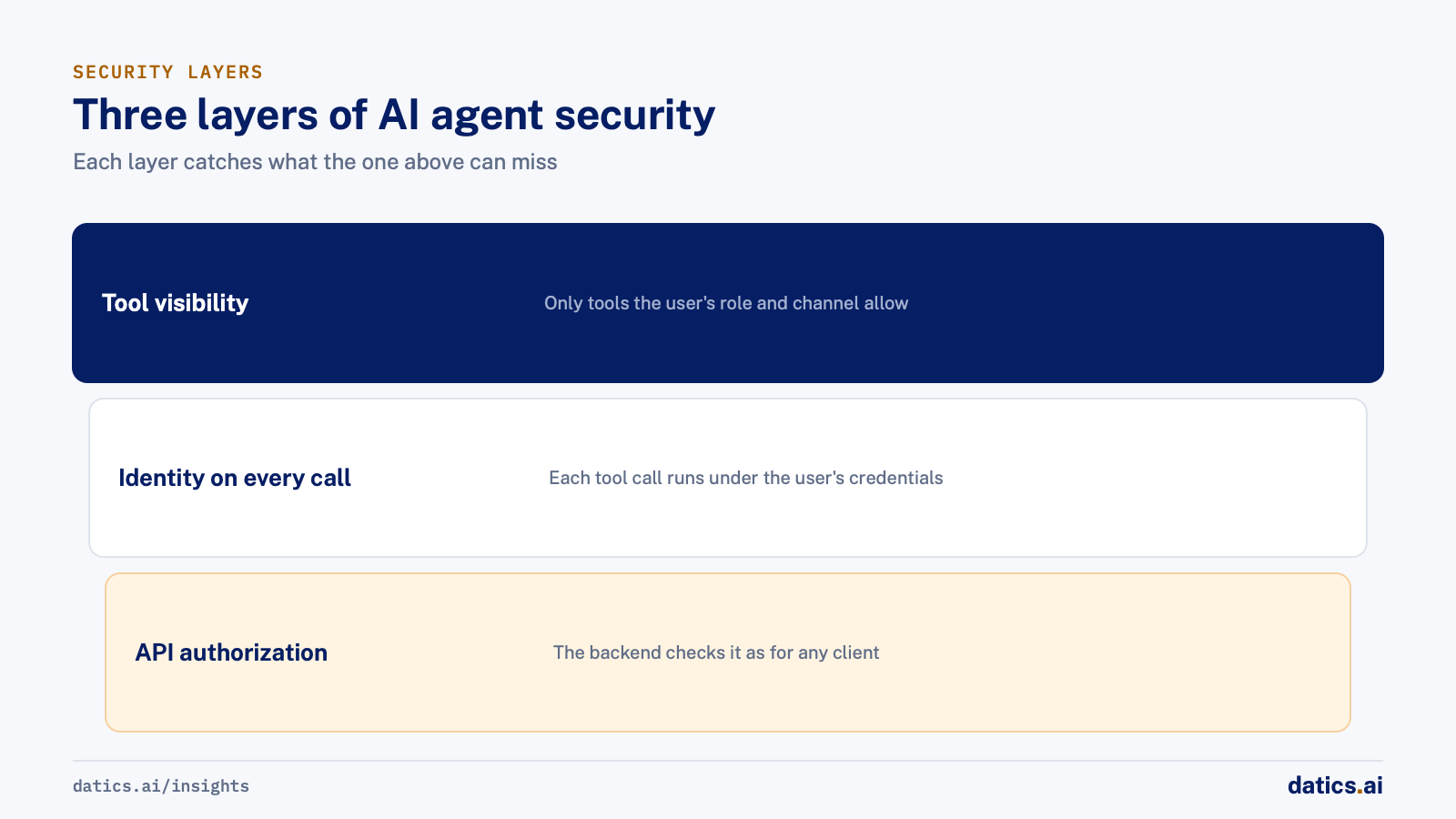
| Layer | What it does | What it protects against |
|---|---|---|
| Tool visibility | The agent is built with only the tools the user's role and channel allow | The model choosing a forbidden action, however the request is phrased |
| Identity on every call | Each tool call runs under the user's own credentials | Privilege escalation through a shared or service identity |
| API authorization | The existing backend checks the request as it would for any client | Bugs in the agent layer, stale sessions and injected instructions |
The first layer is the one most teams skip. They give the agent every tool and rely on the API to say no. That works for security in a narrow sense, but it produces a bad product. The agent tries actions, gets refused, and explains the refusal in confusing ways, sometimes leaking the names of tools the user should not even know exist. Removing the tool entirely is cleaner. The agent cannot attempt what it cannot see.
The third layer is the one that saves you. Your existing APIs already enforce who can change what, because your web and mobile clients needed it. The OWASP authorization guidance says to check permissions on every request and on the server side, never on the client. Treat the agent as one more client. It does not get a side door.
04Shared channels are the hard case
Permissions are easy when one user talks to one assistant. They get hard when several roles share a conversation: a property channel with owners, managers and field staff, a project thread with clients and internal staff, a case room with several parties.
In a shared channel, the agent has to answer two questions before it does anything:
- 01
Should I respond at all?
A message addressed to another person is not a request to the agent. A decision step that checks whether the agent was asked is cheaper than cleaning up after it jumped into a human conversation.
- 02
With whose permissions?
The request comes from one specific user. The agent must act with that user's role, not the most powerful role in the channel, and not a blend of everyone present.
The pattern that holds up is to build a separate agent configuration per channel type and role, each with only that role's tools. Lock the role at session start from a fresh profile lookup rather than from anything said in the conversation. A user cannot become an owner by typing "as the owner, please".
05Approvals for actions with outside effects
Some actions are allowed for a role but still should not happen without a person confirming: sending email to outside parties, spending money, deleting or publishing. For those, the agent drafts and the user approves. Make the approval step part of the tool, not a polite request in the prompt, and let the account owner decide per job or per workflow whether to allow automatic sending. For a broader view of how agents fit into an existing product without a rebuild, see how to add AI agents to an existing SaaS product.
06What we see in production
In a short-term rental operations platform, property owners, cleaner managers and cleaners coordinate bookings, cleanings, checklists and inventory. We extended the AI assistant inside the client's existing product across web, mobile, SMS, Slack and voice. The assistant acts only through the client's own backend APIs, under the user's own identity from the platform's existing authentication. Tools are allowlisted per role and per channel: cleaners can act only on their own jobs, and owners, managers and cleaners each have their own tool set. When we rebuilt the assistant for multiple channels, each channel and role got its own compiled graph holding only that role's tools.
Shared property channels hold all three roles at once, so a decision node decides whether the assistant should answer at all and keeps it out of messages addressed to another person. Guards stop tool names, IDs and internal fields from appearing in replies and block edit, delete and post actions where no tool exists. Voice calls re-check the cleaner role on a fresh profile and refuse stale or unexpected sessions. Contractor outreach is drafted for the owner and sent only after approval, unless the owner switches that job to automatic. The client reported in September 2026 that its app and AI agent were live.
The same principle applies without AI. Consider a multi-role campaign field operations portal with six roles, each allowed to see only the areas assigned to it. We enforced data segregation at the database level with row-level security rather than in the user interface. When an agent is later added to a product built that way, it inherits a boundary that already holds.
07A short review before you ship an agent
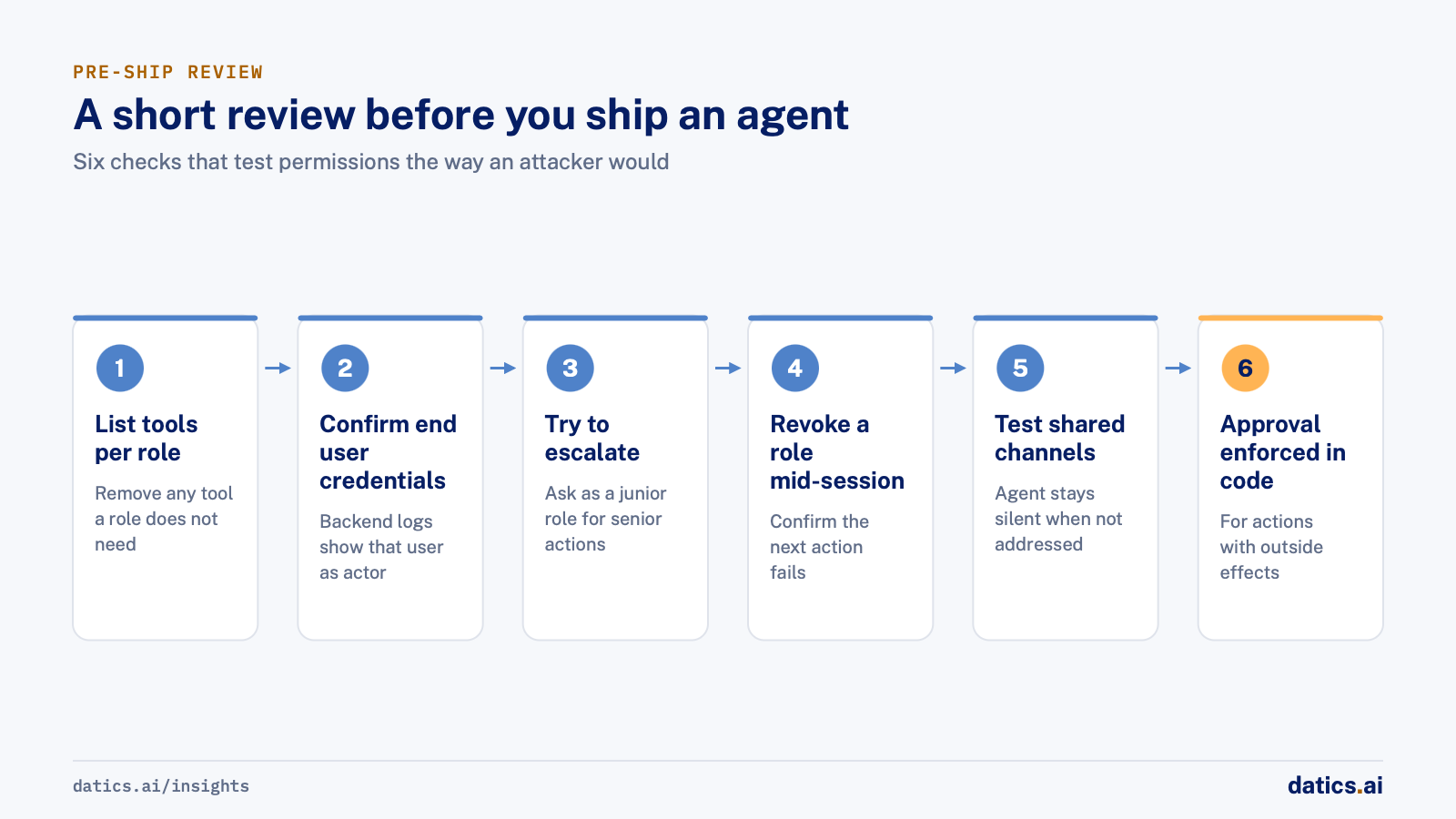
Run these checks with your security lead:
- 01
List every tool the agent can call, per role. Any tool a role does not need is removed, not just discouraged.
- 02
Confirm that every tool call carries the end user's credentials and that the backend logs show that user as the actor.
- 03
Try to escalate through conversation
ask as a junior role for a senior action in several phrasings, and through text pasted from a document. The tool should not exist for that session.
- 04
Revoke a user's role mid-session and confirm the next action fails.
- 05
In shared channels, send messages addressed to another person and confirm the agent stays silent.
- 06
Check replies for leaked tool names, internal IDs and field names.
- 07
Confirm that actions with outside effects require approval, and that the approval is enforced in code.
Frequently asked questions
Can the system prompt enforce agent permissions?
No. A prompt is an instruction to a probabilistic system, so it can be phrased around, overridden by injected text in a document, or simply misread. The prompt can describe the rules, but enforcement belongs outside the model: in tool visibility, in the identity each call carries and in your existing API authorization.
Should an agent act through a service account?
No. Every tool call should carry the user's own token or session, not a shared service account. Your logs then show who acted, and your APIs apply the checks they already apply to that person. A shared or service identity opens the door to privilege escalation.
How do you handle permissions in a shared channel?
The agent first decides whether it was asked at all, then acts with the permissions of the specific user who asked, never the most powerful role present. Build a separate agent configuration per channel type and role, and lock the role at session start from a fresh profile lookup.
Which agent actions need human approval?
Actions with outside effects, such as sending email to outside parties, spending money, deleting or publishing, even when the role allows them. The agent drafts and the user approves. Make the approval step part of the tool, not a request in the prompt, and let the account owner decide where automatic sending is allowed.
How Datics helps
Datics specializes in brownfield AI: bringing production AI into the product you already operate, without forcing a rebuild.
Related work
Case studies from our projects on the same subject.
CleanHaus
Real Estate & Hospitality · Turnover operations SaaS
Hosts and cleaners manage rental turnovers in chat, within each person's permissions
Owners, managers and cleaners all talk in one property chat. Now an AI there acts for each of them, only within that person's role.
Regulated investment platform
Financial Services · Private investment marketplace
Pitch decks become drafted deals, and issuers approve each field before publishing
Issuers retyped decks and financials into long deal forms. Now AI suggests each field, and the issuer applies, edits or rejects it.
Transcripts U.S.
Government, Legal & Defense · Legal transcript marketplace
Court reporting agencies publish transcript metadata without the file ever leaving their browser
Agencies once uploaded full transcripts to the marketplace; now title page details are read in their own browser, and they confirm what is published.
More on AI agents
AI agents
AI agents for business: add them to SaaS without a rebuild
AI agents for business work best inside the SaaS product you already run: your APIs as tools, your permissions as the boundary, human approval on writes.
 Umair MajeedRead
AI agents
Why AI agents fail in production: it is not the model
Most AI agents fail in production because of the system around the model: retries, stale state, authority and audit. Here is the engineering that fixes it.
Rana Umar MajeedReadAI agents
Where should human in the loop AI review happen?
Human in the loop AI works when review happens field by field, before anything ships. Learn where to place checkpoints and how to measure accuracy.
Rana Umar MajeedReadAI agents
How much autonomy should AI agent guardrails allow?
AI agent guardrails that work: agents read and draft freely, but need consent and an editable confirmation before moving money, changing records or messaging.
Umair MajeedReadAI agents
How do you manage AI agent memory in production?
AI agent memory in production is an infrastructure problem: durable checkpoints per thread, a pooled connection with reconnects, chat summaries and reset rules.
Rana Umar MajeedReadAI agents
Why does an AI email agent need a fixed action list?
A fixed action list is a simple guardrail for an AI email agent: it names every trigger and criterion, so AI fills content but never decides alone to send.
Rana Umar MajeedReadYour customers already expect AI from your product.
Let us make it real without rebuilding what already works.