
AI agents
Why does an AI email agent need a fixed action list?
The hard part of automated email is not writing the message. It is deciding who owns the decision to send it.
 Rana Umar MajeedCo-founder and CTO, Datics AI6 min read
Short answer
A fixed action list is one of the simplest guardrails for an AI email agent. It names every event that may trigger a message, the criteria for each, and what the AI may change inside the template. The AI then fills in content and summaries, but it never decides on its own whether to email a customer. Someone on the product side owns that list, and the system refuses anything not on it.
On this page
01Why open-ended email automation goes wrong
AI makes email easy to generate. Give a model user data and a goal, and it will write a reasonable message. The temptation is to let it decide when to write one too: notice a pattern, draft a nudge, send it.
That is where things go wrong. An email is an action with consequences outside your product. It reaches a customer's inbox, it speaks for your brand, and it cannot be recalled. If the model decides when to send, you have given it what security people call excessive agency: more autonomy than the task needs. The OWASP guidance on this risk uses an email assistant as its example, and its advice is direct: limit the functions the model can call, and require approval for high-impact actions such as sending.
A fixed action list is how you apply that advice to product email.
02What the action list for an AI email agent contains
The list is a short, versioned document, or better, a configuration file, that your system reads. For each entry it says:
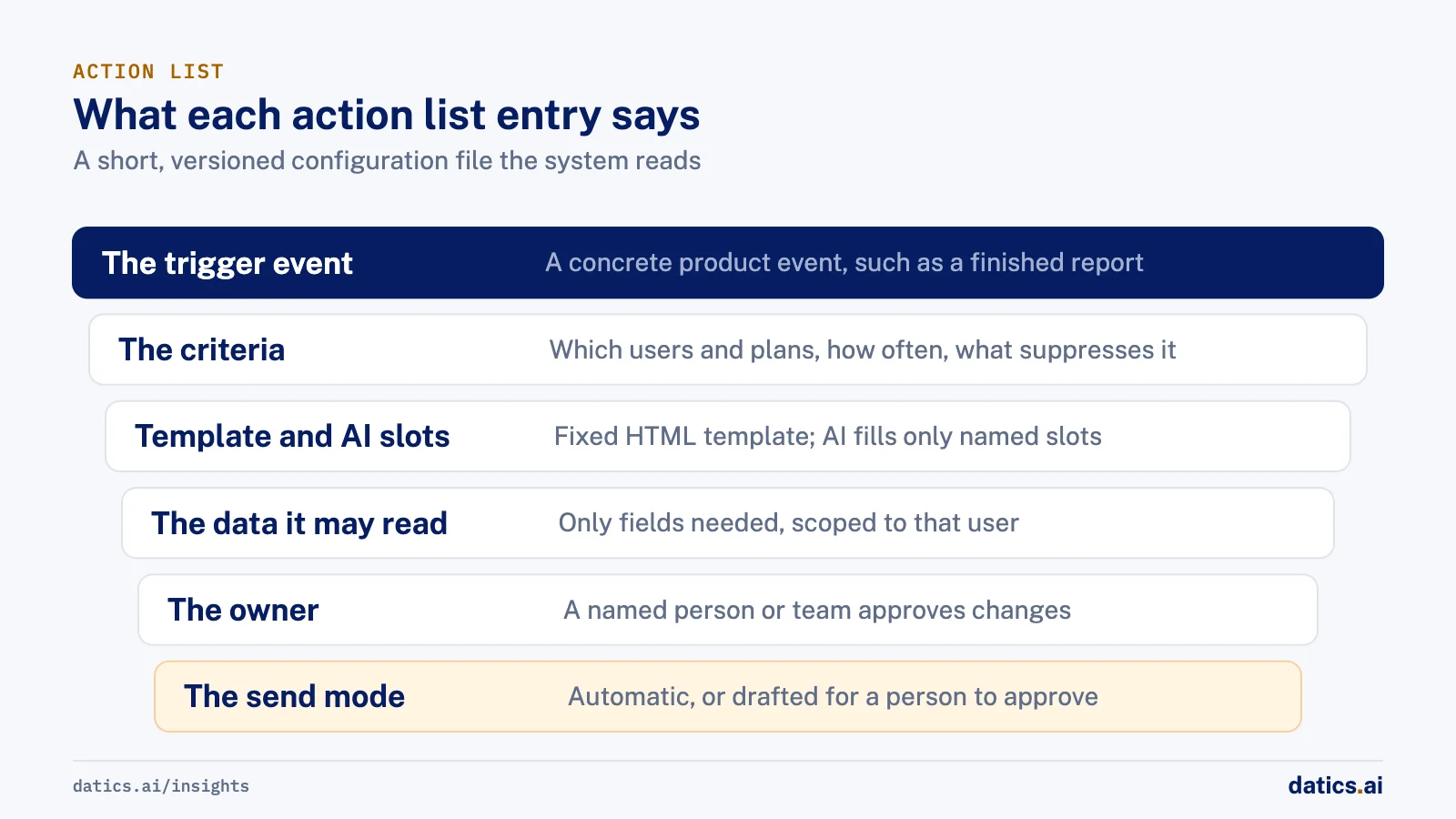
- 01
The trigger event.
A concrete product event: an account created, a usage threshold crossed, a report finished, a subscription about to renew.
- 02
The criteria.
The exact conditions under which the event leads to a message: which users, which plans, how often at most, and what suppresses it.
- 03
The template.
A fixed HTML template with named slots. The structure, links and legal text never change.
- 04
What the AI may fill.
For example, a usage summary, a short explanation of a change, or a personalized line. Everything else is fixed.
- 05
The data it may read.
Only the fields needed for that message, scoped to that user or organization.
- 06
The owner.
A named person or team who approves changes to that entry.
- 07
The send mode.
Automatic, or drafted for a person to approve first.
If an event is not on the list, no email is sent. If the AI produces content that does not fit the slots, the message falls back to the template's default text or is held for review.
03Where AI adds value inside fixed actions
Fixing the actions does not make the emails dull. It moves the AI to the part of the job where it is useful and safe.
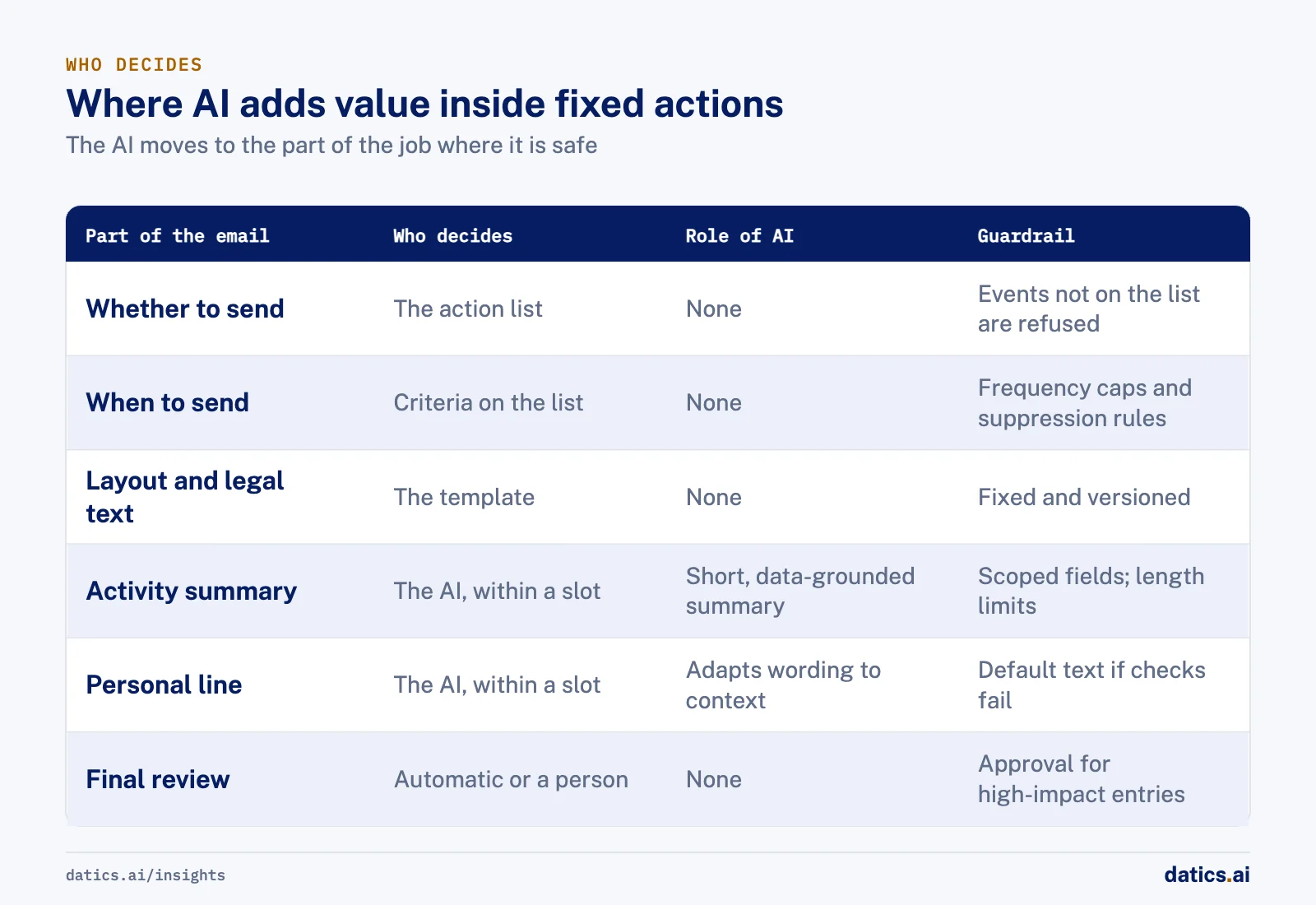
| Part of the email | Who decides | Role of AI | Guardrail |
|---|---|---|---|
| Whether to send | The action list, owned by the product team | None | Events not on the list are refused |
| When to send | Criteria on the list | None | Frequency caps and suppression rules |
| Layout and legal text | The template | None | Template is fixed and versioned |
| Summary of activity or analytics | The AI, within a slot | Writes a short, data-grounded summary | Reads only scoped fields; length limits |
| Personal line or explanation | The AI, within a slot | Adapts wording to the user's context | Falls back to default text if checks fail |
| Final review | Automatic or a person, per entry | None | Approval step for high-impact entries |
This split also makes the system easier to test. You can test the trigger logic as ordinary code. You can test the AI slots with a fixed set of inputs and check length, tone and grounding. And you can show a reviewer a complete list of every email the product can ever send.
04How to get the list written
The technical work is usually the easy part. The blocker is that nobody has written down which events should trigger which messages. Engineering assumes product will decide. Product assumes the AI will figure it out. Marketing has opinions but no access.
We handle this by making the list a deliverable with an owner before any automation is built:
- Ask for it explicitly. At scoping, ask the client to supply the list of actions and the criteria behind each. If they cannot yet, the automatic flow waits.
- Start small. Three to five actions are enough to prove the flow. Add more once the first ones behave.
- Write criteria as rules, not intentions. "Users who have not logged in for 14 days, at most once per month, not on a trial" is a rule. "Re-engage inactive users" is an intention.
- Version it. Changes to the list go through review, like code, because they are behavior changes.
- Log every send. For each email, record which action fired, which criteria matched and what the AI wrote in each slot.
For a broader view of keeping agents inside the workflow without letting them run unsupervised, see adding AI agents to existing SaaS without rebuilding.
05Trade-offs to accept
Less spontaneity. A fixed list will miss some moments where an email would have helped. That is the price of predictability, and it is usually worth paying. Missed opportunities can be added to the list later; an email that should never have been sent cannot be taken back.
Someone has to own it. The list needs an owner who will answer questions and approve changes. Without one, it goes stale or grows without review.
More upfront work. Writing criteria takes time before anything visible ships. It is also the work that prevents the slow, hard conversations later about why a customer received a message nobody intended.
06What we see in production
We worked on a multi-user, multi-model AI chat product for a generative AI startup, built on its own fork of an open source chat interface. The product already had custom features, including an admin dashboard and multi-user chat, on an outdated base. Our scope included migrating the fork to a current upstream version, moving model routing out to a separate service so the app could reach many model providers, a redesign to the client's own designs, hosting with separate development and production environments, automated deployment, and an automatic email flow with dynamic HTML templates.
When the client asked about fixed action types for the automatic email flow, that part of the work moved forward only after the client agreed to supply the list of actions and the criteria behind them. Until then, there was nothing safe to automate: the templates and the summaries could be built, but nobody had decided which events should send which messages. Once that decision had an owner, the dynamic templates and summaries were straightforward engineering. That is the lesson we carry into every automated communication project. The code is rarely the bottleneck. The decision about what the system is allowed to send is.
Frequently asked questions
Should an AI email agent send messages without approval?
Only for entries on the action list that are set to send automatically. Each entry has a send mode: automatic, or drafted for a person to approve first. OWASP advises requiring approval for high-impact actions such as sending, so keep an approval step for the entries where a wrong message would do the most harm.
How many actions should the first version include?
Three to five actions are enough to prove the flow. Write each one's criteria as a rule, such as users who have not logged in for 14 days, at most once per month, not on a trial. Add more actions once the first ones behave, and version every change through review like code.
What happens when the AI writes content that does not fit?
The message falls back to the template's default text or is held for review. The AI only fills named slots, such as a usage summary or a personal line, inside a fixed HTML template whose structure, links and legal text never change. Each slot reads only scoped fields and has length limits.
Who should own the email action list?
A named person or team on the product side who answers questions and approves changes to each entry. Without an owner, the list goes stale or grows without review. Engineering often assumes product will decide while product assumes the AI will, so make the list a deliverable with an owner before any automation is built.
How Datics helps
Datics specializes in brownfield AI: bringing production AI into the product you already operate, without forcing a rebuild.
Related work
Case studies from our projects on the same subject.
A European team AI chat provider
B2B Software · Multi-model team AI chat
Team AI chat moved onto current open source, every custom feature kept
A team AI chat product had its own features stuck on an outdated open source fork. We carried them onto a current base, open to more AI models.
CleanHaus
Real Estate & Hospitality · Turnover operations SaaS
Hosts and cleaners manage rental turnovers in chat, within each person's permissions
Owners, managers and cleaners all talk in one property chat. Now an AI there acts for each of them, only within that person's role.
Regulated investment platform
Financial Services · Private investment marketplace
Pitch decks become drafted deals, and issuers approve each field before publishing
Issuers retyped decks and financials into long deal forms. Now AI suggests each field, and the issuer applies, edits or rejects it.
More on AI agents
AI agents
AI agents for business: add them to SaaS without a rebuild
AI agents for business work best inside the SaaS product you already run: your APIs as tools, your permissions as the boundary, human approval on writes.
 Umair MajeedRead
AI agents
Why AI agents fail in production: it is not the model
Most AI agents fail in production because of the system around the model: retries, stale state, authority and audit. Here is the engineering that fixes it.
Rana Umar MajeedReadAI agents
Where should human in the loop AI review happen?
Human in the loop AI works when review happens field by field, before anything ships. Learn where to place checkpoints and how to measure accuracy.
Rana Umar MajeedReadAI agents
How much autonomy should AI agent guardrails allow?
AI agent guardrails that work: agents read and draft freely, but need consent and an editable confirmation before moving money, changing records or messaging.
Umair MajeedReadAI agents
Where should AI agent security enforce permissions?
AI agent security in a multi-role SaaS product rests on one rule: the agent gets the user's permissions and nothing more, enforced in code, never in the prompt.
Rana Umar MajeedReadAI agents
How do you manage AI agent memory in production?
AI agent memory in production is an infrastructure problem: durable checkpoints per thread, a pooled connection with reconnects, chat summaries and reset rules.
Rana Umar MajeedReadYour customers already expect AI from your product.
Let us make it real without rebuilding what already works.