
AI agents
How do you manage AI agent memory in production?
Long-running AI products fail in ordinary infrastructure places first.
 Rana Umar MajeedCo-founder and CTO, Datics AI6 min read
Short answer
Manage AI agent memory in production as infrastructure, not as a prompt trick. Store conversation state per thread in a durable checkpointer, such as PostgreSQL, behind a managed connection pool with health checks and reconnect handling. Summarize long threads so context stays small, separate short-term conversation state from long-term facts, and set retention and reset rules. Memory failures usually show up first in ordinary infrastructure, not in the model.
On this page
01Two kinds of AI agent memory, and a few more
LangGraph's persistence documentation draws a useful line. Short-term memory is handled by checkpointers, which save a thread's graph state. You select a thread by passing a thread ID in the configuration. Long-term memory, such as facts about a user that should survive across conversations, lives in a separate store. In a real product there are a few more layers around those two:
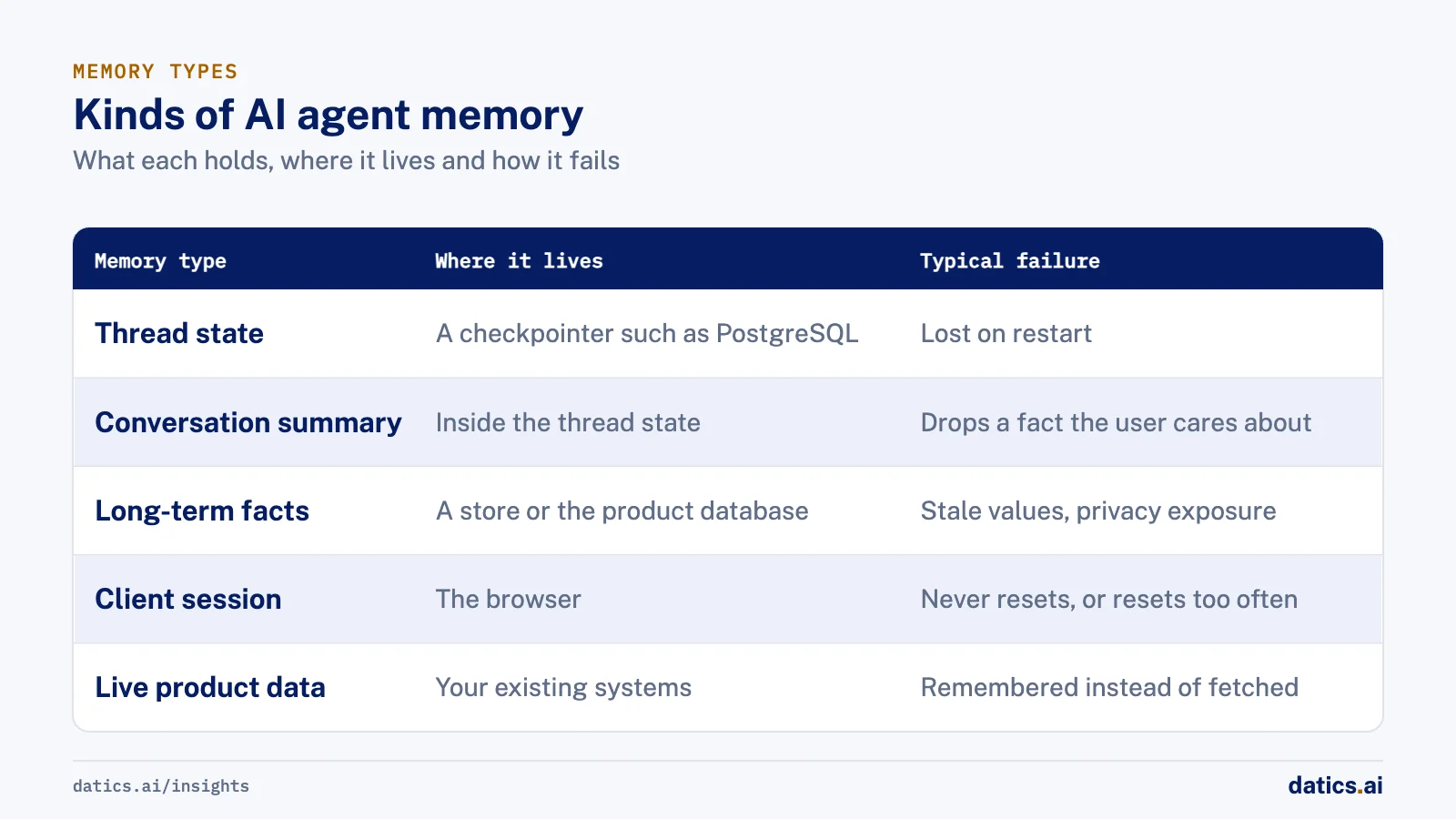
| Memory type | What it holds | Where it lives | Typical failure |
|---|---|---|---|
| Thread state | Messages, tool results, position in the graph | A checkpointer such as PostgreSQL | Lost on restart, or broken by a dropped connection |
| Conversation summary | Compressed older turns | Inside the thread state | The summary drops a fact the user cares about |
| Long-term facts | Preferences, profile details | A store or the product database | Stale values, privacy exposure |
| Client session | Session ID, widget state | The browser | Sessions that never reset, or reset too often |
| Live product data | Inventory, job status, account details | Your existing systems | Remembered instead of fetched, so it goes stale |
The last row matters most in established products. Anything that changes during the day should be fetched from the system of record when it is needed, not remembered from earlier in the conversation.
02Do not keep production memory in process
The LangGraph documentation is direct about in-memory savers: they keep checkpoints in RAM and lose all state when the process restarts. It recommends a persistent option such as a Postgres checkpointer for production. In a containerized deployment, processes restart all the time: on every deploy, on scaling events, on health check failures. An agent that forgets every open conversation on each deploy is not ready for customers.
There are also small details that only show up at scale. The same documentation notes that thread IDs should stay under 255 characters with the Postgres checkpointer because of a column limit. Build thread IDs from short, stable identifiers, such as a tenant key and a conversation key, rather than long strings assembled from user input.
03The connection layer is where it breaks
A checkpointer writes after each step of the graph, so a busy agent makes many short database writes. If those writes share a single long-lived connection, that connection will eventually be closed by the database, a proxy or an idle timeout, and the next write fails in the middle of a customer's conversation. To the user, the agent simply forgets what they said.
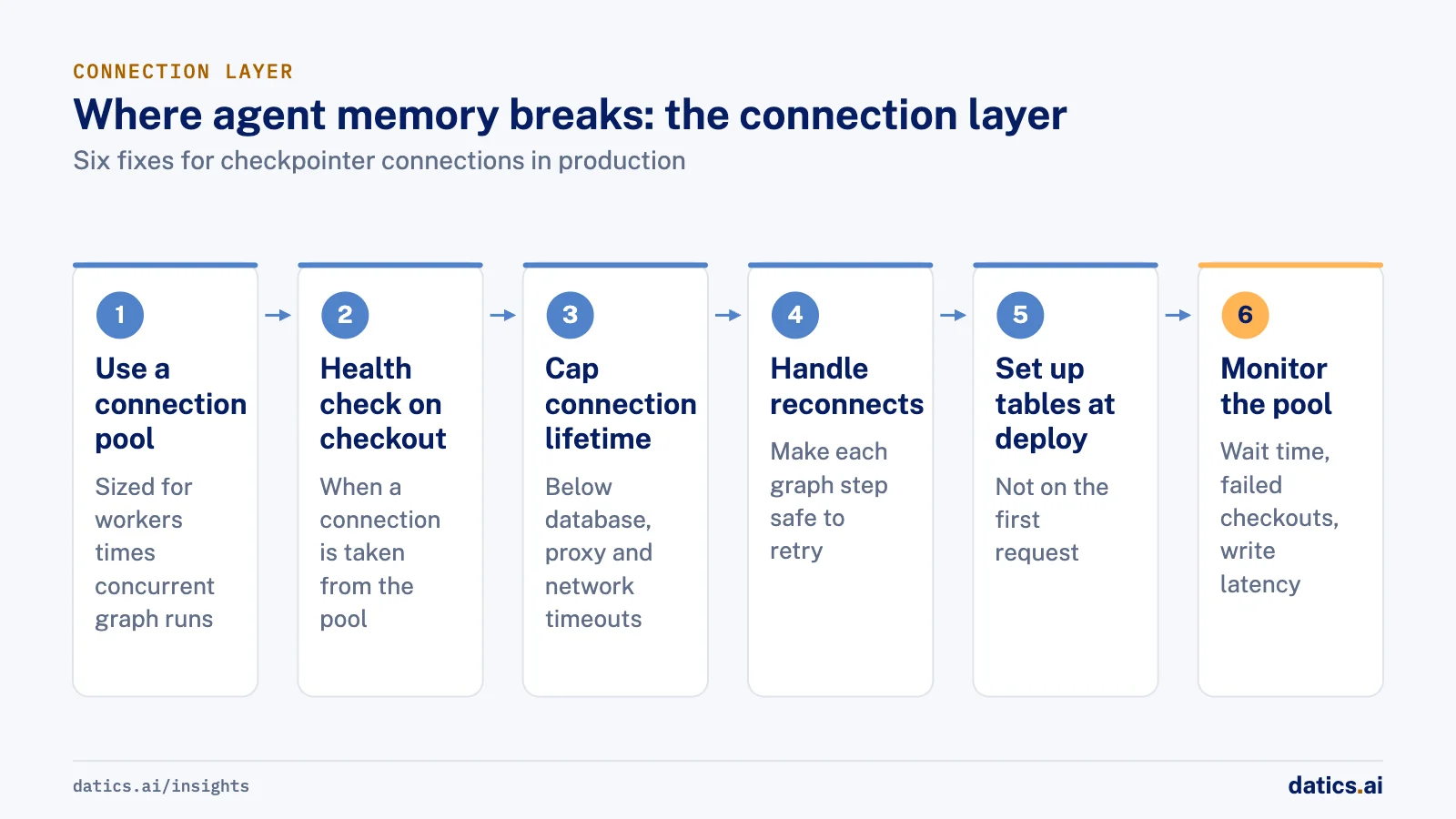
The psycopg connection pool documentation explains why a pool alone is not enough. The pool does not actively check its connections, so a broken connection can be handed to a client unless you configure a check. Connections that exceed a maximum lifetime are replaced, idle connections are closed after a set time, and failed connection attempts are retried with exponential backoff. Our checklist for a checkpointer in production:
- 01
Use a connection pool, not a single connection, and size it for real concurrency
workers multiplied by concurrent graph runs.
- 02
Configure a health check when a connection is taken from the pool.
- 03
Set the maximum connection lifetime below the timeouts of your database, proxy and network.
- 04
Handle reconnects in the agent service, and make each graph step safe to retry.
- 05
Run the checkpointer's table setup during deployment, not on the first request.
- 06
Monitor pool wait time, failed checkouts and checkpoint write latency next to model latency.
- 07
Load test long conversations, not only single questions, because that is where connection and memory problems appear.
None of this changes the model. All of it changes whether the product works on a busy afternoon.
04Keep context small on purpose
More memory is not better memory. If every turn sends the full transcript, cost grows with each message and the model starts to lose track inside a long context. Add a summary step that compresses older turns once a thread passes a set length, keep the last few turns verbatim, and put fresh retrieved data next to them. For live facts, ground the answer in a fresh lookup rather than in what the conversation said earlier.
Test the summary step like any other component. Take long real conversations, run the summary, and check that the facts a user would expect the agent to remember are still there. Those include the product they asked about, the budget they gave and the person they want to reach. A summary that is short but drops the budget is worse than no summary, because the agent now answers confidently from an incomplete picture. The cost side is covered in how to reduce AI infrastructure cost in production.
05Retention, reset and privacy
Memory is data, and it needs the same rules as any other customer data:
- Decide how long threads are kept, and delete or archive them on that schedule.
- Reset idle sessions in the client, so a shared computer does not continue someone else's conversation.
- Re-check identity and role on a fresh profile before sensitive actions, and refuse stale or unexpected sessions.
- Keep tenants apart in every query that reads thread state.
- Redact customer data and tokens before logs leave the production environment.
06What we see in production
We built a multi-tenant AI sales assistant for dealer websites in partnership with a dealership software company. Its conversation state lives in a PostgreSQL checkpointer behind a LangGraph agent that uses tools for inventory search and lead capture. Keeping that memory stable in production took a connection pool and reconnect handling, not a change to the model. Early tests with dealers surfaced context loss, which we addressed by simplifying the flow and later rebuilding it as a tool-using agent.
The widget keeps session persistence with an idle reset, dealer admins see chat history with AI summaries, and token usage is logged per conversation. The stack runs on AWS with RDS PostgreSQL, Redis and background workers, and it was moved from our AWS account to the client's own account. It is live with dealers in the U.S. and Canada, with leads and appointments flowing into the client's CRM.
In a multi-tenant AI sales assistant platform for a retail sales services company, we kept memory per thread and added a summary node so long chats stay cheap. In an AI operations assistant for a short-term rental platform, answers are grounded in fresh profile and property data rather than a stale snapshot. Voice calls re-check the user's role on a fresh profile and refuse stale sessions, and a runbook requires redacting customer data and tokens before logs are shared.
Frequently asked questions
Can we use an in-memory saver in production?
No. In-memory savers keep checkpoints in RAM and lose all state when the process restarts. In a containerized deployment, processes restart on every deploy, on scaling events and on health check failures. Use a persistent option such as a Postgres checkpointer, behind a managed connection pool with health checks.
Why does an agent forget what the user said?
Often because a database write failed, not because of the model. A checkpointer writes after each graph step, and a single long-lived connection will eventually be closed by the database, a proxy or an idle timeout. Use a connection pool with health checks, a maximum lifetime below your timeouts and reconnect handling.
Should the agent remember live product data?
No. Anything that changes during the day, such as inventory, job status or account details, should be fetched from the system of record when it is needed. Remembering it from earlier in the conversation means the agent answers from stale values. Keep memory for conversation state and long-term facts such as preferences.
How long should conversation threads be kept?
Decide a retention period and delete or archive threads on that schedule, because memory is customer data. Reset idle sessions in the client, re-check identity and role before sensitive actions, and keep tenants apart in every query that reads thread state. Redact customer data and tokens before logs leave production.
How Datics helps
Datics specializes in brownfield AI: bringing production AI into the product you already operate, without forcing a rebuild.
Related work
Case studies from our projects on the same subject.
Coast Technology
Automotive & Dealerships · AI sales assistant for dealers
RV shoppers get units from live stock, with towing fit computed, not guessed
Dealer sites offered static forms and filters. Now shoppers ask in plain words and get real units from the hourly feed, with the reason each one fits.
CleanHaus
Real Estate & Hospitality · Turnover operations SaaS
Hosts and cleaners manage rental turnovers in chat, within each person's permissions
Owners, managers and cleaners all talk in one property chat. Now an AI there acts for each of them, only within that person's role.
Regulated investment platform
Financial Services · Private investment marketplace
Pitch decks become drafted deals, and issuers approve each field before publishing
Issuers retyped decks and financials into long deal forms. Now AI suggests each field, and the issuer applies, edits or rejects it.
More on AI agents
AI agents
AI agents for business: add them to SaaS without a rebuild
AI agents for business work best inside the SaaS product you already run: your APIs as tools, your permissions as the boundary, human approval on writes.
 Umair MajeedRead
AI agents
Which AI agent architecture fits a high-stakes workflow?
For a high-stakes workflow, the stronger AI agent architecture is a supervisor routing to narrow sub-agents, each with a contract and a human decision point.
Rana Umar MajeedReadAI agents
Why AI agents fail in production: it is not the model
Most AI agents fail in production because of the system around the model: retries, stale state, authority and audit. Here is the engineering that fixes it.
Rana Umar MajeedReadAI agents
Where should human in the loop AI review happen?
Human in the loop AI works when review happens field by field, before anything ships. Learn where to place checkpoints and how to measure accuracy.
Rana Umar MajeedReadAI agents
How much autonomy should AI agent guardrails allow?
AI agent guardrails that work: agents read and draft freely, but need consent and an editable confirmation before moving money, changing records or messaging.
Umair MajeedReadAI agents
Where should AI agent security enforce permissions?
AI agent security in a multi-role SaaS product rests on one rule: the agent gets the user's permissions and nothing more, enforced in code, never in the prompt.
Rana Umar MajeedReadYour customers already expect AI from your product.
Let us make it real without rebuilding what already works.