
AI agents
How much autonomy should AI agent guardrails allow?
Let the agent think as much as it likes. Make it ask before it acts.
 Umair MajeedCo-founder and CEO, Datics AI6 min read
Short answer
An AI agent should have only as much autonomy as the cost of its worst mistake allows. Good AI agent guardrails let agents read, analyze and draft freely, but require explicit user consent and a confirmation step with editable details before anything that moves money, changes records or sends a message on someone's behalf. Keep the analysis layer separate from the execution layer, and enforce permissions in your own systems, not in the prompt.
On this page
01Autonomy is a design decision, not a model setting
Teams often ask how much they can trust the model. That is the wrong question. Even a very capable model will occasionally misread an instruction, act on manipulated input or pick the wrong record. The right question is: what happens when it does?
The OWASP Top 10 for LLM applications names this risk Excessive Agency: damage caused when a system built on a language model takes actions based on unexpected, ambiguous or manipulated output. Its main causes are too much functionality, too many permissions and too much autonomy. The mitigations OWASP recommends are practical: limit which tools an agent can call, limit what each tool can do, run actions in the authenticated user's context with narrow scopes, require human approval for high impact actions, and enforce authorization in downstream systems rather than trusting the model to decide what is allowed.
That gives a simple way to think about autonomy. It is not one dial for the whole agent. It is a setting per action, chosen by how reversible and how costly that action is.
02A practical autonomy ladder
We sort every action an agent might take into levels before we write any agent code.
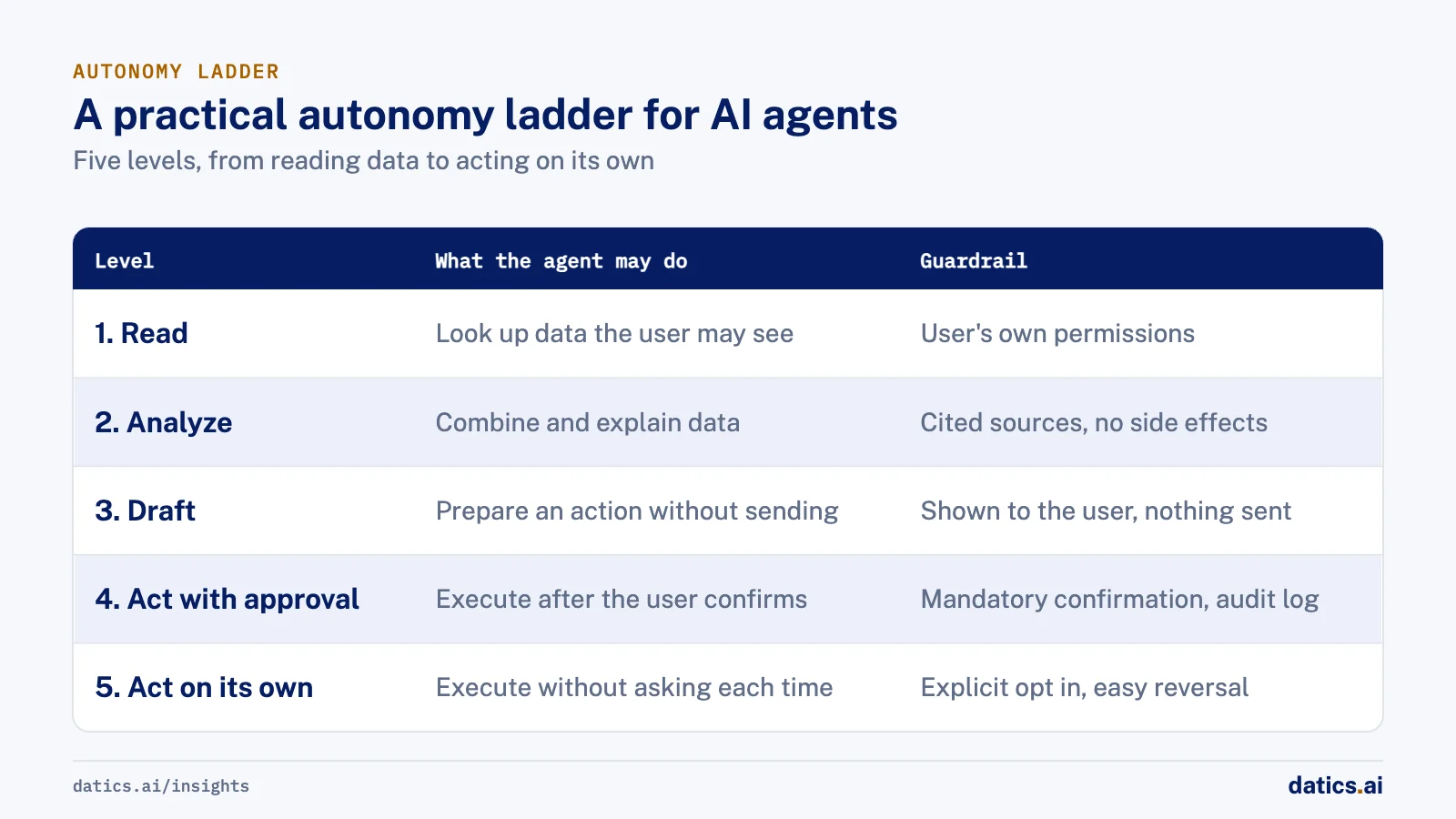
| Level | What the agent may do | Typical examples | Guardrail |
|---|---|---|---|
| 1. Read | Look up data the user may already see | Search records, fetch a job status | User's own permissions, role allowlist |
| 2. Analyze | Combine and explain data | Summaries, research, recommendations | Cited sources, no side effects |
| 3. Draft | Prepare an action without sending it | Draft an email, prepare an order | Shown to the user, nothing sent |
| 4. Act with approval | Execute after the user confirms | Place an order, send a bid email | Mandatory confirmation, editable details, audit log |
| 5. Act on its own | Execute without asking each time | Routine, low risk, user opted in | Explicit opt in per task, logging, easy reversal |
Most agents in live products should live at levels one to four. Level five is earned per task, chosen by the user, and easy to switch off.
03How we build AI agent guardrails into a product
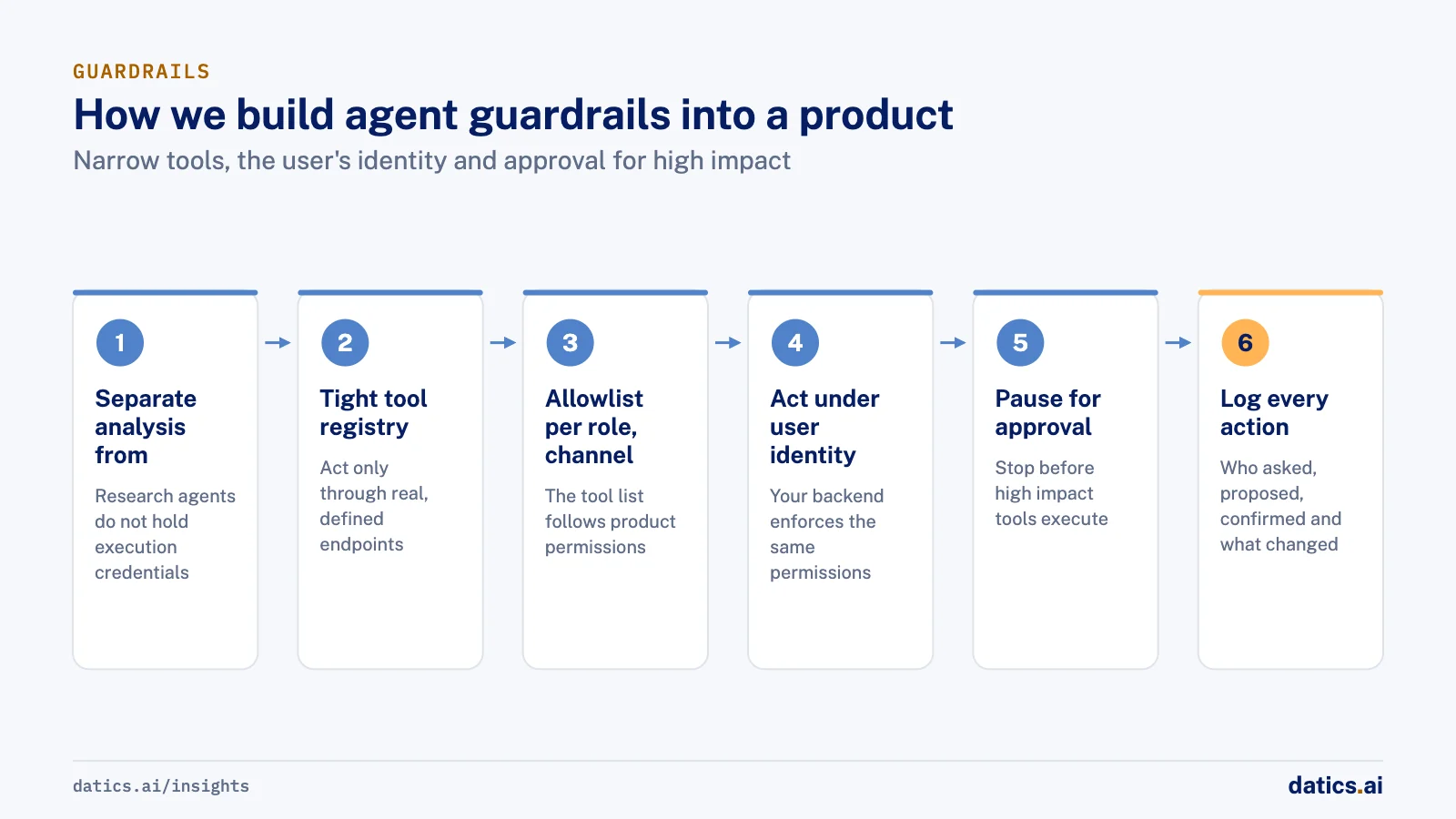
The guardrails that hold up in production are structural. They come from how the system is built, not from instructions in the prompt.
- 01
Separate analysis from execution.
The agents that research and recommend should not hold the credentials that execute. Execution sits in its own layer that only runs after confirmation.
- 02
Expose actions as a tight tool registry.
The agent can only act through real, defined endpoints of your product. If no tool exists for an action, the agent cannot take it.
- 03
Allowlist tools per role and per channel.
A user who cannot assign jobs in your product should not have an agent that can. The tool list follows the user's role.
- 04
Act under the user's identity.
Calls go through your existing authentication, so your backend enforces the same permissions it always has.
- 05
Pause for approval on high impact actions.
Frameworks such as LangGraph support interrupts that stop a run before a tool executes, show the pending action, and resume with approval, edited arguments or a rejection.
- 06
Make confirmation editable.
The user should see the exact parameters and be able to change them, not just click yes or no.
- 07
Log every action and every approval.
Who asked, what the agent proposed, who confirmed and what changed.
- 08
Guard the output, too.
Block internal tool names, IDs and fields from appearing in replies, and stop the agent from claiming it did something it had no tool for.
04What we see in production
On an AI market intelligence and trading app for retail investors, which we built for a fintech venture, the analysis agents and the brokerage execution layer were separated on purpose. Specialist agents for opportunity signals, market research, trading and portfolios sit behind one conversational agent, so a user can go from portfolio review to new ideas in one conversation, and answers in chat cite their sources from filings, news and social media.
But the agents only analyze and recommend. A trade happens only after the user gives explicit consent to connect the brokerage and then passes a mandatory confirmation step with editable parameters. When the venture explored a version for investment firms, the proposal added an admin kill switch and human in the loop settings on top.
On a field operations platform for short-term rental cleaning, our AI assistant runs inside the client's existing product and acts only through the client's own APIs, under the user's existing identity. Tools are allowlisted per role and per channel: cleaners can act only on their own jobs, and hosts, managers and cleaners each have separate tool sets. In shared property channels, a decision node decides whether the AI should answer at all, and it stays out of messages addressed to another person. Guards stop tool names, IDs and internal fields from appearing in replies, and block edit, delete and post actions where no tool exists.
For contractor outreach, the agent drafts bid emails for the owner, and they go out only after the owner approves, unless the owner switches that specific job to automatic. That per-job setting is level five done carefully: the user chooses it, for one task, and can change it back. Voice calls re-check the cleaner's role on a fresh profile and refuse stale or unexpected sessions.
The same lesson carries to any product where an agent can move money, change records or send something on a user's behalf. The model is never the last line of defense. The product's own permissions, a separate execution layer and a confirmation step are.
05Signs your agent has too much autonomy
- It can call a general purpose tool, such as raw database access or an unrestricted HTTP request, where a narrow tool would do.
- Its credentials are broader than the permissions of the user it acts for.
- High impact actions run without a confirmation the user can edit.
- Authorization checks live in the prompt instead of in your backend.
- There is no record of who approved an action.
- Turning automation off for one task means turning it off for everyone.
If any of these are true, reduce the agent's reach before you add more capability. Our article on why AI agents fail in production covers related failure patterns, and how to add AI agents to existing SaaS without rebuilding explains how to expose your existing APIs as safe tools.
06How to decide autonomy for a new action
When a new action is proposed for an agent, we ask four questions:
- Can it be undone? If not, it needs confirmation.
- Does it affect money, records another person relies on, or people outside the product? If so, it needs confirmation and a log entry.
- Would the user be surprised to learn the agent did it? If so, it should not run silently.
- Has the user asked for this to be automatic, for this task? Only then consider level five.
Frameworks like the NIST AI Risk Management Framework are useful for placing these decisions inside a wider governance process, so that autonomy levels are reviewed as the product and its users change.
Frequently asked questions
How much autonomy should an AI agent have?
Only as much as the cost of its worst mistake allows. Autonomy is not one dial for the whole agent. It is a setting per action, chosen by how reversible and how costly that action is. Most agents in live products should stay between reading and acting with approval.
Which agent actions need a confirmation step?
Anything that cannot be undone, that affects money, records another person relies on or people outside the product, or that would surprise the user if the agent did it silently. The confirmation should show the exact parameters and let the user change them, not just click yes or no.
When can an agent act on its own?
Only when the user has asked for it, for one specific task, and can switch it off easily. That is level five on the ladder, with explicit opt in, logging and easy reversal. A per-job setting for automatic contractor outreach is one example of level five done carefully.
How Datics helps
Datics specializes in brownfield AI: bringing production AI into the product you already operate, without forcing a rebuild.
Related work
Case studies from our projects on the same subject.
Cosmic AI
Financial Services · Multi-agent investing assistant
Retail investors go from research to a confirmed order in one conversation
Investors juggled data, news and a separate broker. Now agents research and prepare each trade in chat, and nothing is placed until they confirm.
CleanHaus
Real Estate & Hospitality · Turnover operations SaaS
Hosts and cleaners manage rental turnovers in chat, within each person's permissions
Owners, managers and cleaners all talk in one property chat. Now an AI there acts for each of them, only within that person's role.
Regulated investment platform
Financial Services · Private investment marketplace
Pitch decks become drafted deals, and issuers approve each field before publishing
Issuers retyped decks and financials into long deal forms. Now AI suggests each field, and the issuer applies, edits or rejects it.
More on AI agents
AI agents
AI agents for business: add them to SaaS without a rebuild
AI agents for business work best inside the SaaS product you already run: your APIs as tools, your permissions as the boundary, human approval on writes.
Umair MajeedReadAI agents
Why AI agents fail in production: it is not the model
Most AI agents fail in production because of the system around the model: retries, stale state, authority and audit. Here is the engineering that fixes it.
 Rana Umar MajeedRead
AI agents
Where should human in the loop AI review happen?
Human in the loop AI works when review happens field by field, before anything ships. Learn where to place checkpoints and how to measure accuracy.
Rana Umar MajeedReadAI agents
Where should AI agent security enforce permissions?
AI agent security in a multi-role SaaS product rests on one rule: the agent gets the user's permissions and nothing more, enforced in code, never in the prompt.
Rana Umar MajeedReadAI agents
How do you manage AI agent memory in production?
AI agent memory in production is an infrastructure problem: durable checkpoints per thread, a pooled connection with reconnects, chat summaries and reset rules.
Rana Umar MajeedReadAI agents
Why does an AI email agent need a fixed action list?
A fixed action list is a simple guardrail for an AI email agent: it names every trigger and criterion, so AI fills content but never decides alone to send.
Rana Umar MajeedReadYour customers already expect AI from your product.
Let us make it real without rebuilding what already works.