
AI agents
Where should human in the loop AI review happen?
A document score hides the one field that is wrong. Review the field, not the file.
 Rana Umar MajeedCo-founder and CTO, Datics AI7 min read
Short answer
Human in the loop AI works best when people review at the field level, not the document level, and before anything is published or acted on. Show a confidence for each extracted field, route only the uncertain or high-impact fields to a reviewer, let them edit or suppress, and treat every AI output as a draft the customer owns until a person confirms it.
On this page
- 01Start from the decision, not the model
- 02Why one score per document is the wrong unit
- 03Measure accuracy by file type, not on average
- 04Treat AI output as a draft the customer owns
- 05Not every step needs a person
- 06What we see in production
- 07A checklist for placing human in the loop AI review
- Frequently asked questions
01Start from the decision, not the model
Most teams place human review where the model feels weakest. We place it where a mistake becomes expensive. Those are different places. A model can be shaky on a field nobody acts on, and very confident on a field that triggers a payment, a publication or a regulated step.
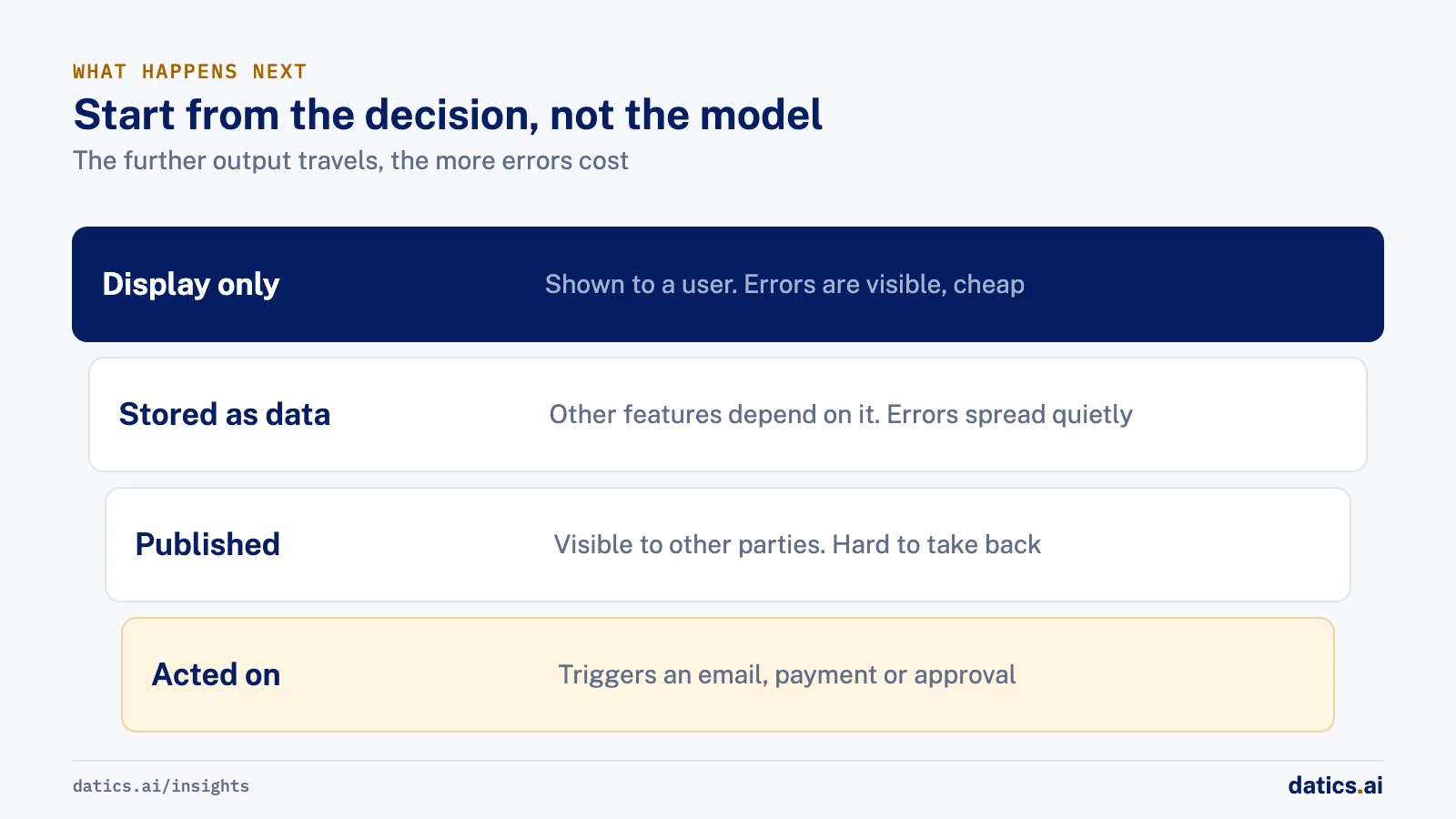
So the first question in any workflow product is: what happens after the AI produces this output? Map each output to the action it feeds:
- Display only. The output is shown to a user who reads it. Errors are visible and cheap.
- Stored as data. The output lands in a database column that reports, search and other features depend on. Errors spread quietly.
- Published. The output becomes visible to other parties, such as buyers, regulators or the public. Errors are hard to take back.
- Acted on. The output triggers an email, a payment, an approval or a change in another system. Errors have consequences outside your product.
Human review belongs in front of the last three, and it gets stricter as you move down the list. That is also how regulators frame it: the EU AI Act asks that the people overseeing a high-risk system can understand its limits, watch for over-reliance on its output, and override or reverse it. You cannot override something that has already been published.
02Why one score per document is the wrong unit
Extraction products often show a single confidence per document: "92% confident". That number tells the reviewer almost nothing. A document can be 92% right and still have the wrong date, the wrong name or the wrong amount, and those are usually the fields that matter.
Field-level confidence changes the reviewer's job. Instead of reading the whole document against the extraction, they see which three fields the system is unsure about and check those. Cloud services built for this pattern work the same way: Amazon Augmented AI, for example, describes sending low-confidence predictions, or important key-value pairs, to human review rather than every document.
In practice we design the review screen around three actions per field:
- 01
Accept.
The value is correct and goes forward as is.
- 02
Edit.
The value is close and the reviewer fixes it. The edit is recorded, because edits are your best training and evaluation data.
- 03
Suppress.
The value should not be published at all, either because it is wrong and cannot be fixed, or because it is sensitive. Suppress is not delete: the record stays for audit, it is only kept out of what others see.
Suppress matters more than teams expect. In regulated and confidential workflows, the most common correct action is not "fix this" but "do not show this".
03Measure accuracy by file type, not on average
An average accuracy number across all documents is the second trap. Clean text files, office documents and scanned images behave very differently, and the mix changes as customers onboard.
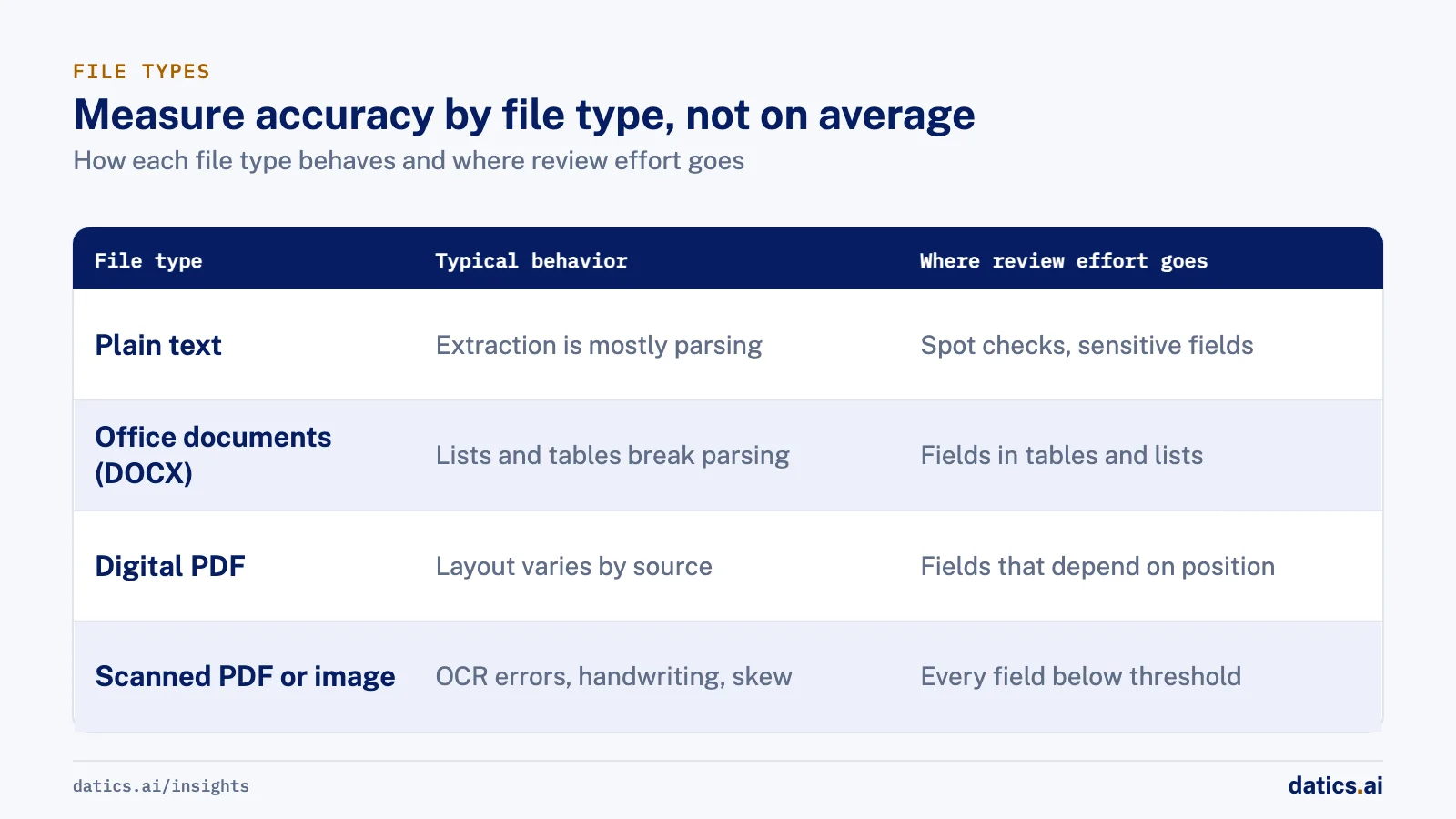
| File type | Typical behavior | Where review effort goes |
|---|---|---|
| Plain text | Structure is predictable, extraction is mostly parsing | Spot checks, plus any sensitive field |
| Office documents (DOCX) | Lists, tables and styles break naive parsing | Fields inside tables and bulleted lists |
| Digital PDF | Text is present but layout varies by source | Fields that depend on position, such as headers |
| Scanned PDF or image | OCR errors, handwriting, skew | Every field below threshold, and names and numbers always |
If you report one number, a customer with mostly clean files and a customer with mostly scans will both be surprised. Report accuracy per file type, set review thresholds per file type, and expect the thresholds for scans to be stricter. When a new customer arrives with a different mix, you already know which bucket their documents fall into.
04Treat AI output as a draft the customer owns
The cleanest pattern we know is to store the AI output next to the human version, not instead of it. The AI draft is one record. The confirmed version is another. A pre-publish gate moves data from draft to confirmed only when a person says so.
This has practical benefits:
- Trust. Reviewers can see what the AI proposed and what they changed. Nobody has to wonder whether a value came from a person or a model.
- Source of truth. Once a human finalizes a field, that value wins. A later AI run cannot overwrite it silently.
- Evaluation. The difference between draft and confirmed is a free, continuous accuracy measure, by field and by file type.
- Audit. When someone asks why a value is what it is, you can show who confirmed it and when.
It also changes how users feel about the feature. A draft they control is help. A value that appears in the system without their say is a risk they have to manage. For more on why AI that cannot be supervised stalls before launch, see why AI agents fail in production.
05Not every step needs a person
Human review has a cost, and too much of it trains reviewers to click "accept" without reading. That is automation bias, and it makes the review useless. Keep people where their judgment changes the outcome, and automate the rest:
- Automate low-impact fields with high confidence, formatting, normalization and routine data entry that a person reviews in batches.
- Review fields below threshold, any field that is published to another party, and any value that feeds a regulated or financial step.
- Require approval for actions with outside effects: sending an email, releasing a file, approving a deal, changing a record in another system.
Make the threshold a setting, not a constant in code. Different customers, and different document types, need different levels of caution, and you will tune it once real review data comes in.
06What we see in production
In a national legal marketplace that connects court reporting agencies and attorneys, we built metadata extraction for plain text, Word, PDF and scanned transcripts. Extraction, including OCR, runs in the agency's browser, and only approved metadata reaches the platform. Each field carries its own confidence, and the agency reviews, edits, publishes or suppresses fields before anything appears in search. Sealed records are suppressed automatically, and protective-order records need extra authorization. The agency stays the release authority throughout. The client wrote that metadata extraction accuracy had improved significantly, and the platform moved into a controlled pilot with agencies and attorneys.
For a regulated private investment platform, our AI agents read pitch decks and deal documents and fill the deal creation fields. We stored the AI-generated deal next to the human-entered one, showed them side by side, and placed a pre-publish gate that needs human confirmation. AI never approves a deal, a KYC check or a tokenization step; it produces structured outputs, and a person decides. Once a human finalizes data, that version is the source of truth.
On our own internal operations platform, AI drafts weekly and project summaries and an automation enters routine project updates through an MCP server under each user's own permissions. A business analyst reviews every update the automation adds. That moved the team from typing updates to reviewing them, which is where we want people: on the decision, not the data entry.
Across these products the pattern repeats. Review goes in front of publication and action, at the level of the field, and the record of what was changed is kept.
07A checklist for placing human in the loop AI review
Before you ship an AI step in a workflow product, check:
- 01
Every AI output is mapped to what happens next
display, store, publish or act.
- 02
Confidence is shown per field, and thresholds are set per file type or input type.
- 03
Reviewers can accept, edit or suppress each field, and every edit is logged.
- 04
AI drafts are stored separately from confirmed values, and confirmed values cannot be overwritten by a later run.
- 05
Nothing is published or sent to another party without passing a human gate, unless a customer has explicitly turned on automation for that step.
- 06
Accuracy is reported by file type and by field, using the gap between draft and confirmed values.
- 07
The threshold for review is a setting you can change per customer.
If those seven are in place, human in the loop stops being a slogan and becomes a feature your customers can configure, measure and trust.
Frequently asked questions
Where should human review go in an AI workflow?
In front of outputs that are stored as data, published or acted on, and stricter as you move toward action. Place review where a mistake becomes expensive, not where the model feels weakest. A model can be shaky on a field nobody acts on, and very confident on a field that triggers a payment or a regulated step.
Why use field-level confidence instead of one score per document?
A document can be 92% right and still have the wrong date, the wrong name or the wrong amount, and those are usually the fields that matter. Field-level confidence shows the reviewer which few fields the system is unsure about. They check those instead of reading the whole document against the extraction.
How do you stop reviewers from clicking accept without reading?
Keep people only where their judgment changes the outcome. Too much review trains reviewers to accept without reading, which is automation bias. Automate low-impact fields with high confidence, review fields below threshold or published to another party, and require approval for actions with outside effects. Make the threshold a setting you can tune per customer.
What does suppress mean in AI review?
Suppress keeps a value out of what others see without deleting it. Reviewers use it when a value is wrong and cannot be fixed, or when it is sensitive. The record stays for audit. In regulated and confidential workflows, the most common correct action is not "fix this" but "do not show this".
How Datics helps
Datics specializes in brownfield AI: bringing production AI into the product you already operate, without forcing a rebuild.
Related work
Case studies from our projects on the same subject.
Transcripts U.S.
Government, Legal & Defense · Legal transcript marketplace
Court reporting agencies publish transcript metadata without the file ever leaving their browser
Agencies once uploaded full transcripts to the marketplace; now title page details are read in their own browser, and they confirm what is published.
Regulated investment platform
Financial Services · Private investment marketplace
Pitch decks become drafted deals, and issuers approve each field before publishing
Issuers retyped decks and financials into long deal forms. Now AI suggests each field, and the issuer applies, edits or rejects it.
Coast Technology
Automotive & Dealerships · Self-serve ad campaign portal
Dealerships plan and launch streaming TV campaigns themselves, in a guided wizard
Campaigns once needed back end know-how and long documentation. Now dealers move through four guided stages, preview everything and publish.
More on AI agents
AI agents
AI agents for business: add them to SaaS without a rebuild
AI agents for business work best inside the SaaS product you already run: your APIs as tools, your permissions as the boundary, human approval on writes.
 Umair MajeedRead
AI agents
Which AI agent architecture fits a high-stakes workflow?
For a high-stakes workflow, the stronger AI agent architecture is a supervisor routing to narrow sub-agents, each with a contract and a human decision point.
Rana Umar MajeedReadAI agents
Why AI agents fail in production: it is not the model
Most AI agents fail in production because of the system around the model: retries, stale state, authority and audit. Here is the engineering that fixes it.
Rana Umar MajeedReadAI agents
How much autonomy should AI agent guardrails allow?
AI agent guardrails that work: agents read and draft freely, but need consent and an editable confirmation before moving money, changing records or messaging.
Umair MajeedReadAI agents
Where should AI agent security enforce permissions?
AI agent security in a multi-role SaaS product rests on one rule: the agent gets the user's permissions and nothing more, enforced in code, never in the prompt.
Rana Umar MajeedReadAI agents
How do you manage AI agent memory in production?
AI agent memory in production is an infrastructure problem: durable checkpoints per thread, a pooled connection with reconnects, chat summaries and reset rules.
Rana Umar MajeedReadYour customers already expect AI from your product.
Let us make it real without rebuilding what already works.