
AI security and compliance
How do you build an AI audit trail you can reproduce?
Provenance is cheap on the first automated entry and nearly impossible on the ten thousandth.
 Rana Umar MajeedCo-founder and CTO, Datics AI6 min read
Short answer
An AI audit trail lets you audit and reproduce what AI assistants do and write. Record every automated change with its source, the user whose permissions it used, the inputs it read, the model and prompt version, and the person who approved it. The trail has to be designed before automated entries pile up. Once AI and human input are mixed without labels, nobody can tell them apart again, and no review can recover that history.
On this page
01Why AI writes need a different audit trail
Most products already log who changed a record and when. That was enough when every change came from a person clicking a button. AI assistants break the assumption in three ways.
First, an assistant acts on behalf of a user, so the "who" is now two things: the person whose permissions were used and the automation that made the change. Second, the same request can produce different output on another day, because models, prompts and context change. Third, assistants can write at volume. A browser automation or a tool connected through the Model Context Protocol can enter hundreds of updates in the time a person enters one.
If your log only shows "updated by a named user", you cannot answer the questions that come next: did that person type this, or did their assistant? Which source did it read? Would it write the same thing today?
02What every automated entry should carry
We treat an automated write like a small transaction with a receipt. The receipt should be stored with the record, not only in a separate log that nobody reads.
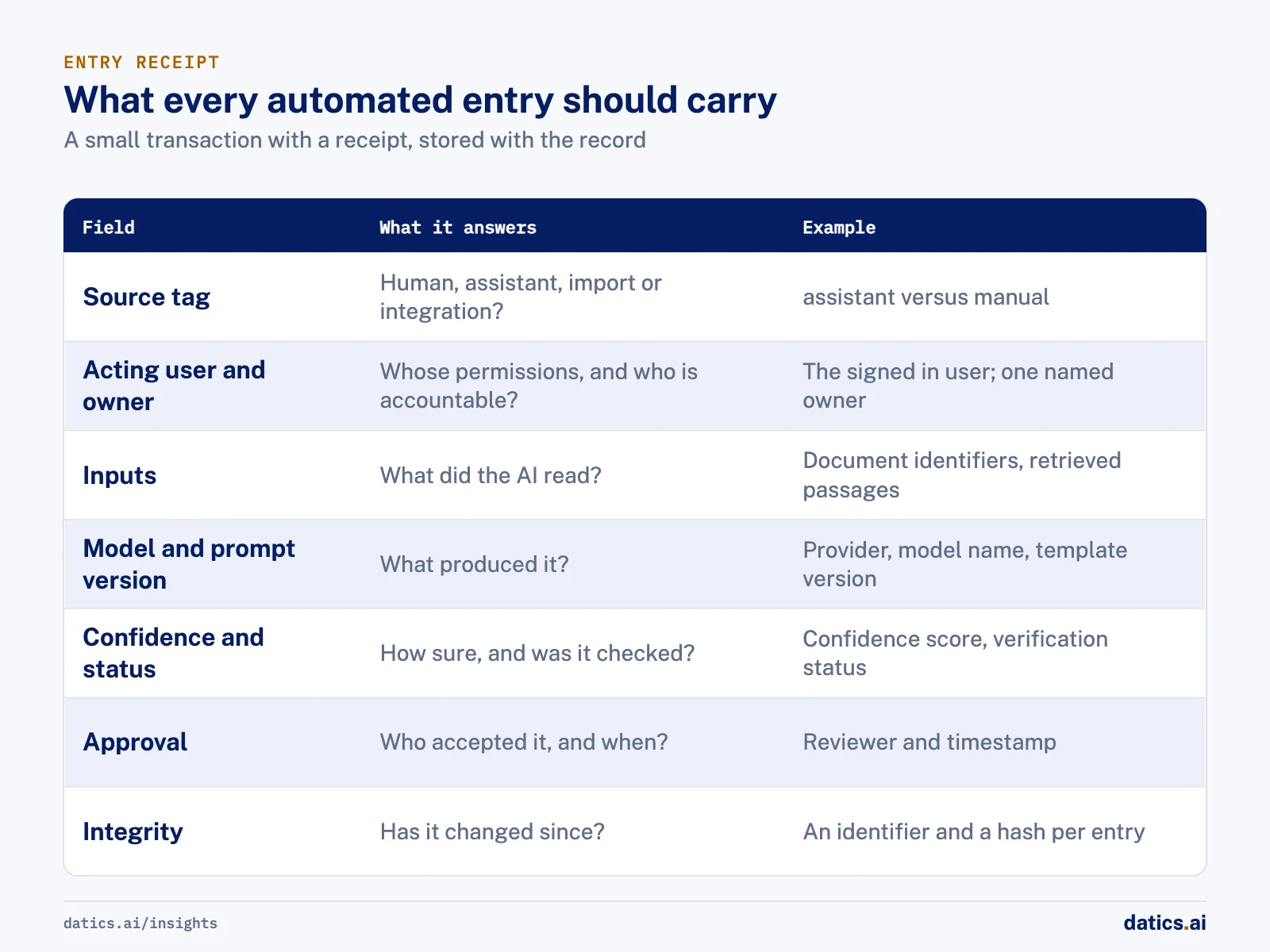
| Field | What it answers | Example |
|---|---|---|
| Source tag | Was this human, assistant, import or integration? | "assistant" versus "manual" |
| Acting user | Whose permissions were used? | The signed in user behind the assistant |
| Owner | Who is accountable for this record? | One named person per resource |
| Inputs | What did the AI read to produce this? | Document identifiers, source records, retrieved passages |
| Model and prompt version | What produced it? | Provider, model name, prompt template version |
| Confidence and status | How sure was it, and was it checked? | Confidence score, verification status |
| Approval | Who accepted it, and when? | Reviewer and timestamp |
| Integrity | Has it changed since? | An identifier and a hash per entry |
W3C's PROV standard offers a useful vocabulary here: it describes provenance in terms of entities, activities and agents, which maps neatly onto records, AI actions and the people or systems behind them. You do not need to adopt the full standard to borrow its structure.
03How to make AI output reproducible
Exact reproduction is not always possible with language models, but you can get close enough for an audit. The goal is that a reviewer can see what the AI saw and rerun it.
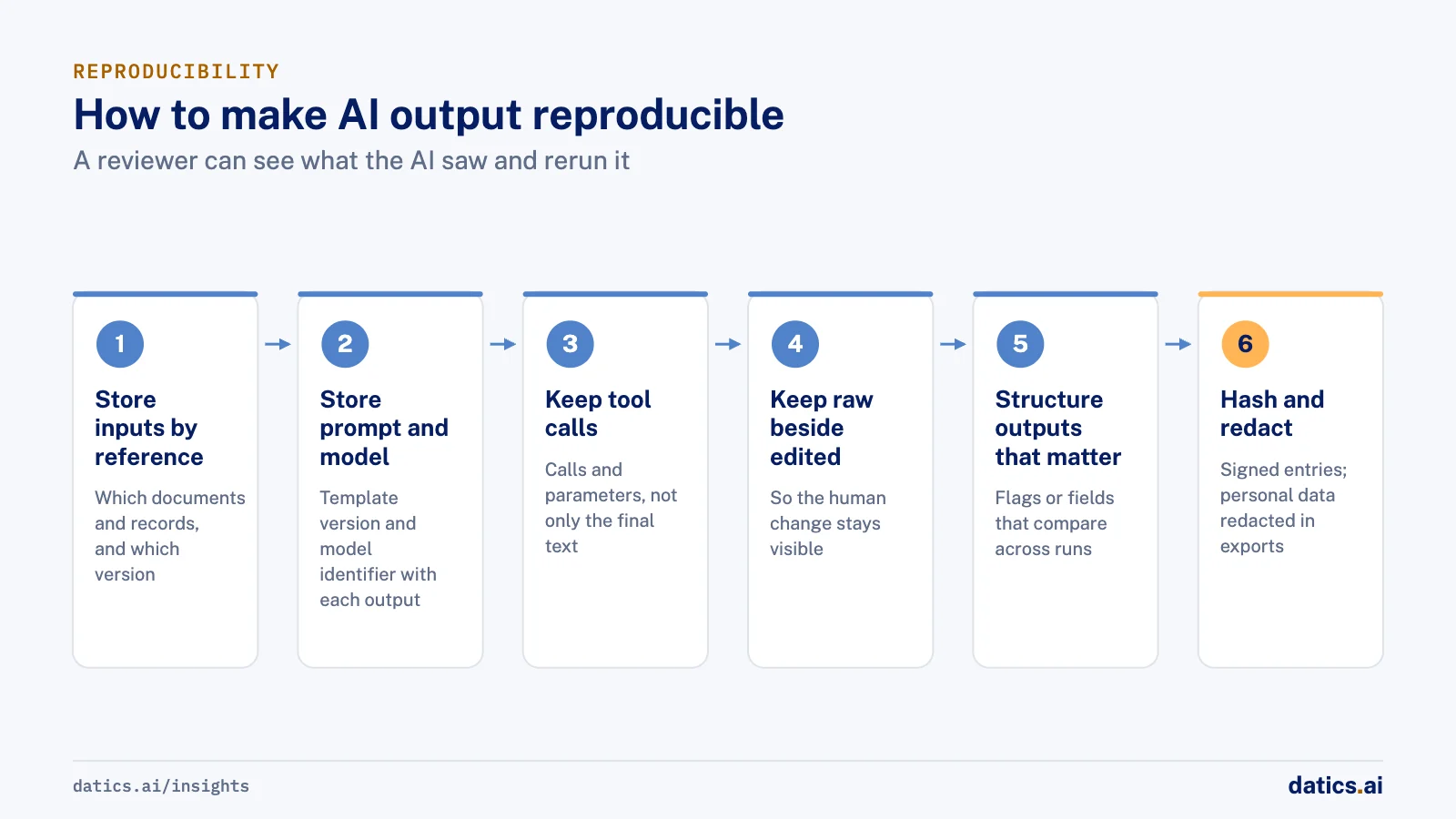
- 01
Store the inputs by reference
which documents, which records, which version of each.
- 02
Store the prompt template version and the model identifier with every output.
- 03
Keep tool calls and their parameters, not only the final text.
- 04
Keep the raw output next to any edited or approved version, so the human change is visible.
- 05
Make outputs that matter structured, such as flags or fields, so they can be compared across runs.
- 06
Use signed or hashed log entries when records may be disputed later.
- 07
Redact personal data in exports by default, and log who exported what.
OpenTelemetry now publishes semantic conventions for generative AI spans, events and metrics, including agent spans, which helps teams use the same tracing tools for AI that they already use for the rest of the product.
04Keep humans in the loop where it counts
An audit trail is not a substitute for approval. For writes that matter, the safest pattern is to let the AI draft and a person accept. Show the AI's version next to the human version, highlight the differences and require confirmation before anything is published. For regulated steps, the AI should never be the approver. It produces a structured recommendation, and a named person decides.
Decide in advance which writes need approval and which can go straight in with a tag. Routine updates that a person reviews in a weekly pass may be fine with a tag. Anything customer facing, financial or regulated should wait for a person.
05Common gaps in AI audit trails
When we review existing AI features, the same gaps come up again and again:
- Logs that capture the final text but not the tool calls that produced it, so nobody can see which records the AI changed.
- Shared service accounts for automations, which hide the user whose permissions were used.
- No prompt or model version on stored outputs, so a change in behavior cannot be traced to a release.
- Human edits that overwrite AI drafts, so the original output and the correction are both lost.
- Audit logs that anyone in the tenant can read, including fields they should not see.
- Retention rules that were never set, so logs either vanish too soon or grow without limit.
Each of these is cheap to fix while the feature is small. Add the source tag, the acting user, the inputs and the versions on day one. Decide retention, restrict who can read the audit log, and test that an automated entry can be traced back to its inputs. Then review a sample of automated entries every week, so the trail is used, not just stored.
06What we see in production
On our own internal operations platform, an MCP server lets AI assistants add project updates, resource updates and utilization in plain language under each user's own permissions and access token. Browser based automations turn weekly sheets and sprint data into updates. A business analyst reviews every update an automation adds. Once automated entry became possible, a proposed process added a source tag on every entry and one human owner per resource, so reviewers could tell automated input from manual input. The proposal was not adopted. That is itself the lesson: provenance has to be decided before automated entries pile up, because tagging old entries afterwards is guesswork.
On a regulated investment platform, AI agents parse pitch decks and deal documents into a structured deal template. We stored the AI generated deal next to the human entered one and showed them side by side, with a pre-publish gate that needs human confirmation. Risk outputs are structured flags only, traceable to their inputs and kept for audit. The AI never approves a deal, a KYC check or tokenization, and human entered data, once finalized, is the source of truth.
On a claim verification engine for an AI founder, we designed a signed audit ledger with a time ordered identifier and a SHA-256 signature per claim. We added telemetry for token usage and reasoning traces with export, and specified that exports redact user content and personal data by default. On a later governed content platform for the same founder, every answer reports how many units came from the knowledge graph, how many were newly created, the verification status and the confidence. Claim receipts expose the record behind each statement.
The same habit applies beyond text. On an engine that turns a plain request into a circuit board design, the manufacturing files for every run are built from placement, routing and drilling data and kept in their own timestamped folder. Each output can be traced to the run that produced it.
For more on what breaks agents after launch, see why AI agents fail in production.
Frequently asked questions
What is an AI audit trail?
It is a record of every automated change that shows its source, the user whose permissions it used, the inputs the AI read, the model and prompt version, and who approved it. Each entry works like a receipt stored with the record, so a reviewer can see what the AI saw and rerun it.
Can AI output be reproduced exactly?
Not always, because models, prompts and context change. You can get close enough for an audit by storing the inputs by reference, the prompt template version, the model identifier, the tool calls and their parameters, and the raw output next to any approved version. Structured outputs such as flags can then be compared across runs.
Does an audit trail replace human approval?
No. For writes that matter, let the AI draft and a person accept, with the AI's version shown next to the human version before anything is published. Routine updates that a person reviews weekly may be fine with a tag. Anything customer facing, financial or regulated should wait for a person.
When should a product start recording provenance?
On day one. Provenance is cheap on the first automated entry and nearly impossible on the ten thousandth. Once AI and human input are mixed without labels, nobody can tell them apart again, and tagging old entries afterwards is guesswork.
How Datics helps
Datics specializes in brownfield AI: bringing production AI into the product you already operate, without forcing a rebuild.
Related work
Case studies from our projects on the same subject.
Regulated investment platform
Financial Services · Private investment marketplace
Pitch decks become drafted deals, and issuers approve each field before publishing
Issuers retyped decks and financials into long deal forms. Now AI suggests each field, and the issuer applies, edits or rejects it.
SovrenAI
B2B Software · TITO, an AI claim verification engine
Claim verification on the founder's own ontology, where the language model only suggests
A founder's AI-coded prototype could not be measured or audited; now rules anchor every verdict and each answer shows how it was reached.
IDEEZA
B2B Software · Generative hardware design engine
Inventors describe a device in plain words and get a buildable board design
Hardware ideas needed electrical engineers to become boards; now a plain request becomes a checked circuit design, manufacturing files and an app.
More on AI security and compliance
AI security and compliance
AI security for SaaS: protect data and pass security reviews
A practical map of AI security for established SaaS: threats, data governance, permissions, audit trails and how to answer enterprise security reviews.
 Umair MajeedRead
AI security and compliance
How do you stop AI data leakage through search metadata?
Stop AI data leakage in search by treating metadata as sensitive: classify records, automate high stakes rules, keep people on unclear cases, and audit.
Rana Umar MajeedReadAI security and compliance
LLM security: why treat model output as untrusted input?
A core LLM security rule: treat every model response like input from an unknown user. Parse it, validate it against business rules, then let it through.
Rana Umar MajeedReadAI security and compliance
Which AI disclaimers does a product need?
An AI disclaimer works when it is designed into the feature: say it is AI, that it can be wrong, what happens to data, and where its numbers come from.
Umair MajeedReadAI security and compliance
What enterprise AI security questions do buyers ask?
Enterprise AI security reviews ask where data and models run, who reaches production, what the AI may do alone and how it is logged. Here is how to prepare.
Umair MajeedReadAI security and compliance
How do you enforce tenant isolation beyond database rows?
Tenant isolation beyond database rows means boundaries per field and per role, in caches, files, payments and jobs, so no tenant sees what another owns.
Rana Umar MajeedReadYour customers already expect AI from your product.
Let us make it real without rebuilding what already works.