
AI agents
AI agents vs rule-based automation: which do you need?
Automate what you can describe. Use an agent for what you cannot.
 Umair MajeedCo-founder and CEO, Datics AI6 min read
Short answer
In the choice between AI agents vs automation, start with rules. Rule-based automation is cheaper, faster and easier to audit when the steps and inputs are known in advance. An AI agent earns its place when inputs vary, the next step depends on judgment, or the rules would need constant rewriting. In most established SaaS products the right answer is both: rules around the edges, an agent only where judgment is needed.
On this page
01AI agents vs automation: what is actually different
Rule-based automation follows instructions someone wrote down. When a condition is met, a defined action runs. A new invoice arrives, its fields are copied into the ERP, and a notification goes to finance. Microsoft describes its desktop flows in Power Automate as built for people who perform "simple or complex rule-based tasks", from organizing files to data entry on an ERP system. The logic is fixed, so the behavior is the same every time.
An AI agent decides its own steps. AWS defines an agent as a program that can interact with its environment, collect data and use that data to perform self-directed tasks, and contrasts it with traditional software that "follows hard-coded instructions". Anthropic draws the line in a way that is useful for engineering teams: workflows run models and tools through predefined code paths, while agents let the model direct its own process and tool use.
That gives a simple test. If you can draw the flowchart before the work starts, you are looking at automation, possibly with a model inside one step. If the flowchart depends on what the input turns out to say, you are looking at an agent.
Neither is more advanced in a way that matters to your customers. What matters is whether the work gets done correctly, at a cost you can carry, in a way you can explain afterwards.
02The trade-offs in one table
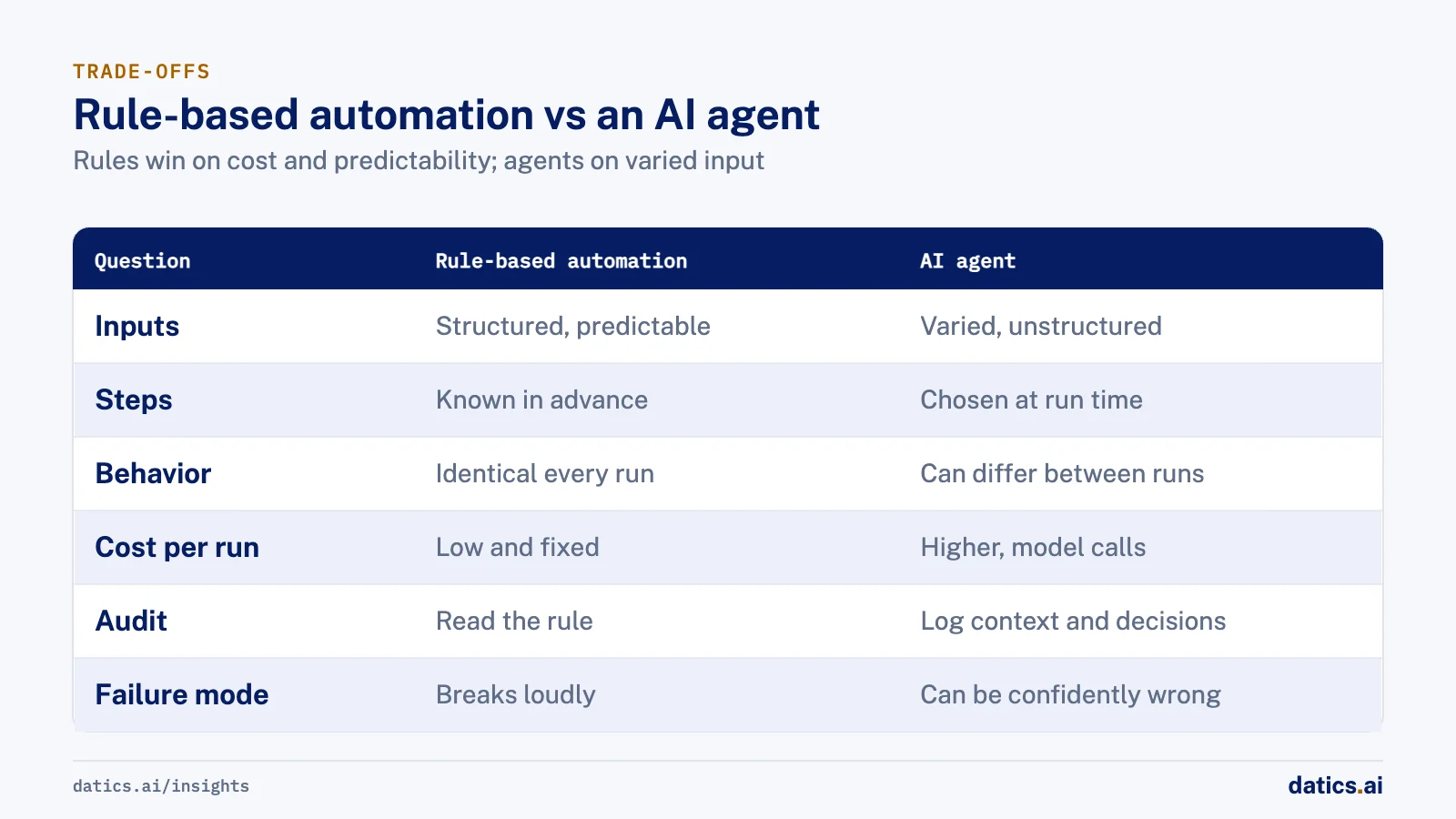
| Question | Rule-based automation | AI agent |
|---|---|---|
| Inputs | Structured and predictable | Varied, unstructured or ambiguous |
| Steps | Known in advance | Chosen at run time |
| Behavior | Identical on every run | Can differ between runs |
| Cost per run | Low and fixed | Higher, with model calls on each step |
| Speed | Fast | Slower, several reasoning steps |
| Audit | Read the rule | Log context, tools, decisions and approvals |
| Failure mode | Breaks loudly on an unexpected input | Can be confidently wrong |
| Change | Someone rewrites the rule | Prompts, tools and evaluation set change |
Anthropic puts the cost side plainly: agents trade latency and cost for better task performance, and their autonomy brings higher costs and the potential for compounding errors. Its advice is to find the simplest solution possible and add complexity only when it is needed, and it notes that for many applications a single model call with retrieval and examples is enough.
That is the right default for an established product. An agent is a cost you take on deliberately, not a badge.
03When you need an agent, and when you do not
Rules win when the process is stable and the inputs are clean. Routing a ticket by product area, sending a reminder three days before a due date, syncing a record between two systems, applying a discount above a threshold: all of these are better as plain code. They are cheaper to run, easier to test and impossible to argue with in an audit.
An agent starts to make sense when one or more of these is true:
- The input is unstructured. Free-text emails, call transcripts, scanned documents and chat messages do not fit a rule without a model reading them first.
- The next step depends on judgment. A support request might need a refund, a configuration change or an escalation, and the right choice depends on the account, the history and what the customer actually said.
- The rules have become unmaintainable. When a rules engine has grown to hundreds of brittle conditions that still miss real cases, the logic you are trying to encode is judgment, not a rule.
- The task spans several systems in a varying order. Gathering facts from a CRM, a billing system and a document store, in whatever order the case requires, is where an agent saves real work.
If none of those apply, a well-written workflow will beat an agent on cost, speed and predictability. If only one step involves reading messy input, put a single model call inside that step and keep the rest as rules.
04How to decide, step by step
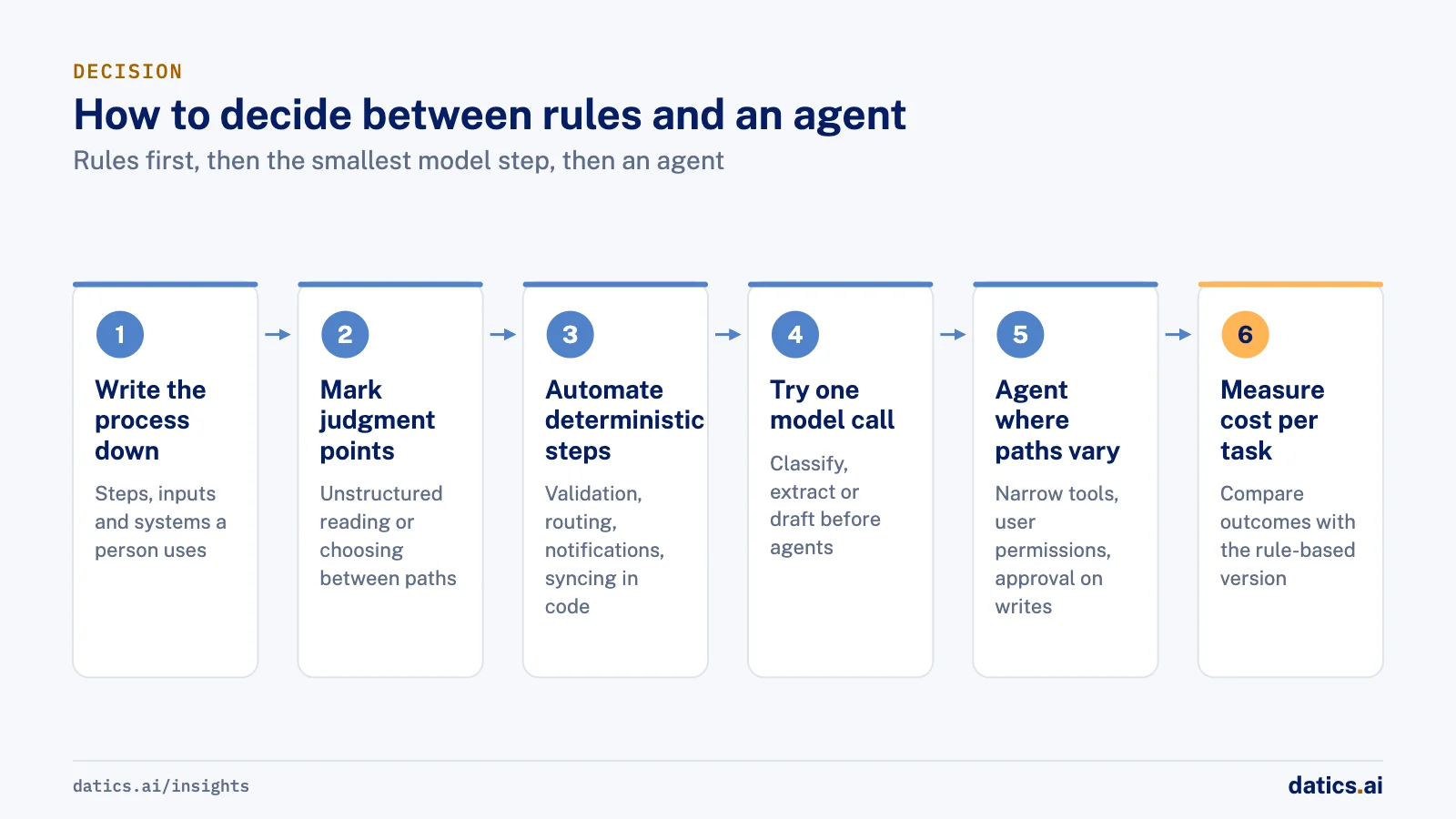
This is the sequence we use with product teams before anyone writes agent code.
- 01
Write the process down.
List the steps a person takes today, with the inputs and the systems involved. If you cannot write it down, nothing will automate it reliably.
- 02
Mark the judgment points.
Highlight the steps where the person reads something unstructured or chooses between paths. Everything else is a candidate for rules.
- 03
Automate the deterministic steps first.
Validation, routing, notifications and data syncing go into code or your existing workflow tools.
- 04
Try the smallest model step.
For each judgment point, test a single model call (classify, extract, draft) before reaching for a multi-step agent.
- 05
Use an agent only where the path itself varies.
If the system must decide which tools to call and in what order, that is an agent. Give it narrow tools and the user's permissions, nothing more.
- 06
Keep a person on consequential writes.
Anything that moves money, changes records or messages a customer goes through approval until the logs justify otherwise.
- 07
Measure cost per successful task.
Compare the agent with the rule-based version on outcomes, not on how impressive it looks.
05The hybrid pattern that holds up
In practice the best systems are not a choice between AI agents and automation. They are rules wrapped around a small amount of judgment.
The deterministic layer handles what must always be true: who the user is, what they may do, which tenant the data belongs to, which actions need approval, and how a retry is made safe. The agent handles the part that varies: reading the input, gathering context and proposing the next step. The agent can request an action; the rules decide whether it runs.
This is also how you keep an agent safe. OWASP lists "excessive agency" among the top risks for LLM applications, caused by too much functionality, too many permissions or too much autonomy. Its mitigations read like a description of the hybrid pattern: give the agent only the functions it needs, run actions in the user's own context, require human approval for high-impact actions, and enforce authorization in the downstream system rather than in the model.
If you are adding agents to a product that already has workflows and permissions, how to add AI agents to an existing SaaS product without rebuilding it walks through the build. For what goes wrong once an agent meets real retries and real state, see why AI agents fail in production.
06What we see in production
The work that holds up in production almost always mixes rules and models.
On a claim verification product, claims are broken down through a 114-token ontology that combines rules, embeddings, retrieval and LLM reasoning. The rules give structure and repeatability; the model handles the language that rules cannot parse. Neither alone would do the job.
On a regulated investment platform, we added AI and automation through services around the existing .NET and SQL Server core, so document, onboarding and compliance workflows could change without replacing the regulated application. The deterministic core stays authoritative, and the AI works at the edges where documents and judgment come in.
In dental clinical documentation, live transcription and patient history draft the clinical note, and the dentist reviews, edits and approves it before release. The model does the drafting. A person makes the decision. And on a governed AI verification platform, AI content is traced, classified, verified and audit-gated before publication: a model produces, rules decide what is allowed out.
Our agent harness follows the same order every time: user intent, product context, allowed tools, permission check, approval, action, evaluation and audit. Only one of those steps is the model reasoning. The rest are rules.
Frequently asked questions
Is RPA the same as rule-based automation?
Robotic process automation is one form of it. It repeats the clicks and keystrokes a person would make in an application, following fixed steps. It works well on stable screens and structured data. Because it follows fixed steps and screen elements, it needs updating whenever a screen or an input changes in a way the script did not expect.
Can an AI agent replace our existing workflows?
It should not. Your existing workflows encode rules your customers rely on. Keep them, and let an agent call them as tools where judgment is needed. Replacing a working rule with a model adds cost and uncertainty for no gain.
Where do we start if we already have a rules engine?
Look at the rules that change most often or carry the most exceptions. Those are usually judgment in disguise. Try a single model call on that decision, measure it against the current rules on real cases, and move to an agent only if the path itself varies.
How Datics helps
Datics specializes in brownfield AI: bringing production AI into the product you already operate, without forcing a rebuild.
Related work
Case studies from our projects on the same subject.
CleanHaus
Real Estate & Hospitality · Turnover operations SaaS
Hosts and cleaners manage rental turnovers in chat, within each person's permissions
Owners, managers and cleaners all talk in one property chat. Now an AI there acts for each of them, only within that person's role.
Regulated investment platform
Financial Services · Private investment marketplace
Pitch decks become drafted deals, and issuers approve each field before publishing
Issuers retyped decks and financials into long deal forms. Now AI suggests each field, and the issuer applies, edits or rejects it.
Transcripts U.S.
Government, Legal & Defense · Legal transcript marketplace
Court reporting agencies publish transcript metadata without the file ever leaving their browser
Agencies once uploaded full transcripts to the marketplace; now title page details are read in their own browser, and they confirm what is published.
More on AI agents
AI agents
AI agents for business: add them to SaaS without a rebuild
AI agents for business work best inside the SaaS product you already run: your APIs as tools, your permissions as the boundary, human approval on writes.
Umair MajeedReadAI agents
Why AI agents fail in production: it is not the model
Most AI agents fail in production because of the system around the model: retries, stale state, authority and audit. Here is the engineering that fixes it.
 Rana Umar MajeedRead
AI agents
Where should human in the loop AI review happen?
Human in the loop AI works when review happens field by field, before anything ships. Learn where to place checkpoints and how to measure accuracy.
Rana Umar MajeedReadAI agents
How much autonomy should AI agent guardrails allow?
AI agent guardrails that work: agents read and draft freely, but need consent and an editable confirmation before moving money, changing records or messaging.
Umair MajeedReadAI agents
Where should AI agent security enforce permissions?
AI agent security in a multi-role SaaS product rests on one rule: the agent gets the user's permissions and nothing more, enforced in code, never in the prompt.
Rana Umar MajeedReadAI agents
How do you manage AI agent memory in production?
AI agent memory in production is an infrastructure problem: durable checkpoints per thread, a pooled connection with reconnects, chat summaries and reset rules.
Rana Umar MajeedReadYour customers already expect AI from your product.
Let us make it real without rebuilding what already works.