
Claude and ChatGPT connectors
How do you build a Claude connector for your product?
Your users already ask an AI assistant about their work. The question is whether your product answers, or a guess does.
 Umair MajeedCo-founder and CEO, Datics AI6 min read
Short answer
A Claude connector puts your product inside Claude: your users ask a question in their chat and get the answer from your product, under their own login and your permission rules. It is a small server, built on the open Model Context Protocol, that sits in front of your existing API. The same server can also power an app in ChatGPT, so one build reaches both assistants.
On this page
- 01Why your users want your product inside Claude and ChatGPT
- 02What a Claude connector is, and how it reaches ChatGPT too
- 03What your product needs before you build
- 04The access tests a connector must pass
- 05How to build a Claude connector in four steps
- 06What we see in production
- Frequently asked questions
01Why your users want your product inside Claude and ChatGPT
More of your customers start their working day in an AI assistant. They draft emails there, summarize meetings there and ask it what to do next. When the question is about something that lives in your product, such as an overdue invoice, an open job or a customer's last order, the assistant has two choices: guess, or ask your product.
A connector lets it ask. The user stays in the chat they already have open, and the answer comes from your system of record, not from a model's memory. For a SaaS company, that does three things. It keeps your product in the daily habit of users who now live in an assistant. It makes your data the trusted answer instead of a copied spreadsheet. And it is far smaller than building your own copilot, because the assistant already exists.
02What a Claude connector is, and how it reaches ChatGPT too
A Claude connector is a remote server that follows the Model Context Protocol, the open standard AI assistants use to call outside tools. The server offers the assistant a short list of tools, such as "list this user's overdue invoices", and each tool calls your existing API to get the answer.
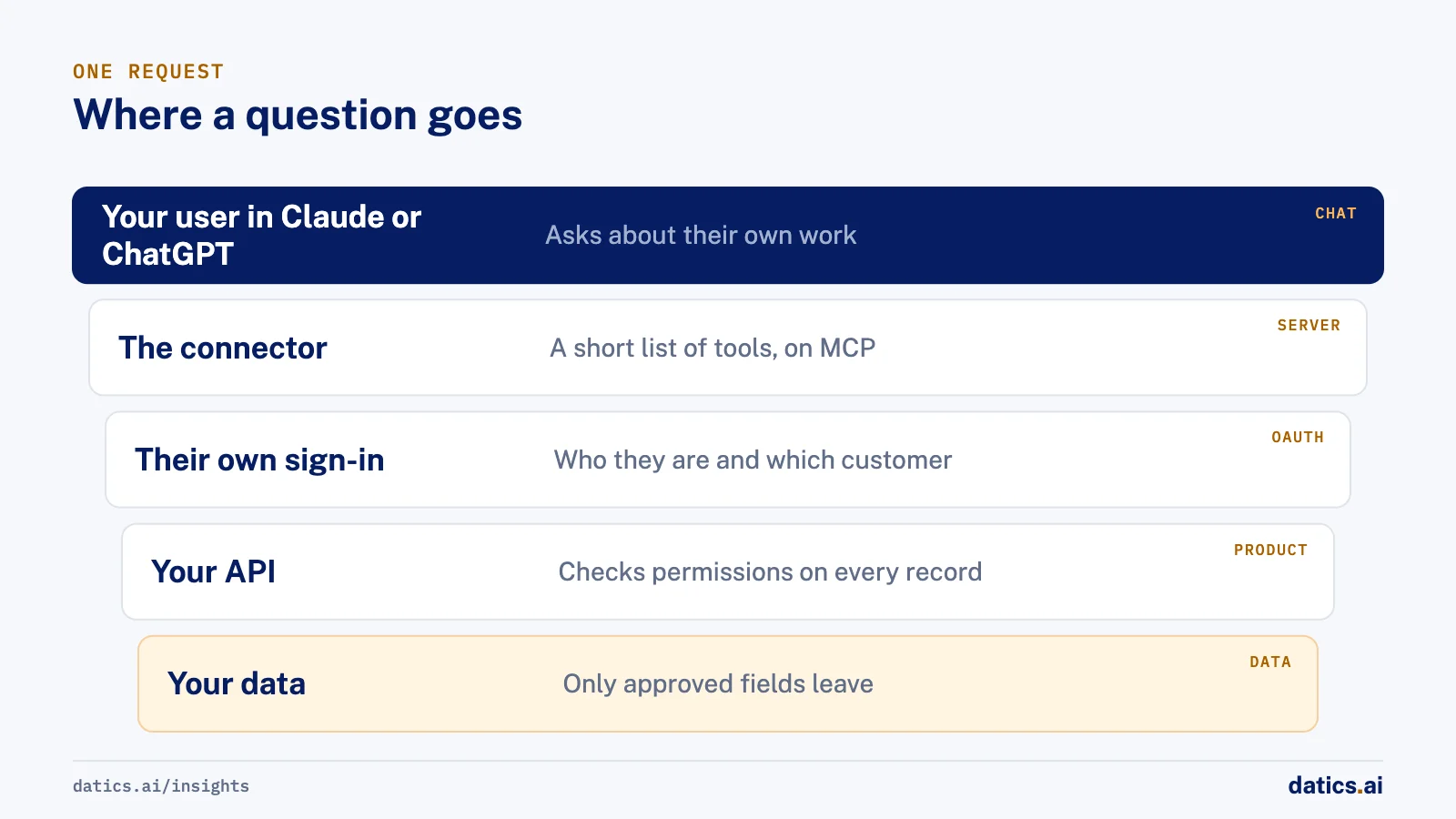
Two details matter for planning. First, Claude connects to a custom connector from Anthropic's cloud, not from the user's laptop, so the server has to be reachable on the internet with proper sign-in in front of it. Second, ChatGPT builds on the same standard: OpenAI now calls these plugins, which combine skills and MCP servers, and you add and test an MCP server in ChatGPT as a custom MCP server before submitting the plugin to OpenAI's directory. One well-built server can serve both assistants, with a little extra work for anything ChatGPT shows as a card or form inside the chat.
| Question | Claude | ChatGPT |
|---|---|---|
| What you build | A remote MCP server | A plugin that includes an MCP server |
| How a user adds it | As a custom connector, by its address | As a custom MCP server while testing, then as a plugin from the directory |
| Teams and companies | An owner adds it for the organization first | A workspace admin turns it on for the workspace |
| Public listing | Optional; Anthropic reviews what it lists | Optional; OpenAI reviews what it lists |
| Who signs in | Each user, with their own account in your product | Each user, with their own account in your product |
Neither listing is required. Your customers can add the connector by its address on day one, and a directory listing can follow later. We go deeper on how assistants choose and call tools in LLM tool calling.
03What your product needs before you build
Most of the work is not the connector. It is whether your product can answer safely for one user at a time. Before we quote a connector, we check five things:
- 01
A documented, working API
for the tasks users ask about. If the answer only exists inside a screen, it needs an endpoint first.
- 02
A staging system with at least two test users,
so access rules can be tested without real customer data.
- 03
A sign-in that identifies each user and each customer.
The connector signs each person in with their own account, following the MCP authorization specification, which is based on OAuth.
- 04
A backend that checks permissions on every record.
The connector must never be the only thing deciding who sees what.
- 05
Data you are happy for an AI assistant to show.
Whatever a tool returns enters the user's chat, under their Claude or ChatGPT account and that provider's terms.
If any of these is missing, it is better to know before the build than halfway through it.
04The access tests a connector must pass
A connector is a new door into your product, so it is tested like one. These six cases are written down before the build, run in staging, and must all fail safely before anyone uses the connector:
- One user asks for another user's record. Your product denies it, and nothing of that record appears in the answer or the logs.
- One customer types another customer's ID. Denied, whatever ID arrives, because the customer is read from the sign-in, never from the chat.
- A user calls a tool they may not use. Denied, even if they know its name.
- Access is removed. The next request is refused, without a new release.
- Your API is down or slow. A clear error comes back, with no made-up answer and no request sent twice.
- A response holds a sensitive field. Only approved fields leave your product, with rows and size capped, and every call is logged.
The second case is the one teams most often get wrong. If a tool trusts a customer ID typed into the chat, one tenant can read another's data. The fix is the same as in any multi-tenant product: take the tenant from the sign-in. We explain that pattern in tenant isolation, and the wider risks of tools that act in AI agent security.
05How to build a Claude connector in four steps
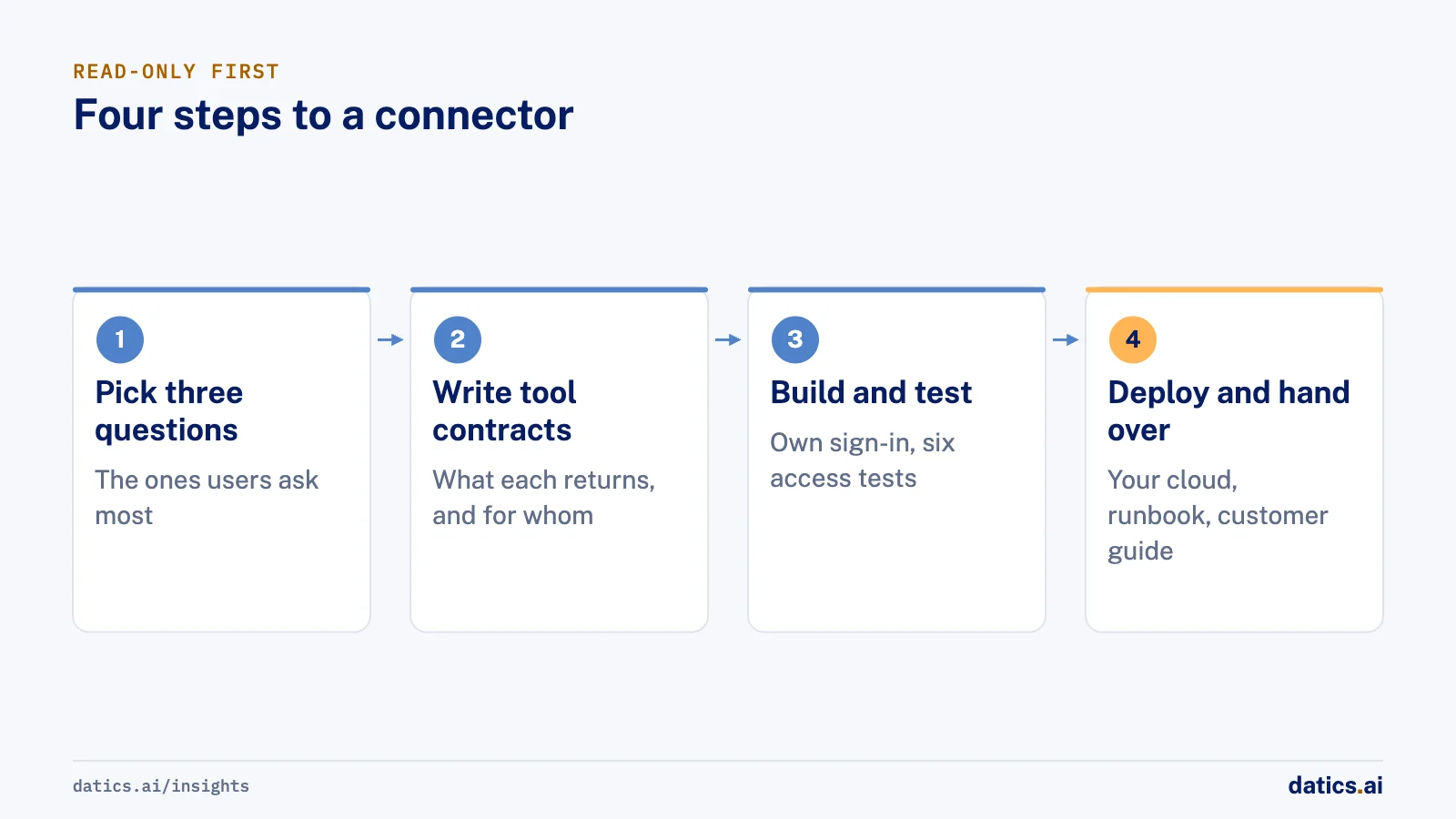
Start read-only and small. Three good tools beat twenty vague ones, and a connector that only reads cannot change anything by mistake.
- 01
Pick the three questions users ask most.
Look at support tickets and search logs. "What is overdue?", "Where is this order?" and "What changed this week?" are typical.
- 02
Write a contract for each tool.
What it returns, for whom, which fields are left out and how many rows at most. Your team approves this list before any code.
- 03
Build, sign in and test.
The server goes in your repository, each user signs in with their own account, and the six access tests run in staging.
- 04
Deploy and hand over.
It runs in your own cloud by default, with a runbook for your team and a short guide for your customers on how to turn it on.
Actions that change data, such as creating a record or updating a status, come after the read-only version has earned trust. Each action should ask the user to approve it in the chat, and your API should check their rights again before making the change.
06What we see in production
We run a connector like this in our own operations. Our team asks Claude and ChatGPT about projects, people and invoices, each person signs in with their own account, and each sees only what their role allows. The useful lesson was how few tools it needed. A handful of well-described tools answered most questions, and every extra tool made the assistant slower to choose the right one.
In client work, we have built AI that acts through a product's own APIs with a tool list per role and each user's own login, and we have tested an assistant answering over live financial data by checking every answer against a direct database query. The pattern is the same each time. The model is rarely the hard part. The hard parts are sign-in, permissions and deciding exactly which fields may leave the product.
The most common surprise for product teams is the second step. Writing the tool contracts forces decisions nobody had made: whether a field is safe to show, whether a support agent should see billing, what "this week" means across time zones. Those decisions are worth making anyway, and the connector is a good reason to make them.
Frequently asked questions
Do our users need a paid Claude or ChatGPT plan?
It depends on the assistant and its current plans, which change often. In Claude, users add custom connectors from their connector settings, and on Team and Enterprise plans an owner adds the connector for the organization first. In ChatGPT, workspace admins control which apps their people can use. We check the current rules for your customers' plans before the build.
Can the connector change data in our product?
It can, but we recommend starting read-only. A read-only connector cannot change anything by mistake, which makes it easier to approve. When you add actions, each one should ask the user to approve it in the chat, and your API should check their rights again before it makes the change.
Is a connector the same as building a copilot inside our product?
No. A copilot lives inside your own screens, which suits users who work in your product all day. A connector reaches users where they already work, in their AI assistant. The two share the same foundation: the tools and permission checks you build for a connector can power your own copilot later.
How long does it take to build one?
For three read-only tools on a product with a working API and a per-user sign-in, one focused sprint is usually enough, including the access tests. A missing API, a new single sign-on build or several identity providers add time, which is why a short readiness check should come first. Our Claude and ChatGPT connector service starts with that check.
How Datics helps
Datics specializes in Brownfield AI: production AI inside software people already rely on. Tenon Starter puts your product inside ChatGPT and Claude with up to three read-only tools, signed in with each user's own account, for $2,500.
Related answers
Claude and ChatGPT connectors
ChatGPT connector: put your product inside ChatGPT safely
A ChatGPT connector is an MCP server that lets users reach your product from ChatGPT under their own login. How it works, what to secure and when to wait.
Umair MajeedReadClaude and ChatGPT connectors
Build an MCP server for your product: a production guide
Build an MCP server as a thin remote service over your API: a few tools from real questions, Streamable HTTP, OAuth per user, limits, logs and real tests.
 Engineering TeamRead
AI agents
How do you design tools for LLM tool calling?
LLM tool calling works in an existing product when each tool maps to a real, approved endpoint with a clear name, description and schema. Here is how.
 Rana Umar MajeedRead
Your customers already expect AI from your product.
Let us make it real inside the product you run today.