
Claude and ChatGPT connectors
ChatGPT connector: put your product inside ChatGPT safely
A connector is a new front door to your product. Build it with the same locks as the old one, and fewer keys.
 Umair MajeedCo-founder and CEO, Datics AI8 min read
In brief
A ChatGPT connector is a remote server, built on the open Model Context Protocol (MCP), that lets people use your product from inside ChatGPT: they ask a question in the chat, and the answer comes from your system under their own login. The build is the small part. The real work is sign-in for each user, a short list of read-only tools, strict control over which fields leave your product, and a rule for anything that writes.
On this page
- 01What a ChatGPT connector is today
- 02How customers turn it on: plans, workspaces and admins
- 03Putting your product inside ChatGPT safely
- 04One MCP server for ChatGPT and Claude
- 05What to measure once it is live
- 06When not to build one yet
- 07What we see in production: checks before a connector goes live
- Frequently asked questions
01What a ChatGPT connector is today
People still search for "ChatGPT connector", but OpenAI's pages now use a different set of words. As of November 11, 2026, the ChatGPT plugins documentation says plugins bundle capabilities into reusable workflows and can include skills and MCP servers, and that ChatGPT and Codex share one public plugin directory. The MCP server is the part that reaches your product: it defines the tools, enforces authentication, returns structured data and performs actions.
There are two ways your server gets into a customer's ChatGPT:
- As a custom MCP server. OpenAI's guide to adding a custom MCP server describes the flow on ChatGPT on the web: open Plugins, choose Add custom MCP server, enter the server URL, configure authentication, accept a risk warning and create it as a plugin. ChatGPT supports both read and write tools from your server, over SSE or streaming HTTP, with OAuth, no authentication, or a mix.
- As a published plugin in the directory. You package the server, submit it to OpenAI for review, and once approved it becomes discoverable for ChatGPT users.
In workspace admin settings, the ability to create these custom connections appears as a permission called "Create plugins with MCPs", described as using developer mode to create custom app connections. So developer mode still exists, but it is now a permission an admin grants, not a hidden toggle.
Either way, your customers reach your product through an MCP server you host, with the same sign-in and permission checks. Our guide to AI assistant features inside your product covers the other route, where the assistant lives in your own screens.
02How customers turn it on: plans, workspaces and admins
Who can add a custom MCP server depends on the customer's ChatGPT account and workspace. OpenAI's developer guide says workspace permissions and security restrictions, including Lockdown, apply to adding and using custom MCP servers. The developer pages we read do not list plan by plan availability, so check OpenAI's Help Center for the plans your customers use before you promise anything in a sales call.
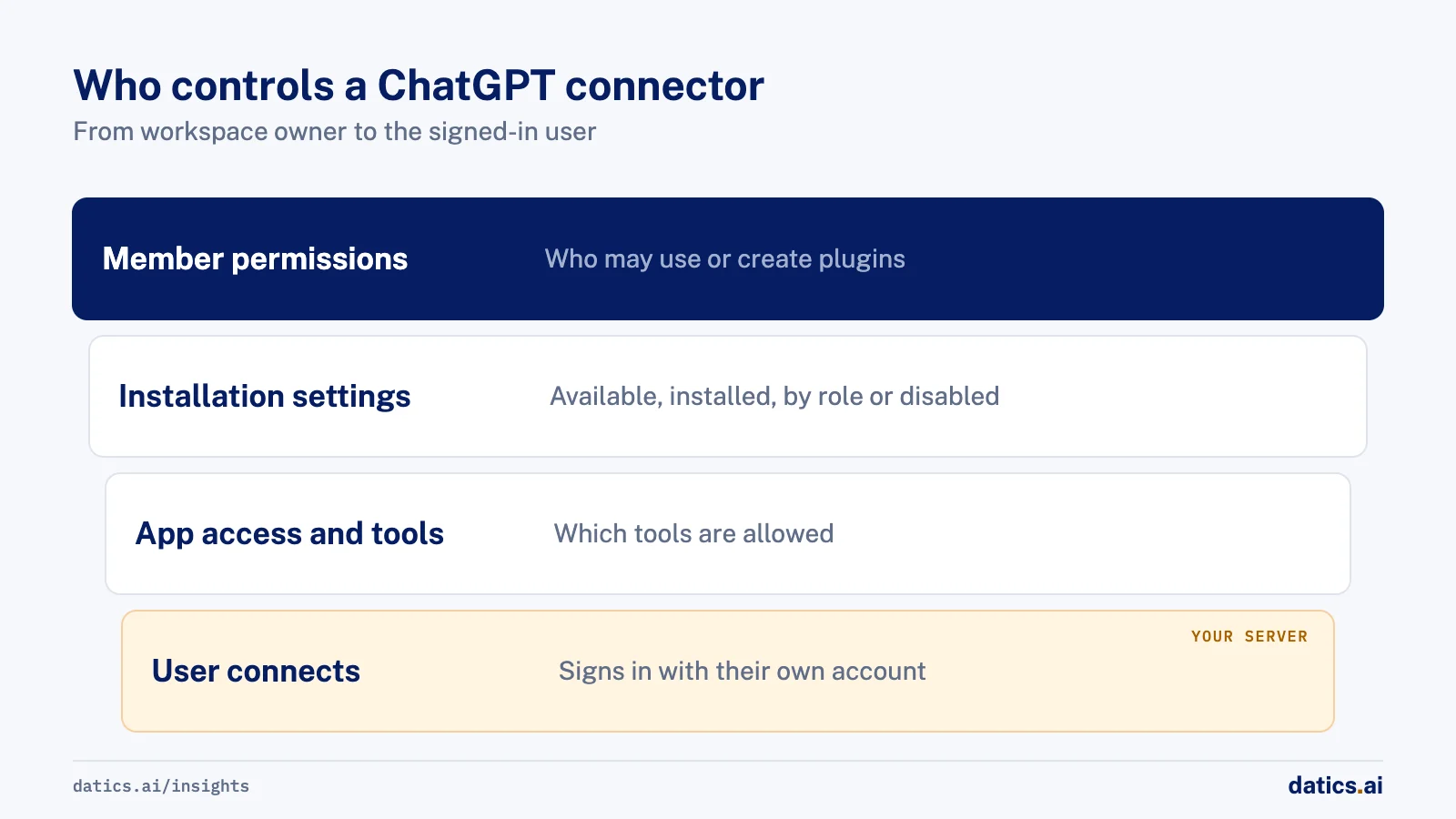
In company workspaces, the admin controls are detailed. The plugin controls guide for admins describes three layers:
- 01
Member permissions
decide who can use, upload, share or publish plugins, and who can create plugins with MCP servers.
- 02
Installation settings
in the Admin console decide whether a plugin is available to install, installed for the whole workspace, set by role, or disabled. ChatGPT Business uses workspace-wide availability.
- 03
App access and actions
decide who can use each app and which of its tools are allowed, including whether new tools added later are allowed automatically.
Two details matter for vendors. OpenAI's MCP guide for ChatGPT notes that in ChatGPT Enterprise, "Use plugins" is on by default, while the two permissions needed to publish an MCP-backed plugin are off by default. And the admin guide says installing a plugin does not give members access to its apps or data: the admin must also allow the app. Your customer guide should walk admins through all three layers.
Getting listed is a separate track. OpenAI's plugin submission guide asks you to complete individual or business verification, upload the plugin as a ZIP, connect a stable public HTTPS endpoint, pass a domain verification challenge and automated scans, and give reviewers a dedicated test account with sample data that works without MFA codes or magic links. Only one MCP server can be connected per plugin. After first publication, changes to your MCP server are picked up automatically, and eligible updates go live once they pass automated checks.
03Putting your product inside ChatGPT safely
A connector moves your data into a conversation you do not control. OpenAI's security and privacy guidance for plugins asks builders to treat every MCP server as production software, with least privilege, explicit user consent and defense in depth, and to assume prompt injection will reach the server. We turn that into five rules.
- 01
Sign in each user with their own account.
OpenAI's authentication guide expects an authenticated MCP server to implement OAuth 2.1 following the MCP authorization specification. Every tool call then runs as a named person, under the same backend checks as your web app. Never let one shared service account answer for everyone.
- 02
Start read-only, and say so in the metadata.
The custom MCP server guide says ChatGPT respects the readOnlyHint annotation, and tools without it are treated as write actions. Mark read tools correctly and ship only a few at first. Our piece on LLM tool calling explains how tool names and descriptions decide which tool gets picked.
- 03
Take the tenant from the sign-in, never from the chat.
If a tool trusts a customer ID typed into the conversation, one customer can read another's records. The token tells you who the user is and which account they belong to. Our guide to tenant isolation covers the pattern.
- 04
Decide exactly what data leaves your product.
OpenAI's guidance says to include only the data required for the current prompt and to redact personal data before writing logs. The plugins page adds that when ChatGPT sends data through an MCP server, that service's terms and privacy policy apply. Write a field list per tool and cap rows and size. Our article on AI data leakage lists the usual leaks.
- 05
Make write actions wait for the user, then check again.
The custom MCP server guide says write actions require confirmation by default, but a user can choose to remember an approval for the rest of a conversation. The admin guide is blunt: asking for confirmation does not replace restrictions on what the app or account can access. So your API must re-check the user's rights on every write, whatever the chat approved.
Teams should also confirm with their own counsel and security team what their customer contracts allow, before customer data appears in a third party's chat product.
04One MCP server for ChatGPT and Claude
Because both assistants use MCP, one well-built server can serve both. The differences sit in how customers add it, how admins control it and how listing works. This table uses only what OpenAI and Anthropic pages said when we read them on November 11, 2026.
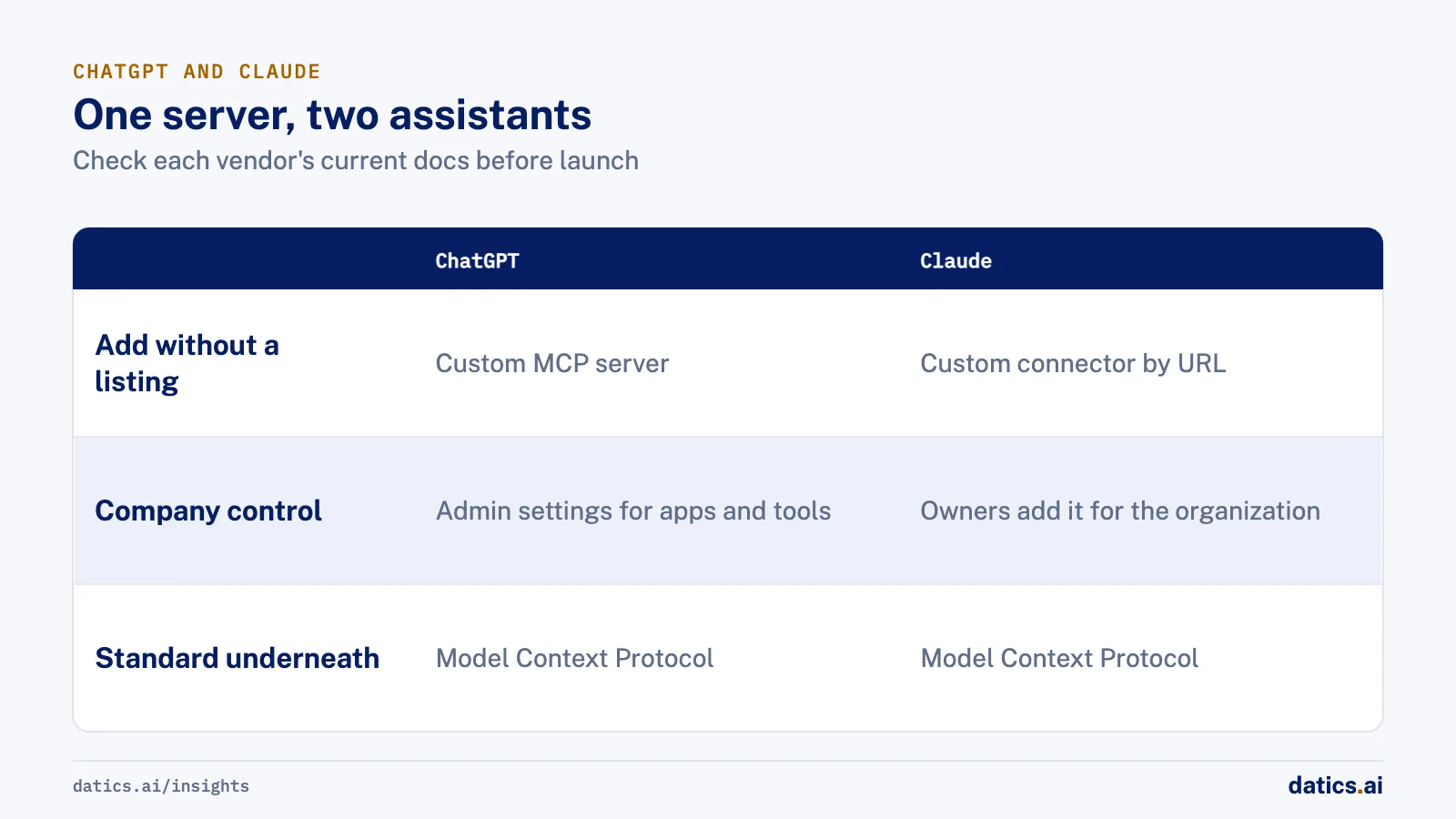
| Point for a vendor | ChatGPT | Claude |
|---|---|---|
| What you host | A remote MCP server, packaged as a plugin for the directory | A remote MCP server, added as a connector |
| Adding it without a listing | Add custom MCP server on ChatGPT on the web; workspace permissions apply | Add custom connector by URL on Free, Pro, Max, Ultra, Team and Enterprise; Free allows one |
| Company control | Admin console sets plugin availability, app access and allowed tools | On Team and Enterprise, an Owner adds it for the organization |
| Each user's sign-in | OAuth 2.1 per the MCP authorization spec | OAuth, where each user signs in with their own account |
| Write actions | Confirmation by default; tools without readOnlyHint count as writes | Per tool: Always allow, Needs approval or Blocked |
| Public listing | Review after verification, domain check and scans | Optional; listed as Community by default, may be escalated to Verified |
The Claude column comes from Anthropic's guide to adding a connector that is not in the directory, its page on connector verification, and its getting started guide, which describes the per-tool permissions. Anthropic's guide to building an MCP server for Claude adds limits worth designing for: about 150,000 characters per tool result and 240 seconds per tool call on claude.ai and Desktop.
One listing does not carry over to the other. OpenAI's guide for submitting a Claude plugin or connector to OpenAI says Claude marketplace listings and approvals do not transfer, and that a public HTTPS MCP endpoint goes through OpenAI's remote MCP submission. Plan for two reviews, but one server, one set of tools and one set of access tests.
05What to measure once it is live
A connector is a product surface, so measure it like one. We track a short list:
- Connected accounts, and the share active each week.
- Questions answered from your data. Log which tool answered and whether the user asked a follow-up that suggests the answer missed.
- Wrong tool, no tool. OpenAI's connect and test guide recommends an evaluation set of direct, indirect, follow-up and unsupported requests, rerun whenever tool names or descriptions change. Keep it and rerun it before each release.
- Denials and errors. Denied calls should be rare and explainable. A spike means a permission bug or a confused tool description.
- Support tickets and churn notes that mention ChatGPT or Claude, before and after launch.
Do not judge the connector on raw call volume. Our piece on AI product strategy covers how to tie an AI feature to a business result.
06When not to build one yet
Some products are not ready, and building anyway creates risk without users. Wait if:
- The answers your users want only exist on a screen, with no API behind them.
- Your sign-in cannot identify each user and each customer account.
- Permissions are checked in the front end, not on every record in the backend.
- The data is regulated or covered by contracts that have not been reviewed for use in a third-party assistant.
- No customer has asked. Look at sales calls and support tickets first.
07What we see in production: checks before a connector goes live
We run a connector of our own for our operations: our team asks Claude and ChatGPT about projects, people and invoices, and each person signs in with their own account. From that and our client work, we hold every connector to six access tests in staging before anyone uses it. One user asks for another user's record and is denied. A customer types another customer's ID and is denied, because the customer comes from the sign-in. A user calls a tool their role may not use and is denied. Access is removed and the next request is refused. Your API goes slow or down and a clear error comes back, with no invented answer and no duplicate request. And only approved fields leave the product, with rows and size capped and every call logged. Most problems we find are not in the model. They are in a field nobody had decided was safe to show.
If you want your product inside ChatGPT and Claude, our Claude and ChatGPT connector service starts with Tenon Starter at $2,500: up to three read-only tools, signed in with each user's own account, with those security tests, one deployment and a runbook for your team.
Frequently asked questions
Is a ChatGPT connector the same as a ChatGPT app or plugin?
They overlap. OpenAI's current pages call the packaged product a plugin, which can include skills and an MCP server, and call the MCP connection an app in admin settings. The MCP server you host is what most people mean by a connector.
Do we need to be listed in OpenAI's directory?
No. Customers can add your server as a custom MCP server by its URL, subject to their workspace permissions. A listing helps discovery but adds verification and review, so launching with the URL first is often sensible.
Can one connector work in both ChatGPT and Claude?
Yes, if it is a remote MCP server with standard OAuth sign-in. The tools, permission checks and access tests are shared. What differs is the listing process, the admin controls and limits such as result size, so test in both.
How Datics helps
Datics specializes in Brownfield AI: production AI inside software people already rely on. Tenon Starter puts your product inside Claude and ChatGPT with up to three read-only tools, signed in with each user's own account, for $2,500.
›References (13)
- OpenAI: Plugins in ChatGPT
- OpenAI: Add custom MCP server
- OpenAI: Plugin controls for workspace admins
- OpenAI: Model Context Protocol in ChatGPT
- OpenAI: Upload and submit your plugin
- OpenAI: Plugin security and privacy
- OpenAI: Plugin authentication
- OpenAI: Connect and test your plugin
- OpenAI: Submit your Claude Code plugin to OpenAI
- Anthropic: Add a connector that is not in the directory
- Anthropic: Connector verification
- Anthropic: Get started with connectors
- Anthropic: Build an MCP server for Claude
Related answers
Claude and ChatGPT connectors
Build an MCP server for your product: a production guide
Build an MCP server as a thin remote service over your API: a few tools from real questions, Streamable HTTP, OAuth per user, limits, logs and real tests.
 Engineering TeamRead
AI agents
Enterprise AI agents: what separates them from demo agents
Enterprise AI agents act as the signed-in user, use a fixed set of tools, wait for approval on risky steps, log every call and are tested on real cases first.
Umair MajeedReadAI security and compliance
HIPAA AI compliance: BAAs, PHI in prompts and audit logs
HIPAA AI for software teams: which model providers sign a BAA, how to keep PHI out of prompts and logs, and where the 2025 to 2026 HHS rules stand.
Umair MajeedReadYour customers already expect AI from your product.
Let us make it real inside the product you run today.