
Claude and ChatGPT connectors
Build an MCP server for your product: a production guide
An MCP server should add a new way in to your product, not a new set of rules.
 Rana Umar MajeedCo-founder and CTO, Datics AI8 min read
In brief
To build an MCP server for an established product, put a thin remote service in front of the APIs you already run, expose a handful of well-described tools chosen from real user questions, and serve them over Streamable HTTP. Every call carries an OAuth token, so it runs as the signed-in user and your existing permission checks decide what comes back. Start read-only, cap every result, log every call and test before real users arrive.
On this page
- 01Build an MCP server by mapping your API to tools, resources and prompts
- 02Design a small set of tools from real questions
- 03Run it remotely over Streamable HTTP
- 04Authorize every call as the signed-in user
- 05Set limits, watch cost and keep an audit trail
- 06Test with the Inspector, then on real questions
- 07What we see in production
- Frequently asked questions
01Build an MCP server by mapping your API to tools, resources and prompts
The MCP documentation describes three building blocks a server can offer, and the useful distinction is who controls each. Tools are controlled by the model, which decides when to call them. Resources are read-only context the host application chooses to load. Prompts are templates the user picks on purpose.
For a product server, tools carry almost all the value: "which jobs are late today?" is a tool call, because the model decides to ask and chooses the arguments. Resources suit stable reference material, such as a glossary of your status codes. Prompts are optional; add one only when users repeat a multi-step task, such as a weekly account review.
Check what each host supports before you design for it. Anthropic's guide to building an MCP server for Claude says Claude supports tools, prompts and resources but not yet resource subscriptions or sampling, and sets limits of about 150,000 characters per tool result and 240 seconds per tool call on claude.ai and the desktop app.
Architecturally, the server sits between the AI host and your existing API gateway. It validates the token, picks the tool, calls one or two of your endpoints as that user, trims the response to approved fields and returns it. It holds no business logic and no copy of your data.
02Design a small set of tools from real questions
The fastest way to a bad server is one tool per endpoint. OpenAI's guidance on defining tools warns against mirroring an internal API and says to start from the outcomes users expect, keep reads and writes in separate tools, and never make the model guess identifiers or account scope. We go further: pull fifty real questions from support tickets and search logs, cluster them, and write a tool only for clusters that recur.
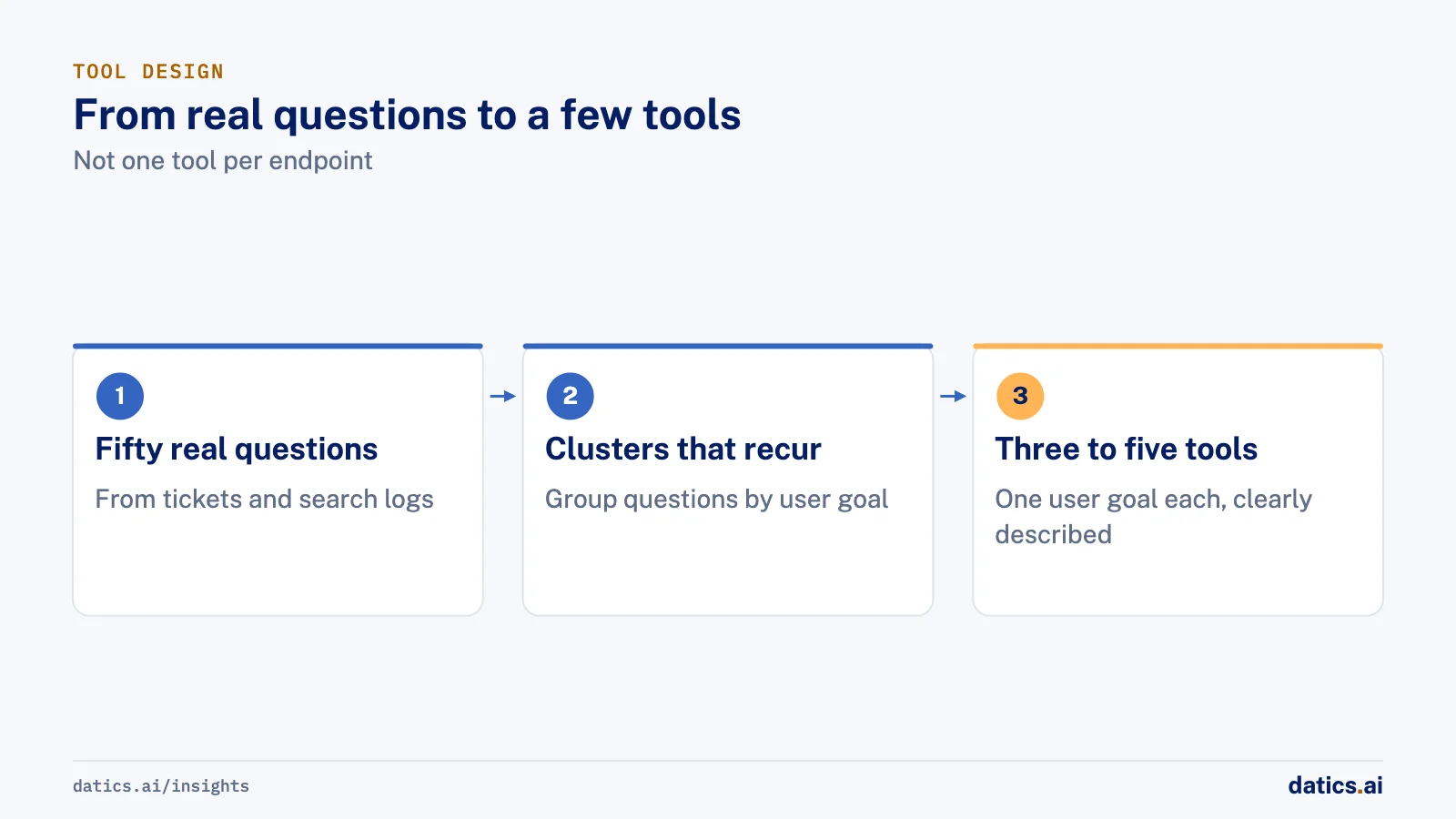
The MCP tools specification adds two practical details. The tool list may vary by the authorization on the request, so a dispatcher and a billing clerk can see different tools. And servers should return tools in a deterministic order so clients can cache the list.
| Decision | Do | Do not |
|---|---|---|
| Scope of a tool | One user goal, such as list_late_jobs | One endpoint each, such as get_jobs_v2_internal |
| Description | Say when to use it, what it returns and its limits | Restate the tool name or use internal jargon |
| Inputs | Typed and bounded, with enums and date ranges | Free text the server must parse, or a tenant ID |
| Output | Approved fields, stable IDs, a row cap | The raw API payload with every field |
| Errors | A clear tool error the model can act on | A stack trace, or an empty list that hides a denial |
| Reads and writes | Separate tools, writes added later | One tool that reads or changes based on a flag |
| Annotations | readOnlyHint true only when nothing can change | Annotations used in place of a permission check |
On errors, the specification separates protocol errors from tool execution errors. A bad date or an API timeout should come back as a result with isError set and a plain message, because models can use that feedback to correct themselves. Our guide to LLM tool calling covers descriptions and schemas in more depth.
03Run it remotely over Streamable HTTP
Remote servers use Streamable HTTP: one endpoint, usually /mcp, that accepts POST. The server answers each request with a single JSON object or a short event stream scoped to that request. Servers must validate the Origin header to block DNS rebinding.
Two points are easy to miss. First, versions. The 2026-07-28 revision removed protocol-level sessions, and every request now carries its protocol version. The versioning page explains how one endpoint can serve both this style and the older handshake style. That matters because hosts move at their own pace: Anthropic's build guide lists the 2025 authorization revisions as the ones Claude follows. Test against each real client before you drop any revision.
Second, state. With no protocol session, state that spans calls travels as an explicit handle in tool arguments. The MCP security best practices say servers must not treat possession of a handle as authentication, and should key stored state by the user ID from the verified token. We keep tools stateless wherever we can, which also lets the server scale out behind a load balancer.
Host the server where your API already runs, behind your existing gateway and firewall, at a stable public HTTPS address. OpenAI's MCP server guide notes that a temporary tunnel does not meet public submission requirements.
04Authorize every call as the signed-in user
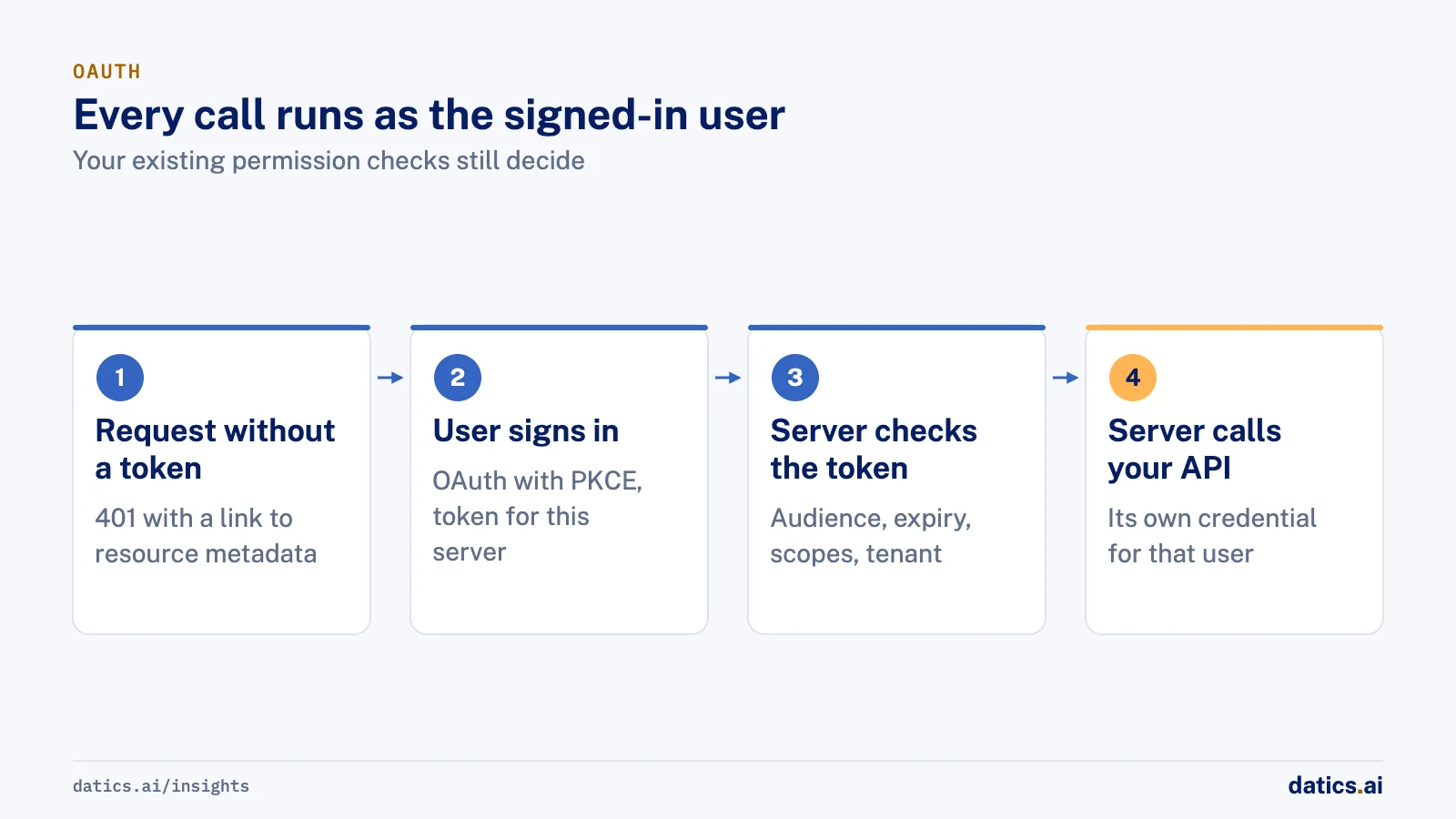
The MCP authorization specification treats your server as an OAuth 2.1 resource server. In engineering terms:
- 01
Publish Protected Resource Metadata
and return 401 with a WWW-Authenticate header pointing to it, so clients can find your authorization server.
- 02
Accept only tokens issued for this server.
Clients send a resource parameter naming your server, and your server checks the token's audience. Tokens never travel in a query string.
- 03
Never pass a client token through to your API.
The security guidance calls token passthrough explicitly forbidden. Exchange it for a downstream credential your API trusts, so logs show the server acting for a named user.
- 04
Support the registration methods hosts use.
Claude can identify itself through a Client ID Metadata Document Anthropic hosts, register through Dynamic Client Registration, or use a client you pre-register, as its custom connector page explains, and its build guide lists https://claude.ai/api/mcp/auth_callback as the redirect URI to allow. OpenAI's authentication guide requires PKCE with S256 and says to check signature, issuer, audience, expiry and scopes on every request.
- 05
Keep scopes small.
Advertise a minimal read scope and ask for more with a 403 insufficient_scope challenge when a user first reaches a write tool.
Tenant isolation follows from the same rule. The customer account comes from the verified token, never from a tool argument. If a tool accepts an account_id, someone will paste another customer's. Your API then applies the same row-level checks it applies to the web app, as we describe in tenant isolation for AI.
Read-only first is practical, not timid. Three read tools cannot change a record by mistake, which shortens security review and shows you what users really ask before you add writes. When writes arrive, give them their own tools, set destructiveHint honestly, require a scope step-up, and recheck permissions in your API on every call.
05Set limits, watch cost and keep an audit trail
The tools specification says servers must validate inputs, implement access controls, rate limit tool invocations and sanitize outputs. Streamable HTTP helps: requests carry Mcp-Method and Mcp-Name headers that mirror the body, so your gateway can rate limit per user, tenant and tool without parsing JSON.
Cost lands in two places. Every tool call is real load on your API, so cap date ranges, rows and page depth. And everything a tool returns enters the model's context, so a 400-row dump is slow and expensive for the user. Return the 25 most relevant rows and a total count, and let the model ask for more.
Log each call with the user, tenant, tool, redacted arguments, downstream endpoints, status and latency, under a correlation ID that also appears in your API logs. Log scope step-ups and denials as their own events. Our guide to an AI audit trail covers what to keep.
06Test with the Inspector, then on real questions
The MCP Inspector is the reference tool. It runs with npx @modelcontextprotocol/inspector, connects to a remote server with --server-url, walks the OAuth flow, and has a --cli mode for CI. On machines without a keychain it saves OAuth tokens to an unencrypted file, so use test accounts in CI.
Our sequence:
- 01
Protocol and auth in the Inspector:
discovery, 401 challenges, token refresh, tool lists per role, and every tool with valid, invalid and out-of-range inputs.
- 02
An access matrix in CI:
users from two tenants, each with an allowed and a denied role, against every tool on every build.
- 03
Real questions in real hosts:
add the staging server to Claude and ChatGPT and run the clustered questions. Score tool choice, arguments, and whether the answer matches a direct query.
- 04
Failure drills:
slow API, expired token, revoked user, empty results. Each should produce a clear message, not a guess.
Step 3 is the one teams skip, and it finds most description problems. Our article on AI agent testing covers scoring at scale.
Then version with care. The protocol has no tool version field, so treat each tool name as a public contract. Add output fields freely; never change what an existing input means. When behavior must change, add list_late_jobs_v2, mark the old tool deprecated in its description, watch logs until calls stop, then remove it and send a list-changed notification.
07What we see in production
We run a connector like this on our own operations data: our team asks Claude and ChatGPT about projects, people and invoices, and access follows each person's role.
On CleanHaus, a live platform for short-term rental turnovers, the assistant acts through the product's existing APIs under each user's own login, with Cognito identity on every call. Each backend API became a registered tool with a name, description, method, path and parameter schema, and each channel and role gets its own tool allowlist, so a cleaner's session has no owner tools. That is the shape a good MCP server takes: tools filtered by who is calling, permissions enforced by the API underneath.
For Superlinked, we built a Qdrant storage and search connector for their open source framework. It is a different kind of connector, but the contract lesson carries over: it implemented the framework's shared connector interface so existing code kept working, the only agreed change to that interface was adding vector size, and the tests were written in pytest, the style the client asked for. Treat your tool contracts the same way.
If you want this built on your product, our MCP server development work starts with Tenon Starter at $2,500: up to three read-only tools that put your product inside Claude and ChatGPT, with each user signed in with their own account and the connector running in your own cloud by default. Tenon Plus adds actions that create or update records, each waiting for the user's approval.
Frequently asked questions
Should the MCP server live in our main application or run as a separate service?
Run it as a separate service in front of your existing API. That keeps the MCP surface small, lets you deploy and scale it on its own, and leaves your API enforcing permissions exactly as it does for the web app. The server should hold no business logic and no copy of your data.
Can one MCP server work with both Claude and ChatGPT?
Yes. Both connect to remote MCP servers over HTTP with OAuth, so one server can serve both. Plan for differences in each host's OAuth client, such as redirect URIs and client registration, and test in each host before release.
How many tools should our first MCP server have?
Fewer than you think. Three to five tools that answer the most common questions usually beat a long list, because similar tools with overlapping descriptions make the model pick the wrong one. Add tools only when real usage shows a question your set cannot answer.
How Datics helps
Datics specializes in Brownfield AI: production AI inside software people already rely on. Tenon Starter puts your product inside Claude and ChatGPT with up to three read-only tools, signed in with each user's own account, for $2,500.
›References (12)
- Model Context Protocol: Understanding MCP servers
- MCP specification: Tools
- MCP specification: Streamable HTTP transport
- MCP specification: Versioning and compatibility
- MCP specification: Authorization
- MCP: Security best practices
- MCP Inspector documentation
- Claude: Build an MCP server for Claude
- Claude: Add a connector that is not in the directory
- OpenAI: Build an MCP server
- OpenAI: Authentication
- OpenAI: Define tools
Related work
Case studies from our projects on the same subject.
CleanHaus
Property Management · Turnover operations SaaS
Hosts and cleaners manage rental turnovers in chat, within each person's permissions
Owners, managers and cleaners all talk in one property chat. Now an AI there acts for each of them, only within that person's role.
Superlinked
Other software · Vector database connector
Superlinked's framework now stores and searches vectors in Qdrant, matching its other connectors
Qdrant stores data unlike Redis or MongoDB; we settled each gap with Superlinked's engineers first, and the interface gained only a vector size.
Related answers
AI agents
How do you design tools for LLM tool calling?
LLM tool calling works in an existing product when each tool maps to a real, approved endpoint with a clear name, description and schema. Here is how.
Rana Umar MajeedReadAI agents
Agent harness: run AI agents reliably in a SaaS app
An agent harness is the software around the model: tools, permissions, small steps, retries and human approval, so AI agents run safely inside a SaaS product.
Rana Umar MajeedReadAI agents
AI agents for business: put them to work inside your SaaS
AI agents for business work best inside the SaaS product you already run: your APIs as tools, your permissions as the boundary, human approval on writes.
 Umair MajeedRead
Your customers already expect AI from your product.
Let us make it real inside the product you run today.