
AI agents
Agent harness: run AI agents reliably in a SaaS app
The model is not the bottleneck. The harness around it decides whether an agent survives production.
 Umair MajeedCo-founder and CEO, Datics AI8 min read
In brief
A production agent harness is the software around the model that makes it safe to run inside a real SaaS product. It has a tool registry mapped to your existing API endpoints, a permission check on every tool call, a workflow engine that splits work into small steps with retries and timeouts, saved state so a run can resume, human approval points for risky actions, and tracing and evaluation on every step.
On this page
01What components make up an agent harness?
Vendor docs each cover one piece: tools, durable execution or tool approval. A staff engineer has to assemble them inside a product that already has tenants, roles and business rules. We call that assembly the agent harness, and we treat it as part of the product, not a side service.
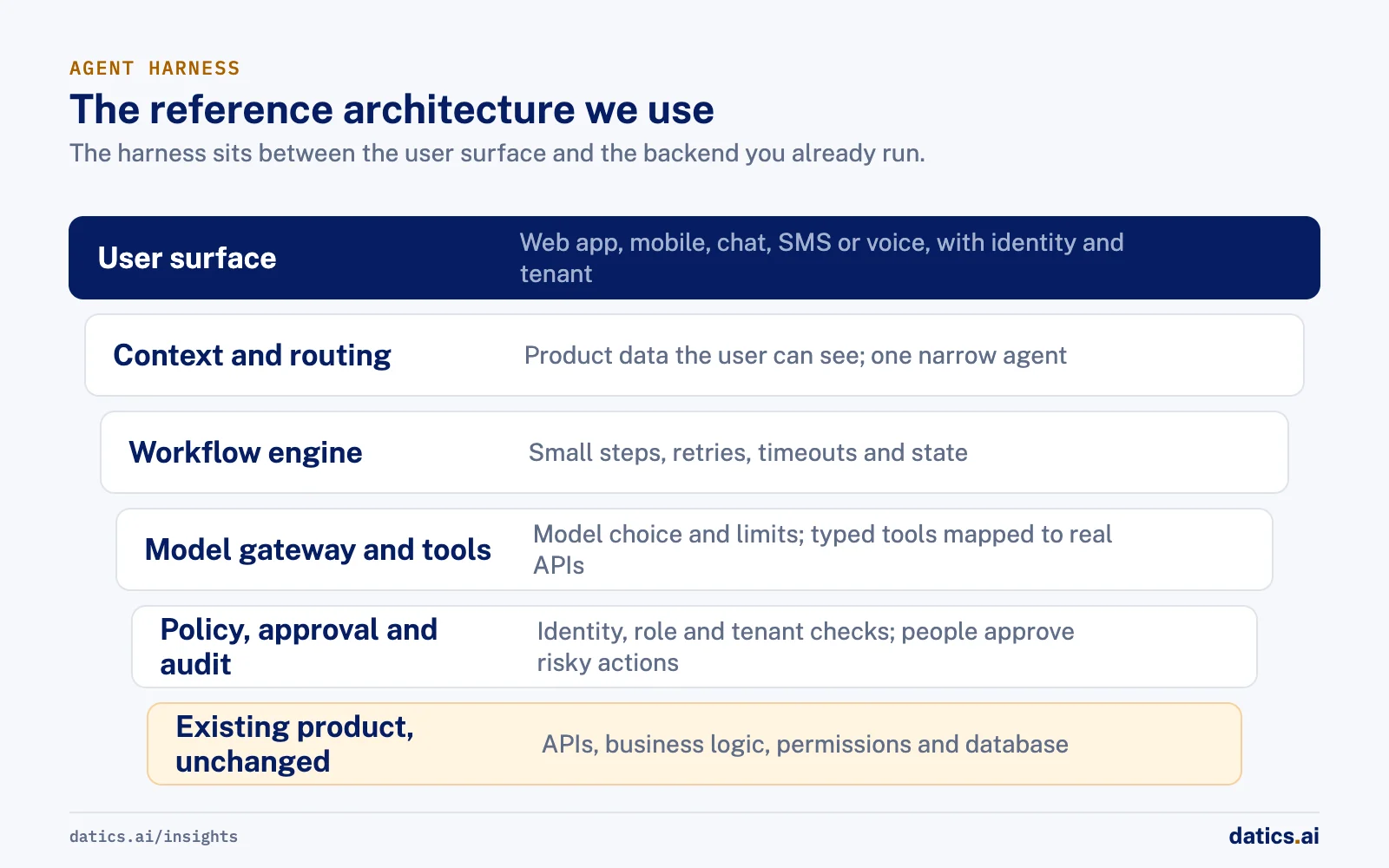
Here is the reference architecture we use when we add agents to an existing SaaS application. The product stays the system of record; the harness sits between the user surface and the backend you already run.
Use this table as a component checklist when you review a design.
- 01
Capture the user intent with the session identity and tenant.
- 02
Build product context from data that user can already access.
- 03
Offer the model only the tools allowed for that agent and that user.
- 04
Run a permission check on every proposed tool call, in code, not in the prompt.
- 05
Route risky actions to a human approval step.
- 06
Execute the action through the existing API.
- 07
Evaluate the result against the expected outcome for that step.
- 08
Write the audit record, including any approval.
| Component | What it does | Failure it prevents |
|---|---|---|
| Context builder | Pulls only the records the current user is allowed to see | Answers built on data from the wrong tenant or role |
| Router | Sends each request to one narrow agent or a fixed workflow | One general agent picking the wrong tool among dozens |
| Workflow engine | Runs work as small steps with retries, timeouts and saved state | Half finished runs that nobody can resume or explain |
| Model gateway | Central place for model choice, rate limits and token cost | Surprise bills and outages when one provider slows down |
| Tool registry | Typed, versioned tools that wrap real backend endpoints | The model inventing actions or calling internal functions directly |
| Policy check | Checks identity, role, tenant and business rules on every call | An agent doing something the user could not do themselves |
| Approval gate | Pauses risky actions until a person approves | Irreversible writes made on a model guess |
| State store | Keeps checkpoints, idempotency keys and short term memory | Duplicate writes after a retry, lost progress after a crash |
| Tracing and evals | Records inputs, outputs, latency and cost for each step and scores quality | Silent quality drift after a prompt or model change |
| Audit log | Keeps a readable record of request, action and approver | Failed customer security reviews and unanswerable incident questions |
The flow for a single request follows the order we use in our own harness design:
02How should tools and permissions be defined?
A tool is a contract, not a suggestion. Each tool should map to one real endpoint, with a typed input schema, a description written for the model, a declared side effect level and an owner. Anthropic's guidance on building agents makes the same point: toolsets and their documentation deserve clear, careful design, in the same way prompts do.
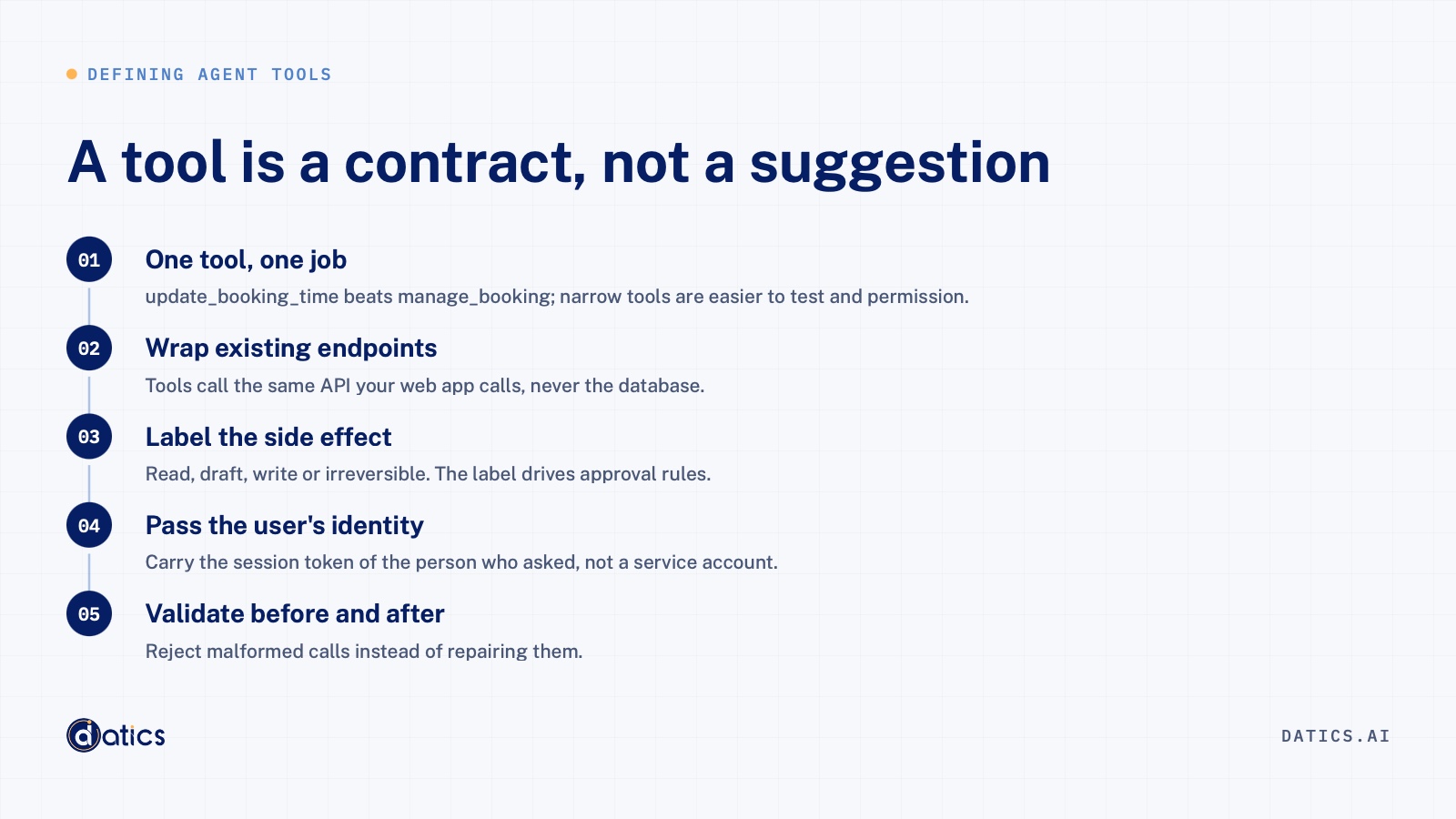
We define tools with these rules:
- One tool, one job. "update_booking_time" beats "manage_booking"; narrow tools are easier to test and permission.
- Wrap existing endpoints. Tools call the same API your web app calls, never the database directly.
- Label the side effect. Read, draft, write or irreversible. The label drives approval rules.
- Pass the user's identity, not a service account. The tool call carries the session token of the person who asked, so the backend applies the permissions it already enforces.
- Validate before and after. Reject malformed calls instead of repairing them.
Permissions belong in code that runs on every call. A prompt saying "only act on this customer's records" is an instruction the model may follow. A policy check comparing the tenant id in the arguments with the session is a control it cannot talk its way around. The rule we apply is simple: an agent should never be able to do anything the user could not do in the product by hand. A mature product already enforces tenant boundaries, roles and business rules; the harness reuses them.
The OWASP Top 10 for LLM Applications calls this risk excessive agency. Its mitigations match this design: minimal tools, tool calls run in the user's context with minimum privileges, human approval for high impact actions, and authorization enforced in downstream systems, not by the model.
03Why break agents into small, narrow steps?
Reliability falls as the decisions in one model call rise. A general agent with forty tools must choose correctly at every turn. A small step has one goal, a short tool list and known inputs and outputs, so it can be tested, retried and moved to a cheaper model on its own.
Anthropic distinguishes workflows, where code defines the path and the model fills in steps, from agents, where the model decides its own path. Its advice is to find the simplest solution that works and add complexity only when needed. In established SaaS we split work into narrow steps early, because the product already has many workflows with different permission rules.
Narrow steps also make evaluation practical: one test set per step, run on every release. Rana Umar Majeed, our co-founder and CTO, describes the underlying idea in why AI agents fail in production: probabilistic reasoning needs deterministic control around it. His CARE lens (consistency, autonomy, reliability, explainability) is easier to satisfy one small step at a time than across one long, open ended run.
04How do we handle retries, timeouts and partial failures?
Agent runs fail in ordinary ways: model timeouts, rate limits, slow APIs, workers restarting mid run. The harness treats these as normal events.
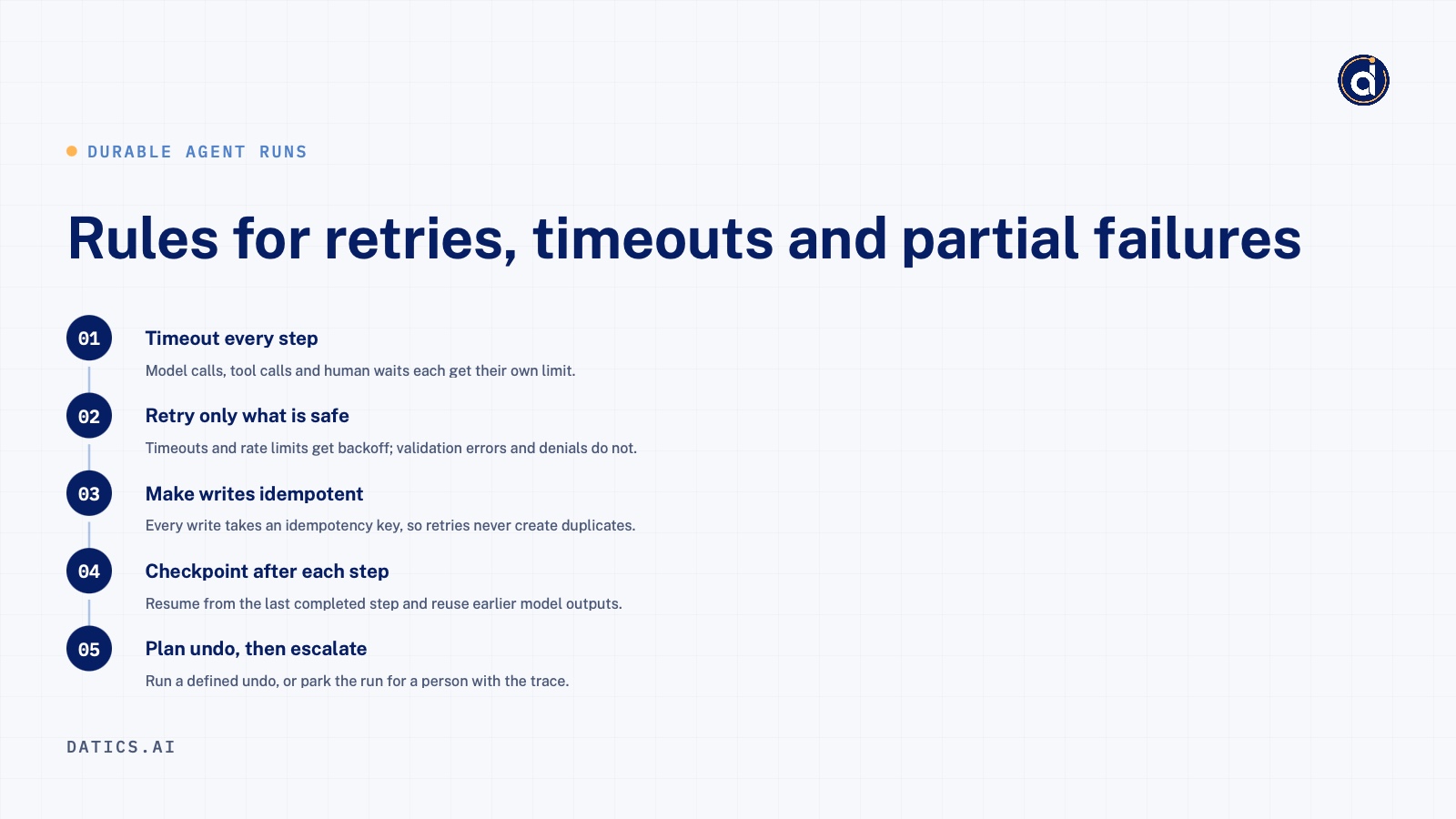
Durable workflow engines such as Temporal are built for this. Temporal's documentation on AI covers durable agents, with each step running as an activity that has its own retry policy and timeout, and with workflow state saved so a run continues after a crash instead of starting over. A queue and a state table can do a lighter version with the same rules:
- Timeout every step. Model calls, tool calls and human waits each get their own limit.
- Retry only what is safe to retry. Transient errors such as timeouts and rate limits get retries with backoff. Validation errors and permission denials do not.
- Make writes idempotent. Every write tool takes an idempotency key stored in the state store, so a retry after a network failure does not create a second booking, invoice or message.
- Checkpoint after each step. Resume from the last completed step and reuse earlier model outputs, which keeps cost and behavior stable.
- Plan compensation for multi step writes. If step four fails after steps one to three wrote data, the workflow either runs a defined undo or parks the run for a person with full context.
- Send exhausted runs to a human queue, with the trace attached.
We measure the result as cost per successful task, not cost per call. A cheap step that fails often and retries three times is not cheap.
05Where do humans approve or intervene?
Place human approval by risk, not everywhere. Too many prompts and people click through them; too few and an agent acts on a guess. The capability ladder from the same article gives a clear way to place them: read, recommend, prepare, modify, execute. Each step up needs more policy, more approval, stronger idempotency and a fuller audit trail.
In practice we apply three patterns:
- Draft and approve. The agent prepares a message or record; a person approves it before anything is sent or saved.
- Approve the action, not the reasoning. The approval screen shows exactly what will change, with the source data linked.
- Escalate with context. When the agent is unsure, hits a policy limit or exhausts retries, a person gets the case with the steps taken and the trace.
Microsoft's Agent Framework documentation shows function tools that can be marked as requiring human approval, so the run pauses and returns an approval request instead of executing. OWASP also recommends human approval for high impact actions. Keep the request, the decision and the approver in the audit log; customer security reviews ask for that record.
This is the layer most teams skip when they add AI agents to an existing SaaS product.
06What we see in production
Three anonymized examples from our work show the pattern.
A vertical operations platform that coordinates field teams. Several roles had to coordinate schedules, assignments, issues and supplies at once. Existing tools needed heavy onboarding and did not serve every worker in their own language, which led to delays and missed tasks.
An earlier assistant covered only part of the job cycle and could not be reached from the channels field workers use. We kept the assistant inside the client's existing product and exposed its backend APIs as a tightly defined tool registry, so the model can only act through real endpoints. The result is an AI enabled operations layer with role aware assistance, multilingual interaction, maintenance communication and mobile task coordination. The lesson: if an action is not an endpoint, the agent cannot take it.
A regulated financial services platform. Issuers copied deal data by hand from pitch decks, memos and financials into long forms. The goal was AI that reads the documents, prepares the record and supports analysis while staying audit ready. We kept the existing core application as the system of record and built AI as services around it, with one narrow agent per workflow step. The lesson: in regulated software, narrow agents make the audit trail readable, with one output per agent that a reviewer can check.
A sales training platform. Sales teams learned a structured script through roleplay with coaches, which did not scale and gave uneven feedback. The goal was voice practice calls with an AI prospect at any time, scored consistently against the client's own checklist. We started with a short proof of concept with hard coded scenarios, then moved scripts, scenarios, checklists and global AI instructions into the database so admins control the AI. Feedback runs as an orchestrated workflow of small steps. The lesson: prompts and rubrics are product configuration, and the people who own the content should control them.
On a team AI chat product built on an old open source fork, we took model routing out into its own service in front of the original provider and others, so adding a model no longer means changing the app, and every custom feature moved onto a current upstream release.
What these products share is what we left alone: the core product, its data model and its permission logic. The harness changed only what the AI capability required.
Frequently asked questions
Do we need a durable workflow engine like Temporal?
Not always on day one, but you need its guarantees. Any agent that writes data, waits for a human or runs longer than one request needs saved state, per step timeouts, retries and resume after a crash. A durable engine such as Temporal provides those. A queue plus a state table can work for simple flows, but you then own the retry, timer and resume logic yourself.
One general agent or many narrow agents?
For established SaaS products we favor many narrow agents behind a router. Each agent has one goal, a short tool list and its own permissions, so it is easier to test, evaluate and debug. Once agents write data across workflows with different permission rules, narrow agents are more predictable and easier to audit.
How do we version prompts and tools?
Treat prompts, rubrics and tool schemas as versioned configuration. Store each version with an id, record that id in every trace and audit entry, and run your evaluation set before promoting a change. Tool schemas follow API versioning rules: add fields freely, and publish a new version for breaking changes.
How does the harness connect to our existing backend?
Through the APIs your product already exposes, called with the requesting user's identity. Each tool wraps one endpoint, so your existing permission checks, tenant boundaries and business rules still apply. The agent never connects to the database directly. Where an endpoint is missing, add a small, targeted API rather than giving the agent internal access. The harness runs in your cloud next to the product.
How Datics helps
Datics specializes in brownfield AI: bringing production AI into the product you already operate, without forcing a rebuild.
Related work
Case studies from our projects on the same subject.
CleanHaus
Real Estate & Hospitality · Turnover operations SaaS
Hosts and cleaners manage rental turnovers in chat, within each person's permissions
Owners, managers and cleaners all talk in one property chat. Now an AI there acts for each of them, only within that person's role.
Regulated investment platform
Financial Services · Private investment marketplace
Pitch decks become drafted deals, and issuers approve each field before publishing
Issuers retyped decks and financials into long deal forms. Now AI suggests each field, and the issuer applies, edits or rejects it.
Transcripts U.S.
Government, Legal & Defense · Legal transcript marketplace
Court reporting agencies publish transcript metadata without the file ever leaving their browser
Agencies once uploaded full transcripts to the marketplace; now title page details are read in their own browser, and they confirm what is published.
More on AI agents
AI agents
AI agents for business: add them to SaaS without a rebuild
AI agents for business work best inside the SaaS product you already run: your APIs as tools, your permissions as the boundary, human approval on writes.
Umair MajeedReadAI agents
Which AI agent architecture fits a high-stakes workflow?
For a high-stakes workflow, the stronger AI agent architecture is a supervisor routing to narrow sub-agents, each with a contract and a human decision point.
 Rana Umar MajeedRead
AI agents
Why AI agents fail in production: it is not the model
Most AI agents fail in production because of the system around the model: retries, stale state, authority and audit. Here is the engineering that fixes it.
Rana Umar MajeedReadAI agents
Where should human in the loop AI review happen?
Human in the loop AI works when review happens field by field, before anything ships. Learn where to place checkpoints and how to measure accuracy.
Rana Umar MajeedReadAI agents
How much autonomy should AI agent guardrails allow?
AI agent guardrails that work: agents read and draft freely, but need consent and an editable confirmation before moving money, changing records or messaging.
Umair MajeedReadAI agents
Where should AI agent security enforce permissions?
AI agent security in a multi-role SaaS product rests on one rule: the agent gets the user's permissions and nothing more, enforced in code, never in the prompt.
Rana Umar MajeedReadYour customers already expect AI from your product.
Let us make it real without rebuilding what already works.