
AI-native
Which workflow should you make AI-native first?
The first AI workflow is not just a feature. It is the precedent every later one inherits.
 Umair MajeedCo-founder and CEO, Datics AI10 min read
Short answer
To make an established product AI native, start with the workflow that scores best on five factors. Those factors are its value to your buyer, how often it runs, how ready its data is, how contained its risk is, and how little of the product has to change. Usually that is a frequent workflow where AI reads or drafts and a person approves before anything is recorded. Autonomous actions come later, on the foundation the first one builds.
On this page
01Why the first workflow matters
Your first AI feature does more than ship. It sets the pattern your team will copy for the next ten. The way it reads data, checks permissions, asks for approval, logs what happened and measures quality becomes the default, because nobody wants to build those parts twice. Choose well, and those foundations get built on a problem small enough to finish. Choose badly, and the team either skips them to hit a date or stalls trying to build all of them at once.
The first feature also sets the tone with customers and with your board. A feature that is used every day and visibly removes work earns patience for the harder ones. A feature that impresses in a demo and is then quietly switched off makes the next AI conversation harder to win.
The failure pattern is well documented. A Gartner prediction on generative AI projects abandoned after proof of concept expected at least 30% of them to be dropped by the end of 2025. It named the causes: poor data quality, inadequate risk controls, escalating costs or unclear business value. Every one of those causes is a property of the workflow you pick. That means most of them can be scored before anyone writes code.
There is also a reason to pick a workflow rather than a feature. McKinsey's March 2025 State of AI survey found that, out of 25 attributes tested, redesigning workflows had the biggest effect on whether organizations saw EBIT impact from generative AI. Yet only 21 percent of respondents whose organizations used it said they had fundamentally redesigned at least some workflows. AI-native does not mean an assistant parked beside the product. It means a workflow inside the product that now runs differently.
02A simple score for AI native candidates
Product teams already know prioritization frameworks. RICE, one of the most widely used, scores reach times impact times confidence, divided by effort. That logic still holds for AI, but it leaves out two things that decide whether an AI feature survives production: whether the data is ready, and how much damage a wrong output can do.
So we score five factors instead: value, frequency, data readiness, risk and effort. Each one gets a score from 1 to 5, and 5 is always the favorable end. A 5 on risk means low risk; a 5 on effort means little change to the product. That keeps the arithmetic simple and the debate focused on evidence.
The process takes one working session with product, engineering and someone who talks to customers every week:
- 01
List five to ten candidate workflows, named as work a user does ("a dispatcher writes the delay notice"), not as features ("add a chatbot").
- 02
Score each candidate on the five factors, from 1 to 5.
- 03
Set aside any workflow that scores 1 on data readiness or risk. Those need groundwork first, not a first launch.
- 04
Add the remaining scores and rank them. Treat a gap of one or two points as a tie.
- 05
Break ties on value
pick the workflow your buyer would notice in a renewal conversation.
- 06
Write down what the winner will build that the next workflow can reuse.
The last step is the one teams skip, and it is the one that makes the first workflow worth more than its own score.
03Scoring value and frequency
Value asks who notices when the workflow gets better. Score it 5 when your buyer, not only your user, would name the improvement in a renewal, a competitive deal or a request to pay for an AI tier. Score it 3 when users would like it but the buyer would probably not notice. Score it 1 when the main audience is your own team's curiosity.
Measure value as work removed, not answers produced. An AI that summarizes a record nobody was going to read creates output, not value. An AI that drafts the message a coordinator writes forty times a week removes work someone can feel. Value also includes the cost side: a workflow worth building is one whose cost per successful task, not cost per model call, fits inside what the customer pays.
Frequency asks how often the workflow runs and across how many accounts. Score it 5 when it runs many times a day across most of your customers. Score it 3 when it runs weekly or in a subset of accounts, and 1 when it runs a few times a quarter.
Frequency matters twice. First, value compounds: a small saving on a daily task beats a large saving on an annual one. Second, frequency is how you learn. A daily workflow produces hundreds of real cases in weeks, which is what you need to build an evaluation set, find the failure modes and prove quality. A quarterly workflow gives you a handful of cases a year, so you never really know whether it works.
The common trap is high value with low frequency, such as annual planning or contract renewal analysis. These make strong second or third workflows. As a first workflow, they are slow to learn from and easy to quietly abandon.
04Scoring data readiness
Data readiness is where most promising candidates lose points, so score it with specific questions rather than a feeling:
- Is the data the workflow needs already inside your product, or in a system you do not control?
- Is it structured, or buried in free text, attachments and email?
- Does every record carry the tenant and user permissions the AI must respect?
- Is there a history of good outcomes to test against, such as approved documents, resolved tickets or sent messages?
- Do your customers use the same definitions for the terms the workflow depends on, such as "active", "overdue" or "at risk"?
Score it 5 when the data lives in your product, is scoped per tenant and per user, and comes with past examples of good work. Score it 3 when the data is in the product but definitions vary between customers or it needs cleanup. Score it 1 when the data is spread across outside systems with no reliable permission model.
Permissions deserve their own attention. In a multi-tenant product, an AI that can see across tenant boundaries is not a quality problem, it is a security incident. The safest first workflows use the access control you already have: the same user sees the same records through the AI as through the screen.
A score of 1 here is not a permanent no. It tells you the real first project is data work, and that the AI feature comes second.
05Scoring risk and effort
Risk asks what happens when the AI is wrong. A useful way to score it is the Read-to-Execute capability ladder that Rana Umar Majeed sets out in Why AI Agents Fail in Production. The ladder runs read, recommend, prepare, modify, execute, and each step up needs more policy, approval, idempotency and audit.
- Score 5 for read or recommend, where a person sees the output and acts on it themselves.
- Score 4 for prepare, where the AI drafts something and a person approves it before anything is recorded or sent.
- Score 2 for modify, where the AI changes records, even with approval.
- Score 1 for execute without review, or for anything that touches money, clinical decisions, legal outcomes or regulated records.
Also ask who sees the output first. A draft that an internal coordinator reviews is lower risk than an answer shown directly to your customer's customer.
Effort asks how much of the product has to change. Score it 5 when the workflow fits your existing APIs, data and permissions and needs only a new surface in the interface. Score it 3 when it needs a new service endpoint, a data sync or a change to one integration. Score it 1 when it requires reworking core architecture, the tenancy model or a regulated part of the system.
Low effort is not the same as low ambition. Our rule is to change only what the AI capability actually requires. A first workflow that forces a rewrite of the core will usually lose to the roadmap, and the roadmap is already full.
06A worked example
Consider an illustrative product, not a client: a scheduling and billing platform for multi-location service businesses. The team lists four candidates and scores them.
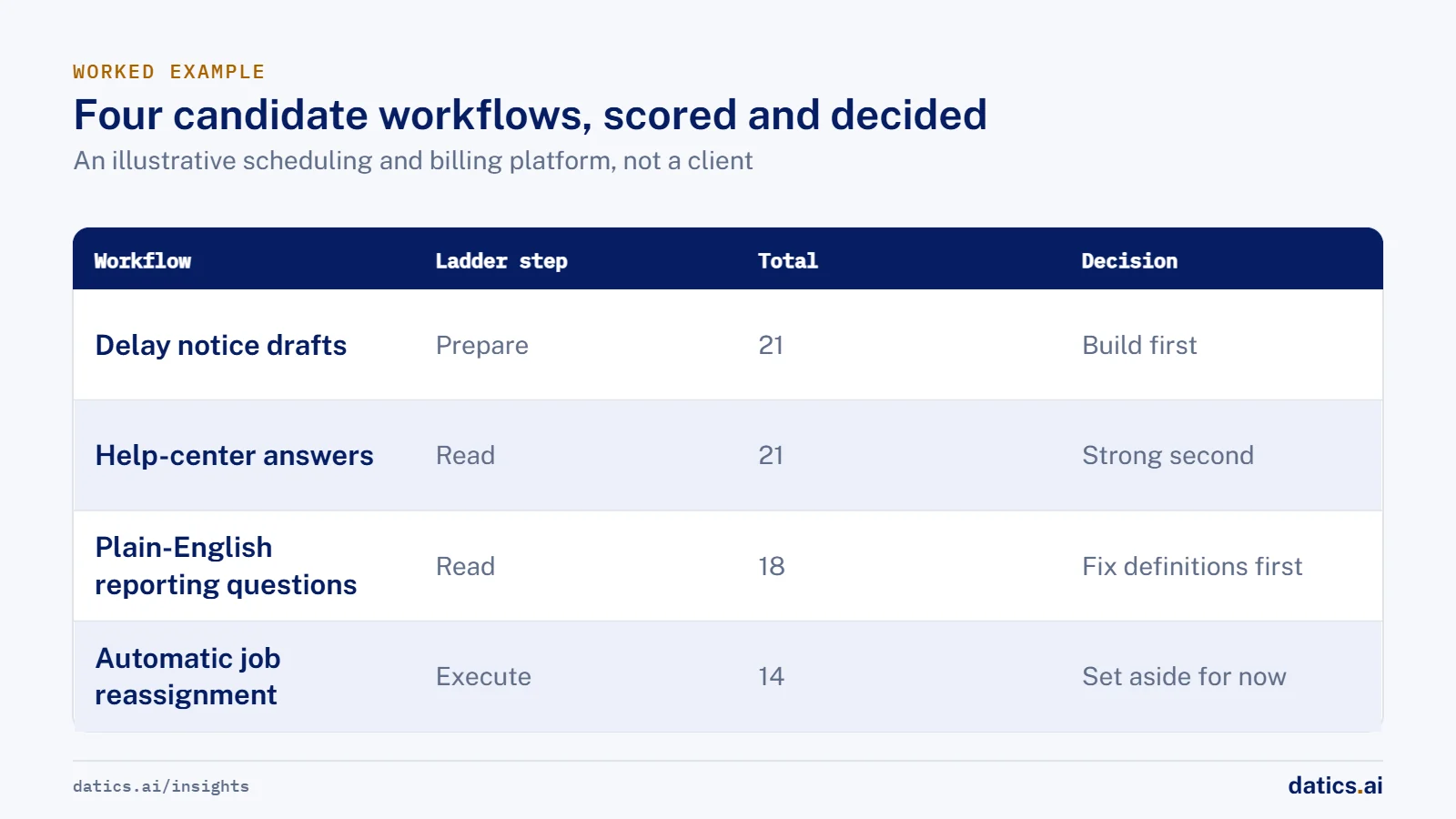
| Candidate workflow | Ladder step | Value | Frequency | Data readiness | Risk | Effort | Total |
|---|---|---|---|---|---|---|---|
| Delay notice drafts for dispatcher approval | Prepare | 4 | 5 | 4 | 4 | 4 | 21 |
| Help-center answers for admins | Read | 3 | 4 | 5 | 5 | 4 | 21 |
| Plain-English reporting questions | Read | 4 | 3 | 3 | 5 | 3 | 18 |
| Automatic job reassignment | Execute | 5 | 4 | 2 | 1 | 2 | 14 |
Automatic job reassignment has the highest value and is the most exciting in a demo. It is also gated out by step 3. Its risk score is 1, because it changes schedules and customer commitments without review, and its data readiness score is 2, because technician skills and availability live partly outside the product. The decision is to set it aside for now, not forever.
Plain-English reporting questions are attractive, but customers define their metrics differently, so the honest decision is to fix definitions first.
Delay notice drafts and help-center answers tie at 21. The tie breaks on value. Help-center answers mostly reduce the vendor's own support load. Delay notices remove work the buyer's dispatchers do every day and prevent the customer complaints the buyer hears about. Delay notice drafts are the workflow to build first, and help-center answers are a strong second.
Step 6 shows why the choice matters beyond its own score. Building delay notice drafts creates parts the next workflows reuse. They include reading job context within the user's permissions, a draft and approve screen, and an audit log of what was suggested and what was sent. They also include an evaluation set built from drafts dispatchers sent unchanged or edited. When the team later returns to job reassignment, most of the control it needs is already in place.
07What we see in production
Our case studies follow the same pattern, even where nobody called it a scoring method at the time.
The workflows that reach production first tend to sit on the prepare step of the ladder. In a clinical documentation product for healthcare practices, live transcription plus patient history drafts the clinical note, and the clinician reviews, edits and approves it before release. That workflow runs during everyday patient visits, uses data the product already holds, and keeps a person in control of the record.
When data readiness scores low, the data becomes the first project. For a vertical software company serving dealerships, the work began by unifying customer, CRM, inventory and engagement data from several systems into one intelligence layer. The AI was only as useful as that layer.
When effort scores low because the foundations are fragile, we fix the foundations first. In a cloud file-management product, reliability and regression coverage came before AI ingestion, vector retrieval and team chat workflows. Shipping AI onto an unstable product spends user patience on bugs that have nothing to do with the model.
Effort stays manageable when the core stays put. On a regulated investment platform, AI and automation were added through services around the existing core application, so document, onboarding and compliance workflows could change without replacing the regulated application. For a communications platform serving healthcare practices, AI for calls, engagement and booking was connected to the practice-management systems the platform already supported, inside the customer's cloud.
Tenancy and permissions are part of the first workflow's scope, not a later phase. A patient intake product grew from an adaptive AI intake prototype into a multi-clinic SaaS by adding clinic isolation, role-based access, onboarding, provider configuration and billing.
The common thread is that the first workflow did not try to prove everything. It proved one useful change, built the controls the next change would need, and left the rest of the product alone.
Frequently asked questions
What are the five factors in the score?
Value to your buyer, frequency, data readiness, risk and effort. Each is scored from 1 to 5, and 5 is always the favorable end, so a 5 on risk means low risk and a 5 on effort means little change to the product.
Should the first AI workflow be an autonomous agent?
Usually not. The strongest first candidates sit on the read, recommend or prepare steps of the capability ladder, where a person reviews the output before anything is recorded or sent. Autonomous actions come later, on the controls the first workflow builds.
What if the most valuable workflow scores 1 on data readiness or risk?
Set it aside for now, not forever. A 1 on data readiness means the real first project is data work. A 1 on risk means the approval, policy and audit controls need to exist before that workflow can run safely.
How do we break a tie between two candidates?
Break it on value. Pick the workflow your buyer would notice in a renewal conversation, not the one that mainly reduces your own team's workload. Treat a gap of one or two points as a tie, and before you build the winner, write down what it will create that the next workflow can reuse.
How Datics helps
Datics specializes in brownfield AI: bringing production AI into the product you already operate, without forcing a rebuild.
Related work
Case studies from our projects on the same subject.
Dental clinical documentation AI company
Healthcare & Wellness · Clinical documentation AI
Dentists approve a clinical note drafted during the appointment, not rebuilt after it
Dentists rebuilt notes from memory after each visit. Now AI drafts the note during the appointment, and only the dentist can release it.
Coast Technology
Automotive & Dealerships · Dealership customer data platform
Dealers see who shopped them online and push each lead to their CRM
Shopper data, messaging and CRMs sat in separate tools. Now dealers see each shopper in one profile and send an email, a text or a CRM lead.
Amove
B2B Software · Internal product knowledge assistant
Amove's team gets product, pricing and cloud cost answers inside Slack
Answers sat in wiki pages, FAQs and pricing tables. Now the team asks in Slack and gets a stored FAQ at once or a sourced answer.
Related answers
Brownfield AI
AI integration for SaaS: add AI without a rebuild
AI integration for an existing SaaS product: keep your core as the system of record, reuse your APIs and auth, and ship one AI workflow without a rebuild.
Umair MajeedReadBrownfield AI
Brownfield vs greenfield: retrofit AI or start fresh?
Brownfield vs greenfield for AI: what a mature SaaS platform has that an AI startup lacks, where legacy code slows it down, and how to move just as fast.
Umair MajeedReadBrownfield AI
AI implementation challenges: lessons from 50+ projects
The AI implementation challenges behind 53 AI projects since 2018: integration, data, permissions, approvals and testing, and what to settle first.
Umair MajeedReadBrownfield AI
AI product strategy: embed AI or launch a separate product?
An AI product strategy for an established SaaS: when to build AI into the product you have, when a separate AI product makes sense, and how to decide.
Umair MajeedReadBrownfield AI
How do you know if your product has AI ready data?
AI ready data means outside feeds arrive through logged pipelines that match, de-duplicate, validate and attribute records before any model sees them.
Umair MajeedReadBrownfield AI
Entity matching: how do you map supplier data to a catalog?
Entity matching for product data works when you agree on mapping rules first, normalize before you compare, and route uncertain matches to people.
 Rana Umar MajeedRead
Your customers already expect AI from your product.
Let us make it real without rebuilding what already works.