
Brownfield AI
How do you know if your product has AI ready data?
A model cannot tell a stale feed from a fresh one. Your pipeline has to.
 Umair MajeedCo-founder and CEO, Datics AI6 min read
Short answer
Your product data is AI ready when every outside feed arrives through a scheduled, logged pipeline that matches, de-duplicates, validates and attributes each record to the right customer before any model reads it. If you cannot say where a record came from, when it arrived and which customer it belongs to, the AI will repeat those gaps with confidence. Fix the pipelines first, then add the model.
On this page
01Why AI makes data problems louder
A report with a wrong number is annoying. An AI assistant that states the same wrong number in a fluent sentence is worse, because users trust it more. The model does not know that a vendor feed failed last night, that two records are the same person, or that a test import was never removed. It reads what is there.
Research backs this up. A Google study of practitioners in high stakes AI found that compounding data problems, which the authors call data cascades, were present in almost every project they examined. They also found that cascades are usually invisible and delayed but avoidable. An earlier Google paper on technical debt in machine learning systems names data dependencies as one of the main sources of long term cost. Neither problem is solved by a better model.
For a B2B product that depends on third party feeds, customer system integrations and imports, the practical test is simple: could you show a customer, record by record, where the answer came from? If not, the data is not ready.
02Treat every source as its own contract
The first step is an inventory. List every source that feeds the product, and for each one write down what you actually know about it, not what the integration document promised.
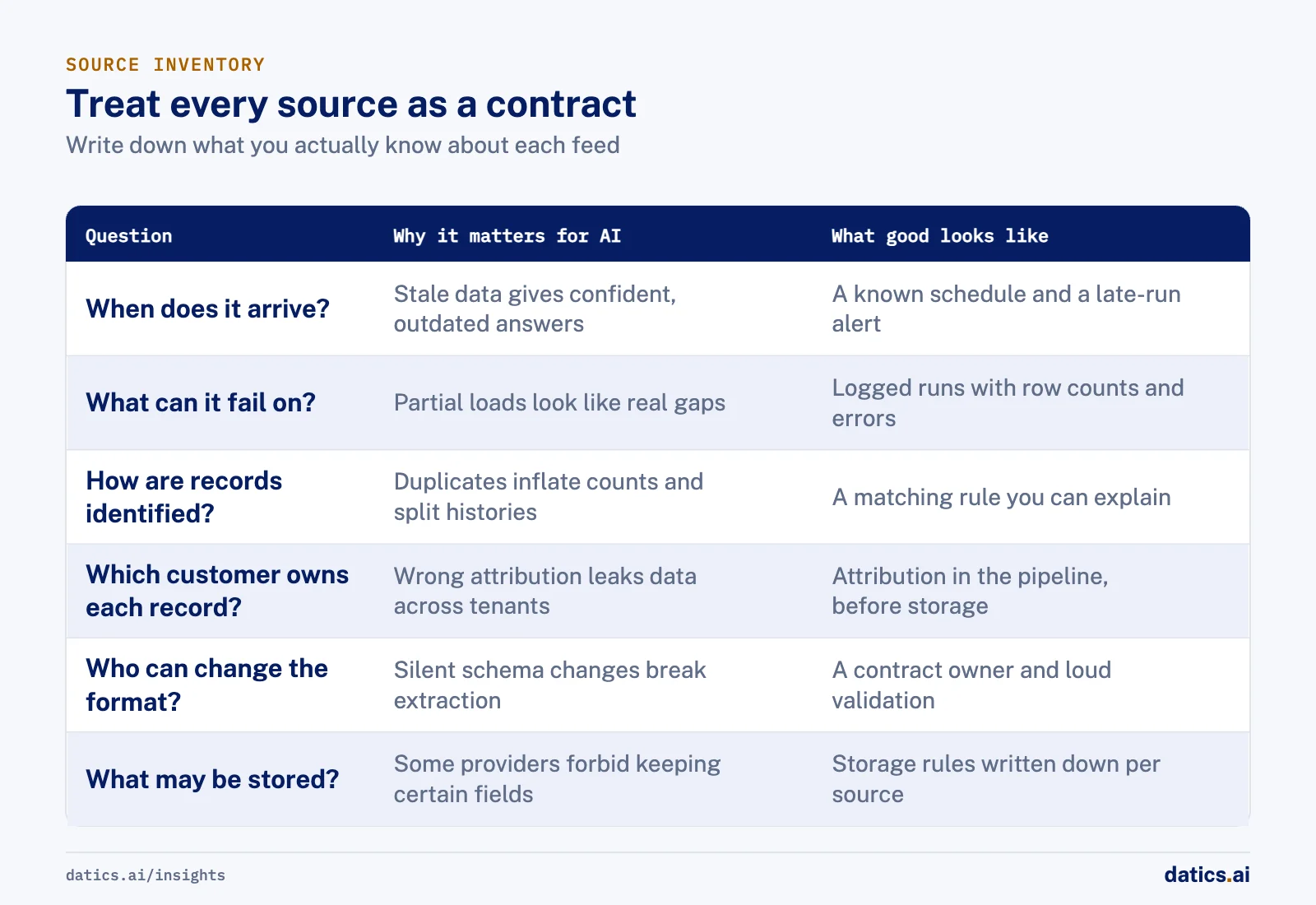
| Question | Why it matters for AI | What good looks like |
|---|---|---|
| When does it arrive? | Stale data produces confident, outdated answers | A known schedule and an alert when a run is late |
| What can it fail on? | Partial loads look like real gaps in the data | Logged runs with row counts and errors per run |
| How are records identified? | Duplicates inflate counts and split histories | A matching rule and a de-duplication step you can explain |
| Which customer owns each record? | Wrong attribution leaks data across tenants | Attribution happens in the pipeline, before storage |
| Who can change the format? | Silent schema changes break extraction | A contract owner and a validation step that fails loudly |
| What may be stored? | Some providers forbid keeping certain fields | Storage rules written down per source |
Treating each source as a contract changes how teams talk about failures. Instead of "the data is wrong", you can say "the vendor feed for this customer arrived four hours late and with half its rows", which is something you can fix.
03Build the pipeline before the prompt
Once the inventory exists, the work is mostly plumbing. It is not glamorous, but it decides whether the AI feature is trusted. We follow the same order on most projects:
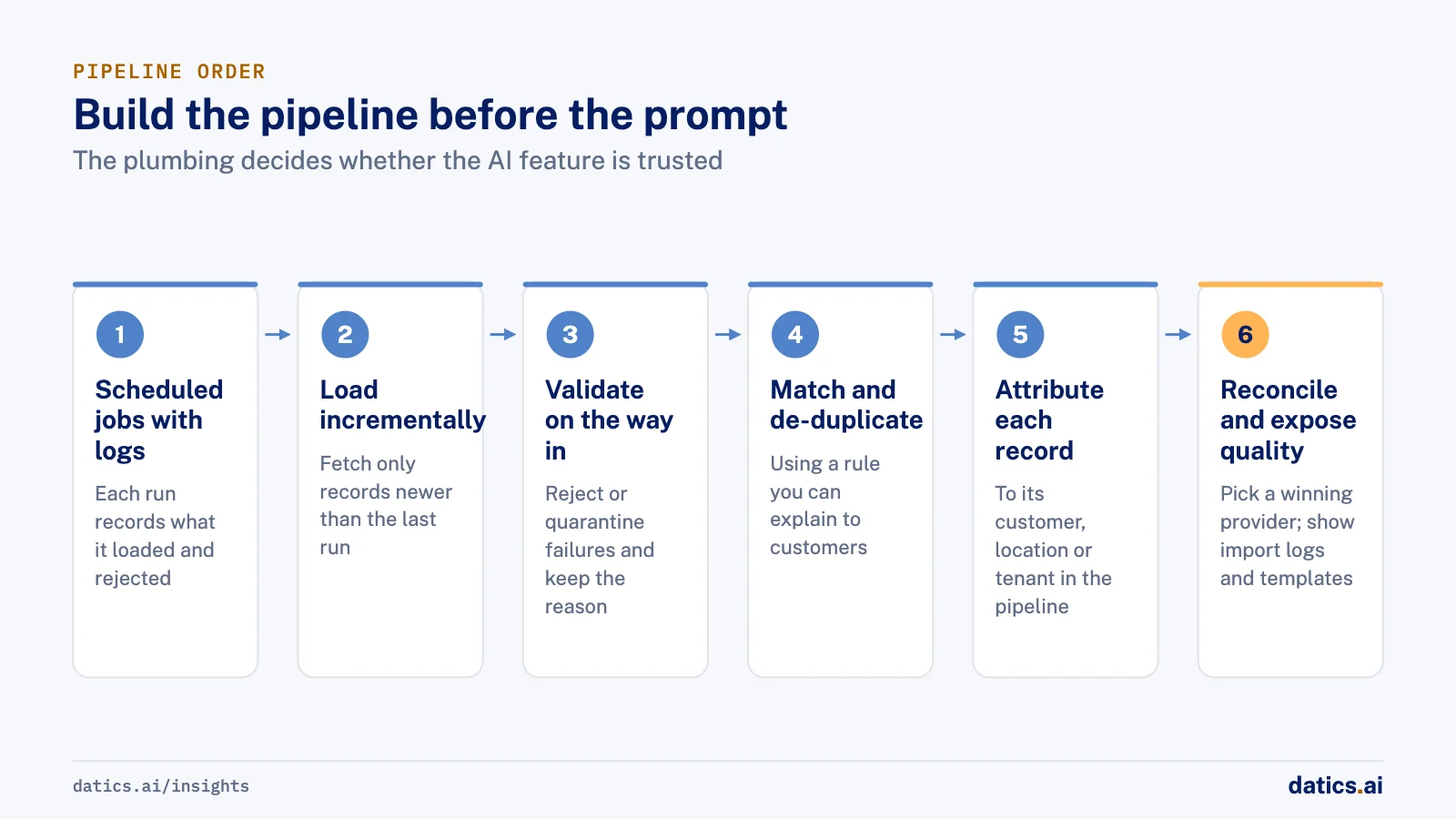
- 01
Move every feed into scheduled jobs with logs, so each run records when it started, what it loaded and what it rejected.
- 02
Load incrementally where you can. Fetch only records newer than the last successful run instead of reloading and comparing everything.
- 03
Validate on the way in. Reject or quarantine records that fail type, range or required field checks, and keep the reason.
- 04
Match and de-duplicate, using a rule you can explain to a customer.
- 05
Attribute each record to its customer, location or tenant in the pipeline itself, not later in the application.
- 06
Reconcile numbers that come from several providers, and decide which provider wins when they disagree.
- 07
Expose quality to the people who own the data
import logs, templates and clear error messages.
The last step is often skipped, and it is one of the most useful. When customers can see their own import logs and use a template that matches your format, many data problems are fixed at the source, by the people who understand them best.
04Make data quality visible inside the product
Data readiness is not a one time project. Feeds change, customers add new systems and providers change their limits. The product itself should show data health, both to your team and to customers:
- Import logs per customer, showing what loaded, what failed and why.
- Templates for manual imports, with the exact labels and ranges the pipeline expects.
- Freshness indicators, so a user can see when a source last updated.
- A way to flag a wrong record, stored for review rather than lost in a support ticket.
These features are useful long before any AI is added. Once an AI feature arrives, they also become the evidence you need when a customer asks why the assistant said what it said.
05What we see in production
On a multi-tenant dealership platform that turns website visitor data and dealer systems into follow ups, the data arrives from many outside sources. These are pixel and geo data vendors, lead feeds, dealer CRMs and dealer management systems, and inventory feeds, all on schedules we do not control. Every dealer group has its own locations, franchises and lead rules. Visitor data has to be matched, de-duplicated and attributed to the right dealership at scale, and communication statistics have to reconcile across several email and SMS providers.
We moved ingestion into scheduled workers and warehouse based pipelines, added each CRM and communication integration one provider at a time, and gave dealers data import templates and logs. The product has kept evolving in production for more than five years without a core rewrite. An AI chat assistant was later added as one feature on top of that data, not as a replacement for it.
On an analytics pipeline for a web3 messaging network, every run downloaded the previous snapshot, ran a full query, loaded everything into memory and compared it to find new rows. Memory use and run time grew with the data. We proposed an incremental design: start from the latest timestamp already in the destination, query only newer rows in batches, upload and confirm each batch, and log completion. Batching also covers the first sync and catch-up after a failed run, because the destination caps each upload at about 200 MB. The client approved the design.
The lesson carries over to AI work: a pipeline that knows where it left off is far easier to trust than one that rebuilds the world every time.
In the approved incremental sync, the destination itself is the record of progress, instead of the separate metadata table we first proposed. The job now reads only new rows every ten minutes, and the client later told us it was working great.
06Signs you do not have AI ready data yet
You can usually tell within a week of looking. Common signs:
- Dashboards that calculate the same metric in different ways.
- Duplicate customers or contacts that nobody can explain.
- Feeds that fail silently and are noticed by customers first.
- Manual imports with no template and no log.
- No record of which customer a row belongs to until the application joins it.
None of these need a model to fix. Fixing them first makes the model you add later look smarter, and it makes the answers defensible when a customer asks. We discuss how this connects to cost in how to reduce AI infrastructure cost in production.
Frequently asked questions
What makes product data AI ready?
Every outside feed arrives through a scheduled, logged pipeline that matches, de-duplicates, validates and attributes each record to the right customer before any model reads it. The practical test is simple: could you show a customer, record by record, where an answer came from? If not, the data is not ready.
Will a better model fix bad data?
No. A model cannot tell a stale feed from a fresh one, and it states a wrong number in a fluent sentence that users trust more than a report. Google research on data cascades and on technical debt in machine learning points the same way: neither problem is solved by a better model.
Where should a team start?
With an inventory of every source that feeds the product. For each one, write down when it arrives, what it can fail on, how records are identified, which customer owns each record, who can change the format and what may be stored. Then build the pipeline before the prompt.
How can customers help keep the data clean?
Show them data health inside the product: import logs per customer, templates with the exact labels and ranges the pipeline expects, freshness indicators and a way to flag a wrong record. When customers can see their own import logs, many data problems are fixed at the source, by the people who understand them best.
How Datics helps
Datics specializes in brownfield AI: bringing production AI into the product you already operate, without forcing a rebuild.
Related work
Case studies from our projects on the same subject.
Coast Technology
Automotive & Dealerships · Dealership customer intelligence SaaS
Dealers kept using their portal daily while we rebuilt it module by module
Dealers relied on a portal run on per dealer scripts. We rebuilt it module by module while they worked, and grew it into a CRM and more.
Ephemera
Data & Analytics · Network analytics data pipeline
Ephemera's network analytics sync redesigned to read only new rows, every ten minutes
Every run reloaded the whole history to find new rows; the new design asks only for what is newer and batches around the upload cap.
More on Brownfield AI
Brownfield AI
AI integration for SaaS: add AI without a rebuild
AI integration for an existing SaaS product: keep your core as the system of record, reuse your APIs and auth, and ship one AI workflow without a rebuild.
Umair MajeedReadBrownfield AI
Is vibe coding enough for mature SaaS?
Vibe coding in SaaS is fast for prototypes. Mature products need server-side permissions, regression tests, evaluation and review before AI code ships.
Umair MajeedReadBrownfield AI
Entity matching: how do you map supplier data to a catalog?
Entity matching for product data works when you agree on mapping rules first, normalize before you compare, and route uncertain matches to people.
 Rana Umar MajeedRead
Brownfield AI
AI data integration: connect AI without a new platform
AI data integration without a migration: leave customer data where it lives, give AI governed paths to it, and index only what retrieval really needs.
Umair MajeedReadBrownfield AI
Brownfield vs greenfield: retrofit AI or start fresh?
Brownfield vs greenfield for AI: what a mature SaaS platform has that an AI startup lacks, where legacy code slows it down, and how to move just as fast.
Umair MajeedReadBrownfield AI
AI product strategy: embed AI or launch a separate product?
An AI product strategy for an established SaaS: when to build AI into the product you have, when a separate AI product makes sense, and how to decide.
Umair MajeedReadYour customers already expect AI from your product.
Let us make it real without rebuilding what already works.