
Brownfield AI
AI implementation challenges: lessons from 50+ projects
The model was rarely the hard part. Fitting AI into everything around it was.
 Umair MajeedCo-founder and CEO, Datics AI5 min read
In brief
The biggest AI implementation challenges are rarely about the model. Across more than 50 AI projects since 2018, what decided success was how the AI fitted around everything else: the systems it had to connect to, the data under it, and the controls around it. Those controls decide who may see what, who approves an action and where it runs.
On this page
- 01How we counted
- 02AI work grew fast after 2023
- 03Integration is most of the work
- 04People stay in the loop
- 05Where it runs matters to buyers
- 06Data comes before models
- 07Evaluation is the step most often skipped
- 08What the wider research says
- 09How to get ahead of AI implementation challenges
- 10What we see in production
- Frequently asked questions
01How we counted
Our project records hold 148 client projects since 2018. 53 of them are AI work: AI added inside an existing product, or new AI products and agents. Each project is tagged with what it needed, such as integrations, human approval or a multi-tenant design. 52 of the 53 are tagged, and the counts below come from those 52. Client names and money figures are left out; every number is a count from our own records. This is part of our larger guide, AI integration for SaaS: add AI without a rebuild.
These are our projects, not a market survey. They lean toward established software companies and toward work that reached real users, so they say more about what it takes to ship AI than about how many teams try it.
02AI work grew fast after 2023
| Year | AI projects started |
|---|---|
| 2018 | 1 |
| 2019 | 3 |
| 2020 | 2 |
| 2021 | 2 |
| 2023 | 7 |
| 2024 | 9 |
| 2025 | 17 |
| 2026 (to November) | 12 |
Before 2023, AI was an occasional request. Since then it has become the main one: 45 of the 53 AI projects started in 2023 or later. The requests also changed. Early projects were mostly models and recommendations built on their own. Recent ones are assistants, agents and document work that have to live inside a product or a team's daily tools.
03Integration is most of the work
36 of the 52 tagged AI projects, about seven in ten, needed integrations with other systems: the product's own APIs and records, CRMs, chat tools, document stores. In 17 projects, the AI sat inside a live product rather than beside it.
In practice, the AI answer was the visible part, and connecting it to everything around it was where most of the time went. An assistant is only useful if it can read the records a user works with, write back where the user expects it, and fail without breaking the screen it sits on. Teams that plan the integration as the main work, and the model as one component, estimate better and ship sooner. The same holds for agents, as in adding AI agents to an existing SaaS product.
04People stay in the loop
17 of the 52, about one in three, built human approval into the workflow: the AI drafts or proposes, and a person confirms before anything changes. In 13, the design had to respect each user's permissions, so the AI never shows someone data they could not see in the product itself.
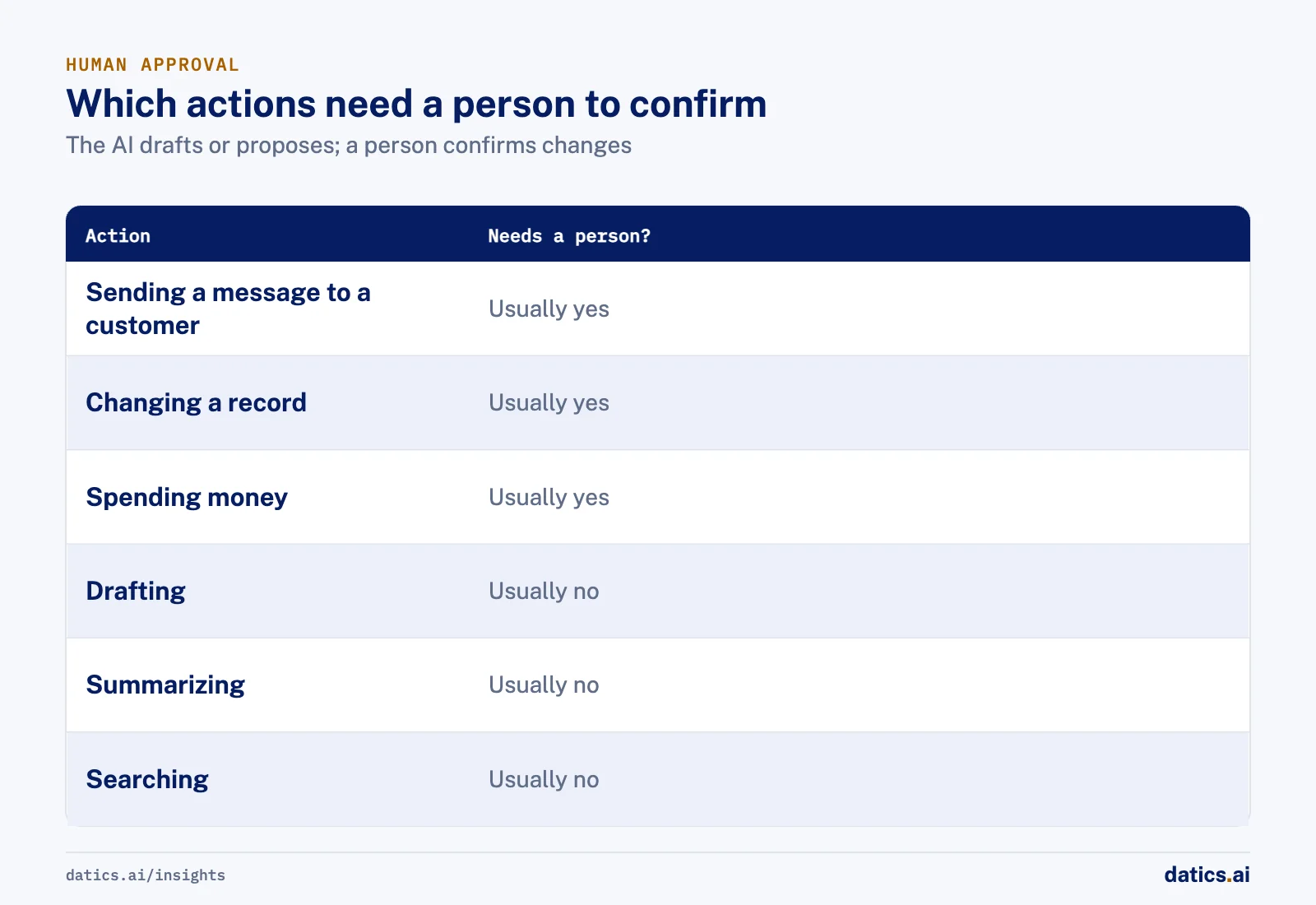
Approval is not a sign that the AI is weak. It is how a team earns the trust to automate more later. The useful question is not whether to keep a person in the loop, but which actions need one. Sending a message to a customer, changing a record or spending money usually do; drafting, summarizing and searching usually do not.
05Where it runs matters to buyers
17 of the 52 ran in the client's own cloud account, and 12 served many customers from one product, so each customer's data had to stay apart. For established software companies, these are often the first questions their own customers ask: where does our data go, who can see it, and could another customer's request ever reach it. Answering them early, in the design, is much cheaper than answering them in a security review after launch.
06Data comes before models
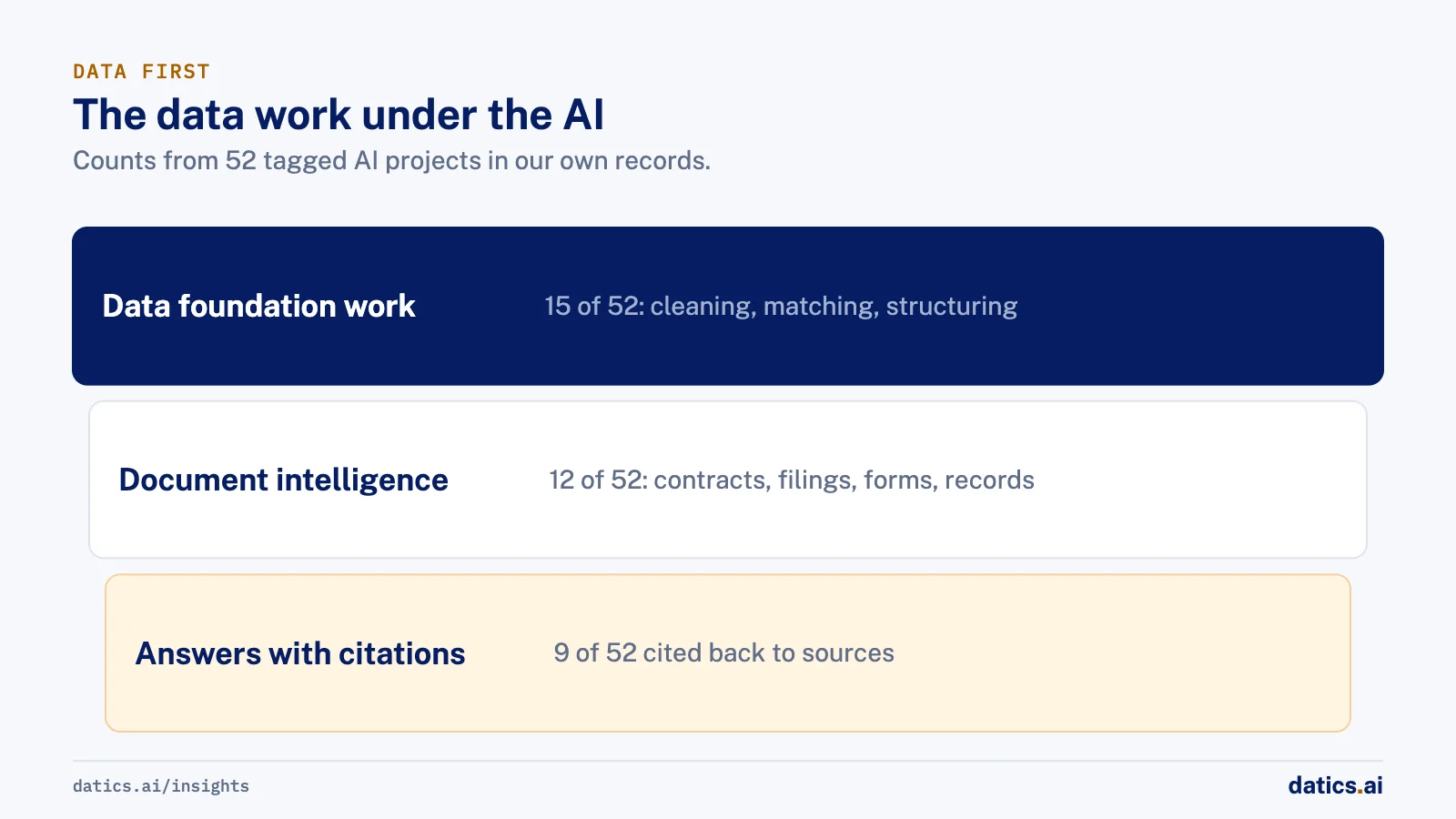
15 of the 52 needed data foundation work before the AI could be trusted: cleaning, matching and structuring what was already there. In 12, the work was document intelligence: reading contracts, filings, forms and records into structured data. In 9, the AI gave answers with citations back to their sources.
This matches the wider research. Gartner expects organizations to abandon 60% of AI projects that are not supported by AI-ready data through 2026. It also named poor data quality first among the reasons it expected many generative AI projects to be dropped after proof of concept.
07Evaluation is the step most often skipped
Only 6 of the 52 were evaluated against a test set before launch. It is also the gap we see most often when teams bring us AI they have already built, and it is what the AI Scorecard tests.
Without a test set, a team cannot tell whether a change made the AI better or worse, and every model update becomes a guess. A small set of real questions with known good answers, run before each release, turns that guess into a number. It also keeps running costs in view, which matter as usage grows (see how much production AI costs in SaaS).
08What the wider research says
Our counts line up with what larger surveys find. Gartner predicted that at least 30% of generative AI projects would be abandoned after proof of concept by the end of 2025, because of poor data quality, inadequate risk controls, escalating costs or unclear business value. Three of those four reasons are the integration, data and control work described above. McKinsey's latest global survey on the state of AI finds that the organizations getting the most from AI redesign workflows around it rather than inserting AI into existing ones. Fitting AI into a product is exactly that redesign, done one workflow at a time.
09How to get ahead of AI implementation challenges
- 01
Where the AI enters the workflow
the screen, the step and the person it serves.
- 02
Which data it reads, and who may see it
the product's own permissions apply to the AI too.
- 03
Who approves what it does
decide which actions need a person to confirm.
- 04
Where it runs
your cloud, your customers' requirements and how tenants stay apart.
- 05
How you will know it works
a test set and a measure, before the first customer sees it.
10What we see in production
The projects that went smoothly settled these five points in the first weeks. The ones that struggled had a working demo early and then met permissions, data and approval rules late. Treating integration, data and controls as the main work, and the model as one part of it, is the difference we see most.
Frequently asked questions
What are the biggest AI implementation challenges?
In our projects, they were integration with existing systems, data that was not ready, permissions and approvals, where the AI runs, and the lack of a test set before launch. The model itself was rarely the blocker. Teams that plan the integration as the main work, and the model as one component, estimate better and ship sooner.
Why do AI projects stall after the proof of concept?
A proof of concept usually runs on clean sample data, without the product's permissions, approval rules or integrations. When those arrive, the work grows. Gartner lists poor data quality, inadequate risk controls, escalating costs and unclear business value as the main reasons projects are dropped after proof of concept.
How do you know an AI feature is ready to launch?
When it passes a test set of real questions with known good answers, respects each user's permissions, has an approval step for actions that change records, and runs where your customers expect their data to be. Run that set before each release, so you can tell whether a change made the AI better or worse.
How Datics helps
Datics specializes in brownfield AI: bringing production AI into the product you already operate, without forcing a rebuild.
Related work
Case studies from our projects on the same subject.
Where Do You Nom
Healthcare & Wellness · Food search and recommendations
Restaurant dishes linked to their recipes, so nutrition comes from ingredient data
Branded dish names linked to nothing, so no dish showed nutrition. Now each menu item reaches its recipe and ingredients.
Coast Technology
Automotive & Dealerships · Competitive inventory intelligence engine
Dealers see rival stock, prices and sales daily, captured from many changing websites
Dealers checked rival lots by hand, site by site. Now one engine captures competitor stock daily and the portal compares prices and sends alerts.
Social music collaboration app
Marketing & Media · Audio search and discovery
A prototype lets musicians search by instrument, read from the audio itself
No field held instruments, so search could not find a pianist or drummer; our prototype read real tracks and tagged what each one is.
More on Brownfield AI
Brownfield AI
AI integration for SaaS: add AI without a rebuild
AI integration for an existing SaaS product: keep your core as the system of record, reuse your APIs and auth, and ship one AI workflow without a rebuild.
Umair MajeedReadBrownfield AI
Is vibe coding enough for mature SaaS?
Vibe coding in SaaS is fast for prototypes. Mature products need server-side permissions, regression tests, evaluation and review before AI code ships.
Umair MajeedReadBrownfield AI
Entity matching: how do you map supplier data to a catalog?
Entity matching for product data works when you agree on mapping rules first, normalize before you compare, and route uncertain matches to people.
 Rana Umar MajeedRead
Brownfield AI
AI data integration: connect AI without a new platform
AI data integration without a migration: leave customer data where it lives, give AI governed paths to it, and index only what retrieval really needs.
Umair MajeedReadBrownfield AI
Brownfield vs greenfield: retrofit AI or start fresh?
Brownfield vs greenfield for AI: what a mature SaaS platform has that an AI startup lacks, where legacy code slows it down, and how to move just as fast.
Umair MajeedReadBrownfield AI
AI product strategy: embed AI or launch a separate product?
An AI product strategy for an established SaaS: when to build AI into the product you have, when a separate AI product makes sense, and how to decide.
Umair MajeedReadYour customers already expect AI from your product.
Let us make it real without rebuilding what already works.