
RAG and AI assistants
What makes a good chatbot human handoff to a live agent?
The worst handoff is not a slow one. It is a handoff to nobody.
 Rana Umar MajeedCo-founder and CTO, Datics AI6 min read
Short answer
A good chatbot human handoff is decided before the first conversation, not improvised during it. Define the triggers that force escalation, such as a question outside the bot's knowledge or a direct request for a person. Let admins set when agents are available. Then pass the full conversation into a shared inbox so the agent continues where the bot stopped, and the customer never repeats anything.
On this page
01Why handoff is a product decision, not a fallback
Teams adding AI chat to a support, sales or service product tend to spend their effort on the answers. The handoff gets a button and a sentence. That is a mistake, because the handoff is where trust is won or lost. A bot that answers most questions well and then drops a frustrated customer into an empty queue does more damage than a bot that never pretended to know.
If your customers deploy your chat to their own end users, the problem doubles. Each of your customers has its own team, its own hours and its own idea of what the bot should never try to answer. Your product must let them encode those decisions without calling you.
So we design the handoff as a feature with its own rules, its own screens and its own tests.
02Decide the escalation triggers up front
A bot should hand off for clear, testable reasons. These are the triggers we define with every client before building:
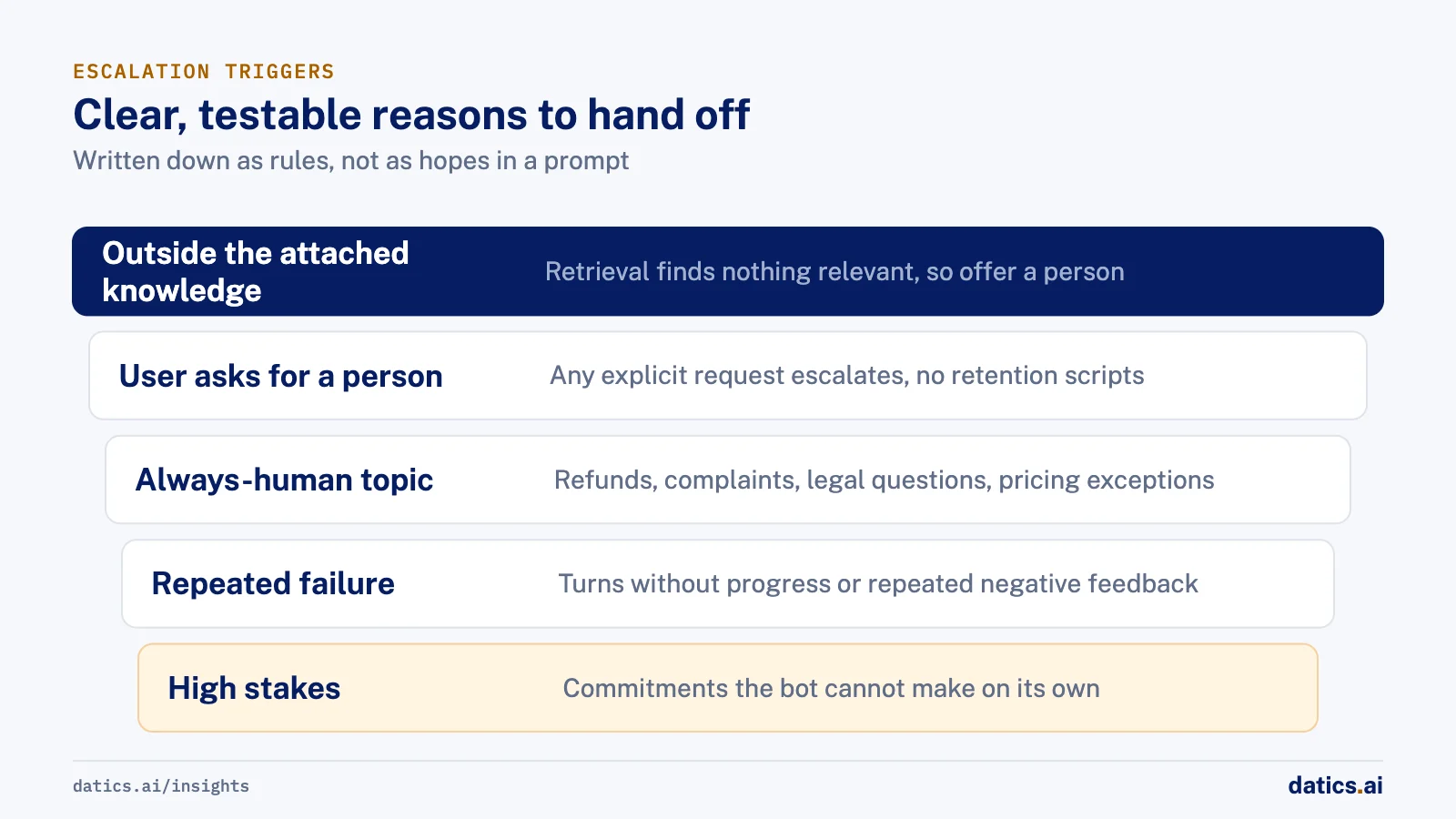
- 01
The question is outside the attached knowledge.
If retrieval finds nothing relevant in the documents, pages or data the admin attached to this bot, the bot says so and offers a person. It does not improvise.
- 02
The user asks for a person.
Any explicit request, in any phrasing, escalates. No retention scripts.
- 03
The topic is on the always-human list.
Refunds, complaints, legal questions, pricing exceptions: whatever the admin marks as human-only.
- 04
The bot has failed repeatedly.
Two or three turns without progress, or repeated negative feedback, is a signal to stop trying.
- 05
The stakes are high.
Anything that would commit the business to an action the bot cannot take on its own.
Write these down as rules, not as hopes in a prompt. Microsoft's guidance for its own agent platform makes the same distinction: implicit escalation when the agent cannot determine what the customer wants or the customer asks for a person, and explicit escalation for topics you decide always need a human.
03Never hand off to nobody
The most common handoff failure is simple: the bot escalates, and nobody is there. The fix is also simple, but it has to be built.
Let admins set agent availability. Each bot should know which agents are assigned to it and when they work. Outside those hours, the bot should say that clearly.
Offer an honest alternative. If no agent is available, collect contact details through a short form and promise a reply by email, or point to a ticketing page. Say when the customer can expect an answer.
Resolve idle conversations deliberately. An idle timer that closes inactive conversations keeps the inbox clean and stops agents from opening chats the customer abandoned hours ago.
Measure escalations. Track the escalation rate and the completion rate per bot. A rising escalation rate tells you the knowledge base is missing something. A falling one with poor feedback may mean the bot is holding on too long.
04In a chatbot human handoff, pass the whole conversation
When the agent picks up, they should see everything the customer saw. That means:
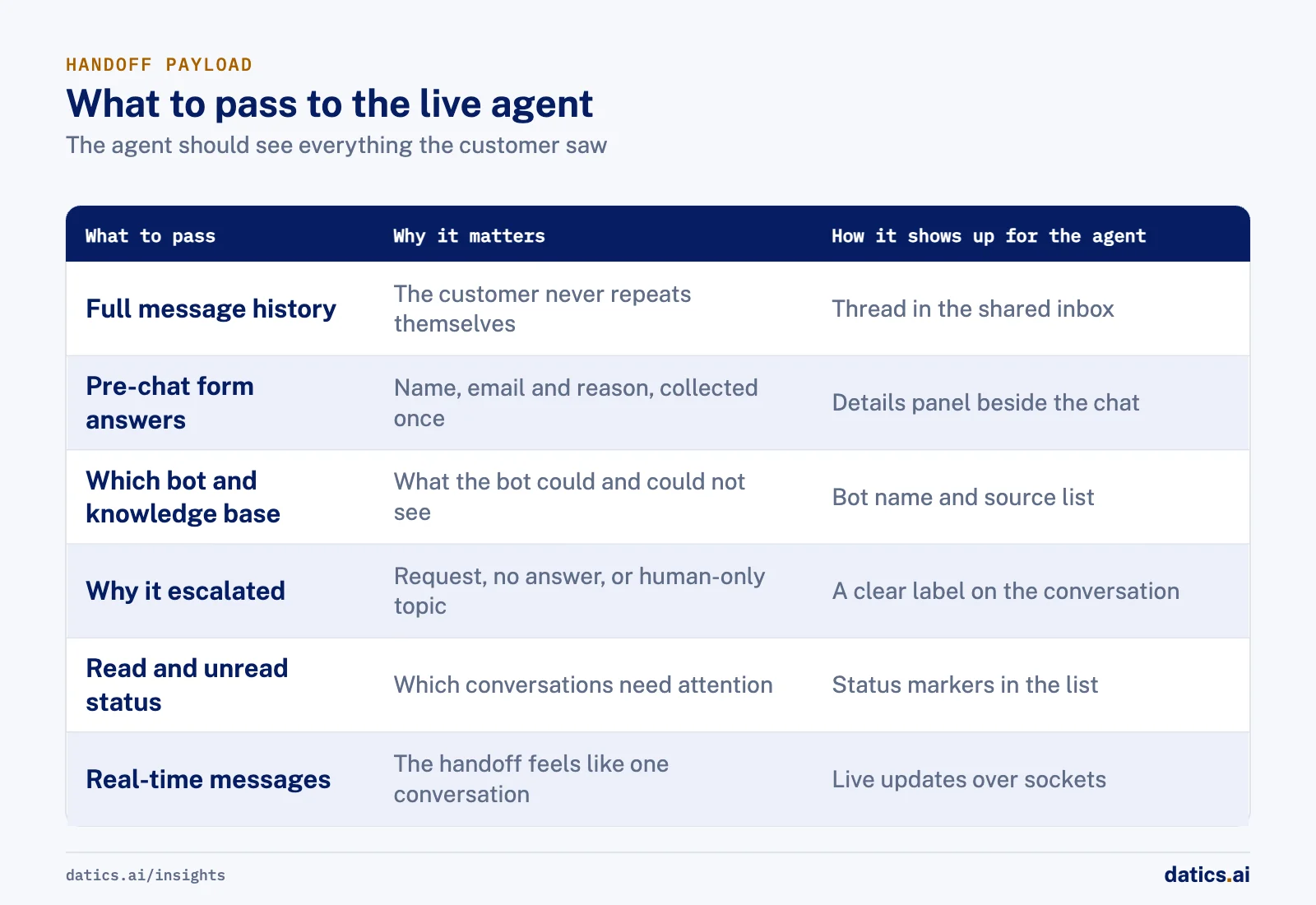
| What to pass | Why it matters | How it shows up for the agent |
|---|---|---|
| Full message history | The customer should never repeat themselves | Conversation thread in the shared inbox |
| Pre-chat form answers | Name, email and reason for contact, collected once | Details panel beside the chat |
| Which bot and knowledge base | Tells the agent what the bot could and could not see | Bot name and source list in the header |
| Why it escalated | User request, no answer found, or human-only topic | A clear label on the conversation |
| Read and unread status | Agents know which conversations need attention | Status markers in the conversation list |
| Real-time messages | The handoff feels like one conversation | Live updates over sockets |
A summary can help the agent ramp up, but it should sit on top of the full transcript, not replace it. Summaries lose the detail that made the customer angry. Platform vendors handle this the same way: Microsoft describes passing the full history and context variables to the engagement hub, and Google's conversational agent platform treats handoff as a signal your own system acts on, with a payload you define.
05Test the failures as carefully as the answers
Most teams test whether the bot answers correctly. Fewer test whether it fails correctly. We write negative scenarios as their own test cases and track failures as bugs:
- Questions with no answer in the knowledge base. Does the bot decline and offer a person, or invent something?
- Several questions in one message. Does it answer all of them, or only the last?
- The same question asked twice. Does it give the same answer?
- A direct request for a human, phrased indirectly. Does it escalate?
- An escalation outside agent hours. Does the customer get a clear next step?
- An agent picking up mid-stream. Can they see the full history and reply in real time?
For more on why agents break once they meet real users, see why AI agents fail in production.
06What we see in production
We built a multi-tenant AI sales assistant for a retail and point of sale sales services company. An organization admin creates chatbots, picks their knowledge bases (documents, web pages, CSV files or a connection to the company's own database), sets a pre-chat form, quick prompts and agent availability, and embeds the bot on a website. The assistant answers only from the knowledge bases attached to that chatbot, and questions it cannot answer escalate to a human sales agent, who works from a shared inbox with a dashboard.
Before release, our business analyst evaluated every deployment against the user stories, and negative scenario queries were tested and tracked as bugs alongside the normal ones. Under the hood, a conversation flow with memory per thread and a summary step kept long chats affordable without losing the context the agent needs when they take over.
Earlier, we built our own AI support assistant: a website chatbot that answers from a company's documents, links and FAQs and hands off to human agents. Each chatbot got its own knowledge base, an agent availability setting and a pre-chat form. The agent side had a shared inbox with a conversation list, chat area and details, read and unread status, real-time messages over sockets, and an idle timer that resolves inactive conversations. Agents saw the full conversation history on handoff. The dashboard tracked escalation rate, completion rate and feedback after resolution.
QA surfaced exactly the failure types listed above: wrong answers despite a supplied website, inconsistent answers to the same question, answering only the last of several questions, and no answer at all in some cases. Those findings are why we now treat failure scenarios as first-class tests. We also learned that building the handoff on a borrowed helpdesk backend limited control over branding and behavior, so we replaced it with our own APIs for conversations, agents and settings.
Frequently asked questions
When should a chatbot hand off to a human?
Hand off for clear, testable reasons defined before building. The question is outside the attached knowledge, the user asks for a person, the topic is on the always-human list, the bot has failed repeatedly, or the stakes are high. Write these down as rules, not as hopes in a prompt, so each one can be tested.
What should happen when no agent is available?
The bot should say so clearly and offer an honest alternative. Collect contact details through a short form and promise a reply by email, or point to a ticketing page. Say when the customer can expect an answer. Let admins set which agents are assigned to each bot and when they work.
Should the agent get a summary or the full transcript?
The full transcript, with a summary on top if it helps. A summary can help the agent ramp up, but it should never replace the transcript, because summaries lose the detail that made the customer angry. Also pass the pre-chat form answers, the bot and knowledge base used, and why the conversation escalated.
How do you know the handoff is working?
Track the escalation rate and the completion rate per bot. A rising escalation rate tells you the knowledge base is missing something. A falling one with poor feedback may mean the bot is holding on too long. Test negative scenarios as their own cases, such as an escalation outside agent hours, and track failures as bugs.
How Datics helps
Datics specializes in brownfield AI: bringing production AI into the product you already operate, without forcing a rebuild.
Related work
Case studies from our projects on the same subject.
FLZR
Retail & E-commerce · AI sales assistant
Shoppers compare products side by side, answered from the seller's live database
Shoppers needed product answers at any hour; now an AI assistant answers from the seller's documents, files and live database, with comparison cards.
Our own product
B2B Software · AI support assistant
Support chats answered from each company's own content, with handoff to a person
Bots that answer from the wrong content lose visitors. Each chatbot in our assistant answers from its own knowledge base and hands off to an agent.
Coast Technology
Automotive & Dealerships · AI sales assistant for dealers
RV shoppers get units from live stock, with towing fit computed, not guessed
Dealer sites offered static forms and filters. Now shoppers ask in plain words and get real units from the hourly feed, with the reason each one fits.
More on RAG and AI assistants
RAG and AI assistants
How do you build a RAG chatbot on your knowledge base?
How to build a RAG chatbot on your knowledge base: a retrieval path per source, one merge step, and strict limits on what each assistant may read.
Rana Umar MajeedReadRAG and AI assistants
How do you stop hallucination in AI document extraction?
AI document extraction from long documents gets reliable with type detection, retrieval per field, clear field definitions and empty values, not guesses.
Rana Umar MajeedReadRAG and AI assistants
How do you make AI product search match how buyers shop?
AI product search works when it learns how buyers decide, such as a monthly payment budget, and turns that into precise filters over live inventory.
 Bilal HassanRead
RAG and AI assistants
Fine tuning vs RAG: when should you train on your own data?
Fine tuning vs RAG: use retrieval when the model lacks facts, fine tune when it does a narrow task badly, and collect user corrections first.
 Umair MajeedRead
RAG and AI assistants
RAG evaluation: how do you test that citations hold up?
RAG evaluation must check more than whether citations exist. Test that each cited passage supports its claim and that answers decline when sources are silent.
Rana Umar MajeedReadRAG and AI assistants
How does natural language search map to product data?
Natural language search over a product catalog works when the agent maps buyer words to attributes your feed actually holds, then filters on them, not guesses.
Rana Umar MajeedReadYour customers already expect AI from your product.
Let us make it real without rebuilding what already works.