
RAG and AI assistants
How do you stop hallucination in AI document extraction?
An empty field is a correct answer. A guessed field is a hidden error.
 Rana Umar MajeedCo-founder and CTO, Datics AI6 min read
Short answer
You reduce hallucination in AI document extraction by narrowing what the model sees and what it may say. Recognize the document type first, and retrieve only the passages relevant to each field. Define every field and its synonyms, and require the model to return an empty value when a field is absent instead of guessing. Handle appendices and amendments separately, and test each change on varied real documents.
On this page
01Why long documents produce confident errors
Extraction looks easy in a demo. Give a model one clean contract and ask for the compensation terms, and it gets them right. Production is different. Documents vary in layout, length and structure. Some put the key numbers in tables, others in paragraphs, and some refer to an appendix twenty pages later. Amendments carry only a few changed fields and leave the rest out. This is part of our larger guide, How do you build a RAG chatbot on your knowledge base?.
Models handle this badly in two ways. First, they do not use long inputs evenly. The research paper Lost in the Middle, from Stanford and partners, found that language models perform best when the relevant information sits near the beginning or end of the input. They perform noticeably worse when it sits in the middle. Feeding a whole long contract into a prompt and hoping for the best is exactly the setup where that weakness shows.
Second, models fill gaps. If a field is not in the text and the instructions say to extract it, the model often supplies a plausible value. In a contract, a plausible compensation figure or start date is worse than a blank, because nobody knows to check it.
02Start AI document extraction by recognizing the type
Amendments are the clearest example of why document type matters. A full contract contains every term. An amendment contains only what changed. A pipeline built and tested on full contracts will treat an amendment as a contract with most fields missing, and then either guess the missing ones or return an incomplete record that overwrites good data.
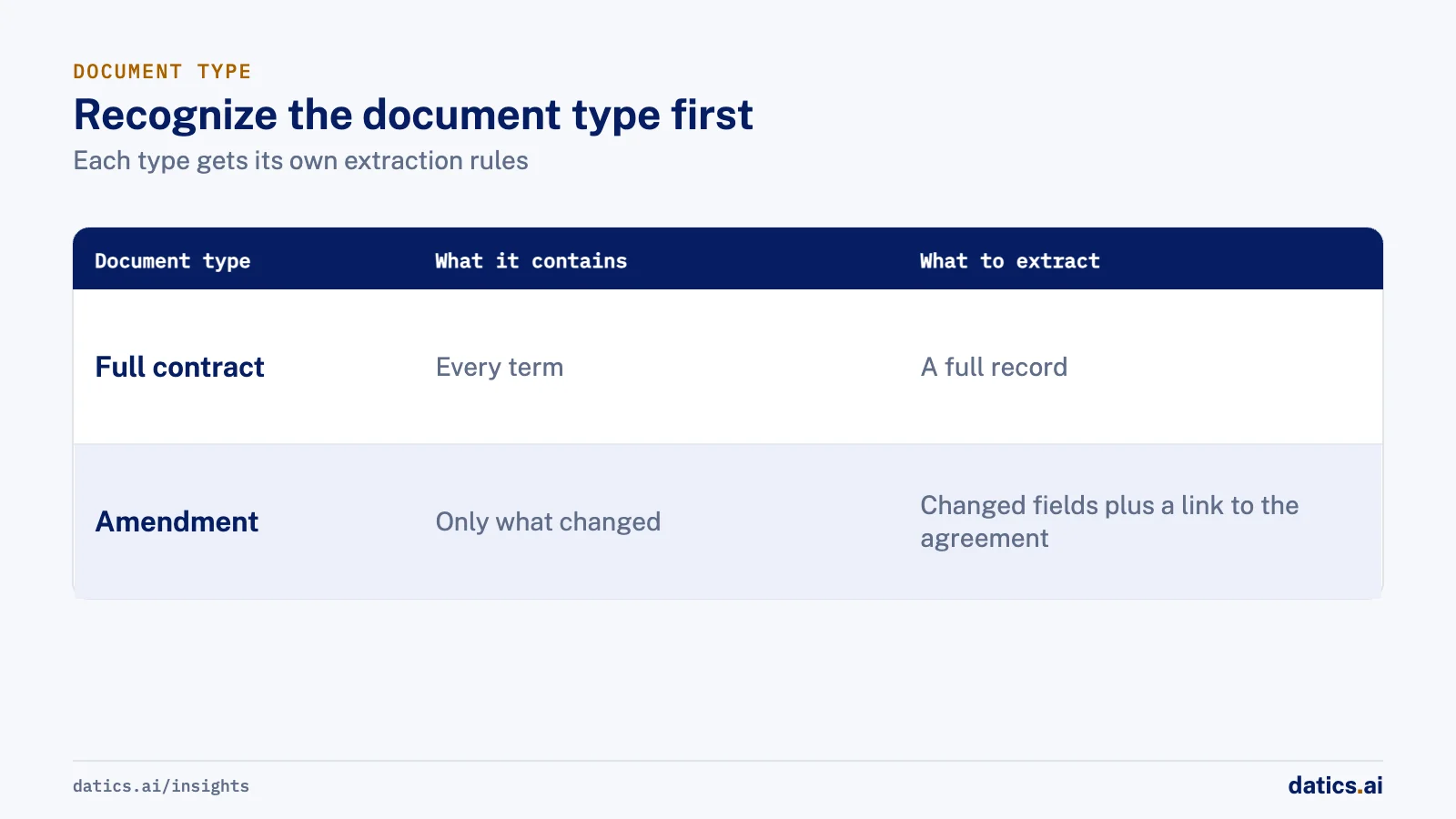
So the first step is to classify each document, at least as full agreement, amendment or appendix, and give each type its own extraction rules. For an amendment, the output should be the changed fields plus a link to the agreement it modifies, not a full record.
03Narrow what the model sees and what it may say
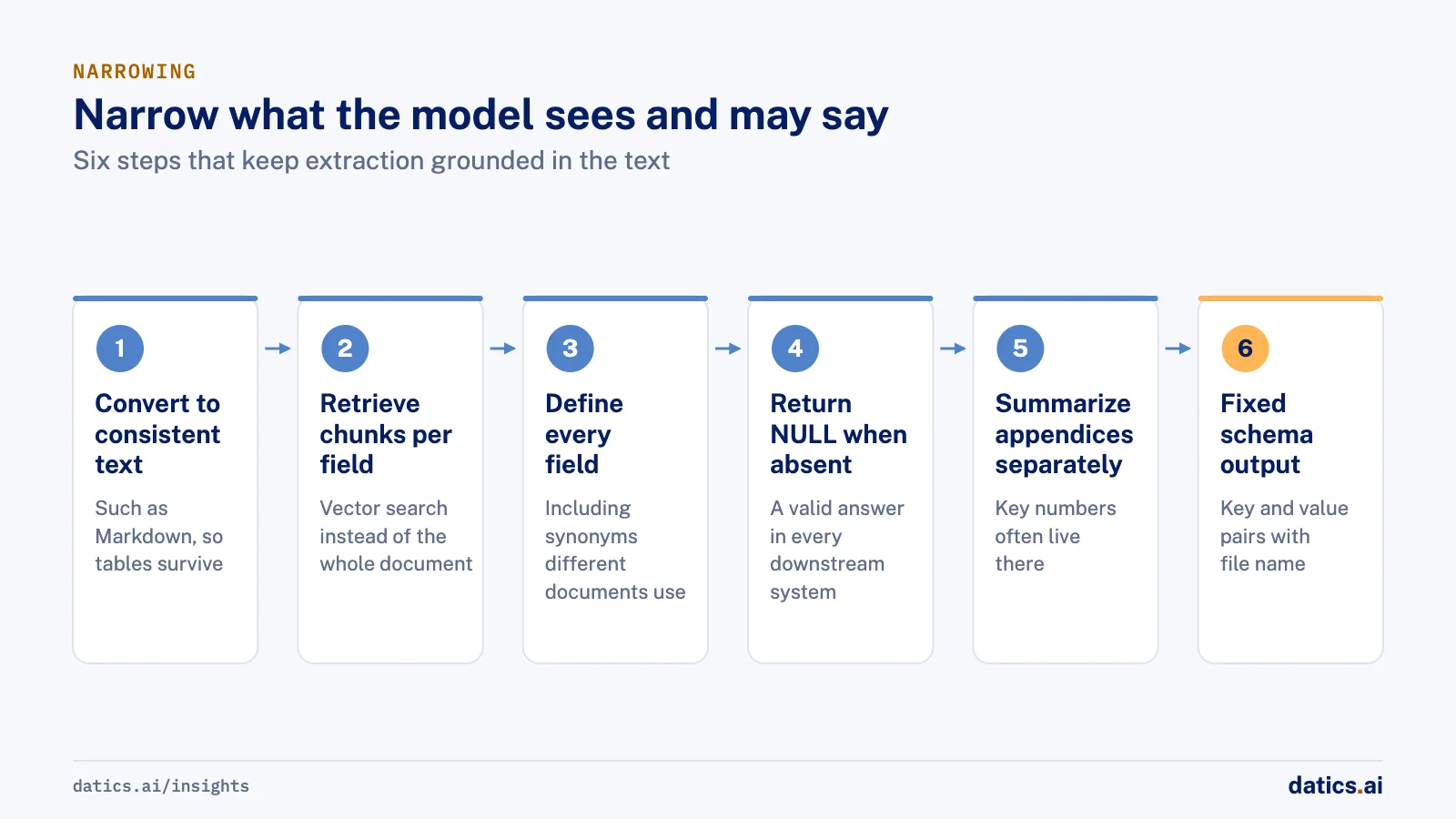
This is the pipeline pattern we use for long-document extraction:
- 01
Convert each document to a consistent text format, such as Markdown, so tables and headings survive in a form the model reads well.
- 02
Split the text into chunks and retrieve the chunks relevant to each field with vector search, rather than sending the whole document.
- 03
Give the model a definition for every field, including the synonyms different documents use, so a term still matches when the wording changes.
- 04
Instruct the model to return NULL when a field is not present in the retrieved text, and treat a NULL as a valid answer in every downstream system.
- 05
Retrieve and summarize appendices separately, then add those summaries to the main prompt, because key numbers often live there.
- 06
Return clean key and value pairs in a fixed schema, with the file name and run time, so every result can be traced back.
- 07
Keep a test set of varied real documents, including the awkward ones, and run it on every change.
Anthropic's guidance on reducing hallucinations supports the same ideas from the model side: give the model explicit permission to say it does not know, ground answers in direct quotes from the document for long inputs. It also advises restricting the model to the provided documents and verifying claims against supporting quotes.
Tables deserve their own attention. Layout services such as Amazon Textract can return tables as structured cells, with headers, merged cells and titles identified. Keeping that structure, rather than flattening a table into running text, removes a whole class of errors where a number is read from the wrong column.
The table below summarizes the common failure modes and the fix for each.
| Failure | What it looks like | Fix |
|---|---|---|
| Value buried mid-document | Field missed or taken from the wrong section | Retrieve chunks per field instead of sending the whole text |
| Synonyms | Field missed because the document uses a different term | Field definitions with known synonyms |
| Absent field | A plausible guess appears in the output | Required NULL rule, checked in tests |
| Appendix reference | Main text points elsewhere, value missing | Separate appendix retrieval and summary |
| Amendment treated as contract | Missing fields guessed or good data overwritten | Classify document type first |
| Repeated terms | Keyword search returns the wrong chunk | Vector retrieval and field-specific queries |
| Table flattened | Number read from the wrong column | Keep table structure from layout extraction |
04Prefer the simpler pipeline that holds up
It is tempting to add clever steps, such as extra reranking, multiple passes or larger models. Some help. Some make results worse in ways that only show on long documents. We test each addition on the full test set and keep it only if it improves results across document types, not just on the example that prompted it.
On the engagement described below, a more elaborate reranking step was tried and missed context in long documents, so the team rolled back to the simpler retrieval pipeline. Rolling back is a normal part of this work. The goal is the pipeline that holds up on the next unfamiliar document, not the most sophisticated one.
05What we see in production
For a healthcare data consultancy working under HIPAA, our engineers worked inside the client's own team on extracting structured fields from physician employment contracts: compensation, productivity thresholds, incentive rates, dates, specialty and locations. The client's existing notebooks handled three contracts with a similar layout and broke on a fourth with a different structure. Inside that team, we replaced layout-specific parsing with the generic approach above. The pipeline converts to Markdown, retrieves with vector search, extracts into key and value pairs with field definitions, and returns NULL when a field is absent instead of guessing.
Keyword retrieval missed the right chunk when a term appeared many times, which is common in contracts, so vector retrieval became the default. Appendices held key numbers outside the main text, so they were retrieved and summarized separately and added to the main prompt. The pipeline ran in the client's own AWS account, triggered when a document landed in storage, under a business associate agreement and with public traffic denied at the network level. Lambda package size limits ruled out heavy libraries, which pushed the design toward simple, light components.
On the physician contract pipeline, we also rolled back a cleverer step. A reranking pass that kept only chunks with dollar amounts sometimes lost context in long contracts. We returned to the simpler pipeline with a definition per field, which read those terms correctly.
The work ran in phases under a fixed weekly hours cap, so each change had to be small and testable. That constraint turned out to be helpful. Small, versioned changes, each checked against varied contracts, made it easy to see which step improved results and which one hurt them. The client approved the second version after a feedback round and, at the close of that work, started a second project with the team right away.
We also see that regulated documents change the hosting conversation. Contract data and provider data stayed in the client's account throughout. For more on the trade-offs of placing AI inside an existing product and cloud, see how to add AI agents to an existing SaaS product without rebuilding it.
Frequently asked questions
Why does a model invent values in long documents?
Models do not use long inputs evenly, and they fill gaps. Research on long contexts found that models perform best when the relevant information sits near the beginning or end of the input. If a field is not in the text and the instructions say to extract it, the model often supplies a plausible value that nobody knows to check.
How should a pipeline handle contract amendments?
Classify each document first, at least as full agreement, amendment or appendix, and give each type its own extraction rules. An amendment contains only what changed, so the output should be the changed fields plus a link to the agreement it modifies. It should not be a full record that guesses the rest or overwrites good data.
Is returning NULL better than a best guess?
Yes. An empty field is a correct answer, and a guessed field is a hidden error. Instruct the model to return NULL when a field is not present in the retrieved text, treat a NULL as a valid answer in every downstream system, and check that rule in your test set of varied real documents.
Should we add reranking or larger models to improve accuracy?
Only if the test set says so. Some clever steps help, and some make results worse in ways that only show on long documents. On a physician contract pipeline, a reranking pass lost context in long contracts, so we rolled back to the simpler pipeline. Keep an addition only if it improves results across document types.
How Datics helps
Datics specializes in brownfield AI: bringing production AI into the product you already operate, without forcing a rebuild.
Related work
Case studies from our projects on the same subject.
Datascape
Healthcare & Wellness · Contract data extraction pipeline
Compensation terms read from any physician contract, built inside the client's HIPAA cloud
Extraction code broke whenever a contract changed layout. One RAG pipeline now reads any contract, inside the client's own AWS account.
FLZR
Retail & E-commerce · AI sales assistant
Shoppers compare products side by side, answered from the seller's live database
Shoppers needed product answers at any hour; now an AI assistant answers from the seller's documents, files and live database, with comparison cards.
Coast Technology
Automotive & Dealerships · AI sales assistant for dealers
RV shoppers get units from live stock, with towing fit computed, not guessed
Dealer sites offered static forms and filters. Now shoppers ask in plain words and get real units from the hourly feed, with the reason each one fits.
More on RAG and AI assistants
RAG and AI assistants
How do you build a RAG chatbot on your knowledge base?
How to build a RAG chatbot on your knowledge base: a retrieval path per source, one merge step, and strict limits on what each assistant may read.
Rana Umar MajeedReadRAG and AI assistants
How does text to SQL work for plain-English data queries?
Text to SQL works in an established product when it runs on defined metrics, the user's permissions and an honest signal of how much data supports each answer.
Rana Umar MajeedReadRAG and AI assistants
How do you make AI product search match how buyers shop?
AI product search works when it learns how buyers decide, such as a monthly payment budget, and turns that into precise filters over live inventory.
 Bilal HassanRead
RAG and AI assistants
Fine tuning vs RAG: when should you train on your own data?
Fine tuning vs RAG: use retrieval when the model lacks facts, fine tune when it does a narrow task badly, and collect user corrections first.
 Umair MajeedRead
RAG and AI assistants
What makes a good chatbot human handoff to a live agent?
How to design a chatbot human handoff: set escalation triggers up front, let admins set agent hours, and pass the full conversation to a shared inbox.
Rana Umar MajeedReadRAG and AI assistants
RAG evaluation: how do you test that citations hold up?
RAG evaluation must check more than whether citations exist. Test that each cited passage supports its claim and that answers decline when sources are silent.
Rana Umar MajeedReadYour customers already expect AI from your product.
Let us make it real without rebuilding what already works.