
RAG and AI assistants
How do you build a RAG chatbot on your knowledge base?
A knowledge base is not one source. It is several sources that each need a different way in.
 Rana Umar MajeedCo-founder and CTO, Datics AI7 min read
Short answer
To build a RAG chatbot that answers from your knowledge base, give each kind of source its own retrieval path: vector search for documents and web pages, query agents for CSV files and database rows. Run those paths in parallel, merge the results in one aggregator step, and only then let the model write. Limit every assistant to the sources an admin attached, and test questions outside them so it escalates instead of guessing.
On this page
01Why one vector index is not enough
Most first attempts put everything into one vector index: PDFs, help pages, a product CSV, even an export of database tables. That works for prose. It fails for structured data. A question such as which plan includes single sign-on and costs less than the enterprise tier is a filter and a comparison, not a similarity match. Embeddings of CSV rows return rows that look similar to the question, not rows that satisfy the condition. And database content goes stale the moment you export it.
The original retrieval augmented generation research paired a language model with a retriever over a dense index of text passages. That pattern is still right for unstructured text. The mistake is stretching it over data that already has structure and a query language of its own.
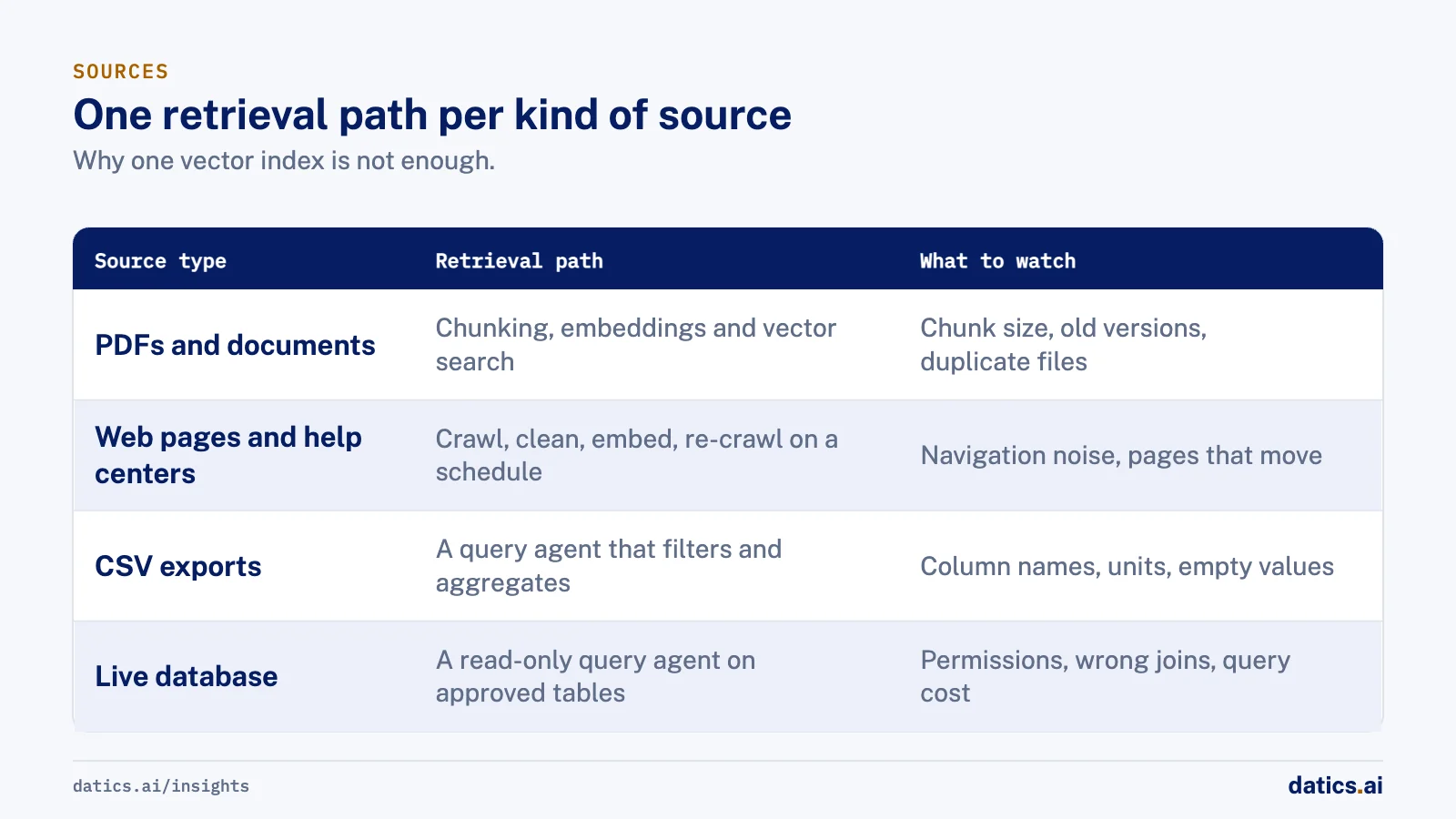
So we start by sorting the sources by shape, because the shape decides the retrieval path:
| Source type | Retrieval path | What to watch |
|---|---|---|
| PDFs and uploaded documents | Chunking, embeddings and vector search | Chunk size, old versions, duplicate files |
| Web pages and help center URLs | Crawl, clean, embed and re-crawl on a schedule | Navigation noise, pages that move |
| CSV exports | A query agent that filters and aggregates the file | Column names, units, empty values |
| Live database | A query agent with read-only access to approved tables | Permissions, wrong joins, query cost |
02How we design the RAG chatbot retrieval flow
In an established product the knowledge already exists. It is spread across systems that were built for people, not for a model. Our job is to connect to it where it lives, without moving it or rebuilding it. The flow we use has five steps:
- 01
Rephrase the question. A follow-up such as and the cheaper one means nothing on its own. A rephrasing step rewrites the latest message into a standalone question using the conversation so far.
- 02
Fan out. Send the standalone question to every retrieval path attached to this assistant at the same time: vector search over documents and pages, and query agents over CSV files and database tables.
- 03
Aggregate. Collect what each path returned, drop empty or weak results, and resolve overlaps, for example a product that is described in a PDF and also listed in a table.
- 04
Generate with structure. Ask the model for structured output, not only paragraphs, when the interface needs it. A product comparison should come back as fields that a widget can render as a table or a
- 05
Cite or escalate. Show the sources behind the answer. If the merged context does not contain the answer, say so and offer a person.
Running the paths in parallel matters for latency. A chain of four retrievals in sequence adds up quickly in a chat window. A parallel fan-out with one aggregator node keeps response time close to the slowest single path, and it gives you one place to log what each path contributed to the answer.
03Keep the assistant inside its sources
The most important control is not in the prompt. It is in the configuration. Each assistant should read only from the knowledge bases an admin explicitly attached to it. If a product runs several assistants, one for sales questions and one for support, they should not share one pool of everything.
OWASP lists sensitive information disclosure among the top risks for LLM applications. Its guidance recommends least privilege access and restricting data sources, and it notes that restrictions written into a system prompt can be bypassed. We apply that literally:
- The retrieval layer, not the model, decides which sources a question can reach.
- Database query agents use read-only credentials scoped to approved tables.
- Tenant boundaries are enforced in the retrieval query itself, so one organization never retrieves another organization's chunks.
- The model is told to answer from the retrieved context and to say when that context does not contain the answer.
Then we test the boundary on purpose. A test set for a knowledge assistant needs negative cases. These include questions about products that do not exist, questions answered only in a source this assistant is not attached to, and questions that need a person, such as a billing dispute. A confident answer to a negative case is a bug, and it gets tracked like any other bug.
04Memory and cost in long conversations
Retrieval quality gets the attention. Conversation memory often does not, until the bill arrives. If every turn sends the full transcript plus fresh retrieved context, cost grows with every message, and the model starts to lose the thread inside a long context.
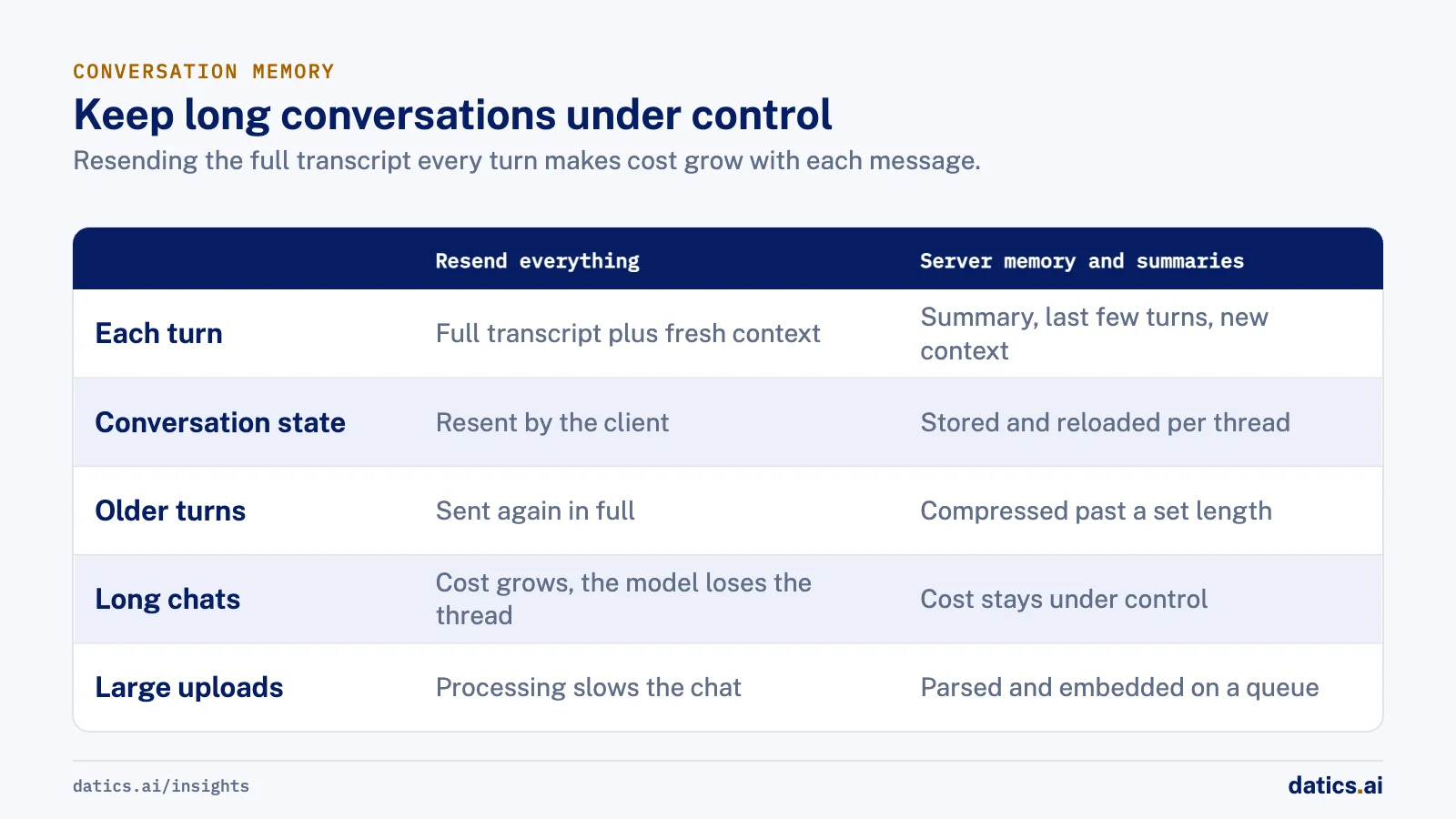
Two techniques keep this under control. First, keep memory per conversation thread on the server, so state is stored and reloaded rather than resent by the client each time. Second, add a summary step that compresses older turns once a conversation passes a set length. The model then sees a short summary, the last few turns and the new context. For the cost side in more depth, see how much production AI costs in SaaS.
Document processing belongs in the background. Parsing, chunking and embedding a large upload should run on a queue, so an admin who attaches a long manual does not slow the chat for everyone else.
05Make every answer traceable
An answer users cannot check is an answer they will not trust for long. Every response should carry its sources: the document name, the page or URL, and ideally a relevance score. For answers from a database or CSV agent, show the filter or query that produced the numbers.
Traceability also helps your own team. When a customer reports a wrong answer, you can see whether retrieval returned the wrong chunk, returned nothing, or returned the right chunk that the model then misread. Those are three different problems with three different fixes, and without traces they all look the same.
06What we see in production
We built a multi-tenant AI sales assistant platform for a retail sales services company. Organization admins create chatbots, attach knowledge bases from documents, URLs, CSV files or a direct database connection, and embed the assistant on their website. Under the hood, a LangGraph conversation flow rephrases each question, keeps memory per thread, summarizes long chats to keep them cheap, and runs retrieval in parallel with an aggregator node before the model answers.
Product comparisons come back as structured output and render as tables, feature cards and comparison cards. Each assistant answers only from the knowledge bases attached to it, questions it cannot answer escalate to a human agent in a shared inbox. We tested negative scenario queries and tracked every failure as a bug.
On that sales assistant, a company database is read only through the tables or SQL view an admin selects after the connection is validated. Admins get reminders to refresh any document, link or database a chatbot answers from, so source routing stays a decision people make, not one the model guesses.
For a software services firm, we added document search to a self-hosted chat interface without changing the interface itself. We kept retrieval as its own API service and connected it through a thin filter that fetches the top five chunks, injects them just before the question, and shows each source with its relevance score. If the service fails, the chat continues without context instead of breaking.
For an AI analytics venture, we built a data copilot where a training layer of table definitions, sample question and SQL pairs and documentation improves text-to-SQL for each customer. Every answer shows the generated SQL, its assumptions and a results table. In a governed internal app builder, agents check every join against a data catalog and pause for human approval when a join is guessed. Each generated query is validated with EXPLAIN before it touches data.
The lesson across these builds is consistent. The hard part is not the model. It is source routing, permissions and what the assistant does when the answer is not there. For the wider pattern of putting agents into a product you already run, see how to add AI agents to existing SaaS without rebuilding.
Retrieval, memory and generation all cost money on every question, so it helps to know what production AI costs in a SaaS product before the assistant goes live.
Frequently asked questions
Can a RAG chatbot answer questions from a live database?
Yes, through a query agent rather than a vector index. The agent gets read-only access to the approved tables or SQL view an admin selects, filters and aggregates the data, and the answer shows the filter or query that produced the numbers. Embedding exported rows instead returns rows that look similar, not rows that satisfy the condition.
How do you stop the chatbot from guessing?
Limit each assistant to the knowledge bases an admin attached, and enforce that in the retrieval layer, not the prompt. Tell the model to answer from the retrieved context and to say when it does not contain the answer. Then test negative cases on purpose, and treat a confident answer to one as a bug.
How do you keep long conversations from getting expensive?
Keep memory per conversation thread on the server, so state is stored and reloaded rather than resent each turn. Add a summary step that compresses older turns once a conversation passes a set length. The model then sees a short summary, the last few turns and the new context.
What should each answer show?
Its sources: the document name, the page or URL, and ideally a relevance score. For answers from a database or CSV agent, show the filter or query behind the numbers. When a customer reports a wrong answer, those traces show whether retrieval returned the wrong chunk, returned nothing, or the model misread the right one.
How Datics helps
Datics specializes in brownfield AI: bringing production AI into the product you already operate, without forcing a rebuild.
Related work
Case studies from our projects on the same subject.
FLZR
Retail & E-commerce · AI sales assistant
Shoppers compare products side by side, answered from the seller's live database
Shoppers needed product answers at any hour; now an AI assistant answers from the seller's documents, files and live database, with comparison cards.
WikiTeq
B2B Software · RAG API for a chat
WikiTeq's self hosted AI chat now answers from its documents, citing every source
The chat could not answer from the firm's own documents. Now a separate retrieval service feeds it passages and shows the source of each answer.
SovrenAI
B2B Software · Enterprise Builder, an AI internal app builder
Internal apps built on company data, with a person confirming every guessed join
An agent writing queries over unknown schemas can join the wrong tables; here every guessed join waits for a person to approve it.
More on RAG and AI assistants
RAG and AI assistants
How do you stop hallucination in AI document extraction?
AI document extraction from long documents gets reliable with type detection, retrieval per field, clear field definitions and empty values, not guesses.
Rana Umar MajeedReadRAG and AI assistants
How do you make AI product search match how buyers shop?
AI product search works when it learns how buyers decide, such as a monthly payment budget, and turns that into precise filters over live inventory.
 Bilal HassanRead
RAG and AI assistants
Fine tuning vs RAG: when should you train on your own data?
Fine tuning vs RAG: use retrieval when the model lacks facts, fine tune when it does a narrow task badly, and collect user corrections first.
 Umair MajeedRead
RAG and AI assistants
What makes a good chatbot human handoff to a live agent?
How to design a chatbot human handoff: set escalation triggers up front, let admins set agent hours, and pass the full conversation to a shared inbox.
Rana Umar MajeedReadRAG and AI assistants
RAG evaluation: how do you test that citations hold up?
RAG evaluation must check more than whether citations exist. Test that each cited passage supports its claim and that answers decline when sources are silent.
Rana Umar MajeedReadRAG and AI assistants
How does natural language search map to product data?
Natural language search over a product catalog works when the agent maps buyer words to attributes your feed actually holds, then filters on them, not guesses.
Rana Umar MajeedReadYour customers already expect AI from your product.
Let us make it real without rebuilding what already works.