
GovTech
AI in government software: where does it pay off?
In government software, the AI explains and the clerk decides. Build it the other way round and no agency will sign.
 Umair MajeedCo-founder and CEO, Datics AI4 min read
Short answer
AI in government works when it handles the reading, matching and explaining that slow agency staff down, and leaves every decision to a person. For the software companies that serve tax offices, courts, clerks and public safety teams, that means AI inside the product agencies already use: answers cited to the record, differences explained before month close, and every change approved by staff.
On this page
01Where AI in government actually pays off
Most talk about AI in government is about federal agencies buying chat tools. The larger opportunity for software companies is quieter: the tax, payments, records and public safety platforms that thousands of local agencies already run every day. Those platforms hold the records, the rules and the workflows. AI added there starts with the data it needs and the users who need it.
The federal direction makes the same point from the agency side. The Office of Management and Budget memo on accelerating federal use of AI asks agencies to adopt AI faster while keeping governance and public trust, with extra practices for AI that has a high impact on people. Agencies will ask the same of the software they buy: show where each answer came from, keep a person in charge of decisions, and keep records where they belong.
Four kinds of work pay off first:
- Explaining money that does not balance. A tax or fines platform takes payments from the counter, mail, lockbox files, card swipers and an online portal. When a batch is off by a few dollars, a balancer searches every file by hand. AI can match each payment to its notice and name the cause, with the file line behind it.
- Answering the public from their own record. Taxpayers and defendants call the counter to ask what a bill includes and when it is due. An assistant that reads only the person's own notice can answer that, and send protests and waivers to staff.
- Finding the page in the records. Records requests mean reading minutes, ordinances and scans page by page. Cited answers cut that to minutes, and a clear decline when the records are silent keeps staff from guessing.
- Linking events across teams. Public safety systems receive alerts, incidents and responses from many units. Suggested links, with the reasons shown and approved up the chain, let leaders see what each alert led to.
02What makes AI in government software different
The technology is the same as in any other product. The constraints are not.
| Constraint | What it means for the AI | How to design for it |
|---|---|---|
| Public money | A wrong amount is a finding, not a bug | The AI explains and drafts; a balancer approves every correction |
| Public records | Answers may be repeated to the public | Every claim cites its record and page, or the system declines |
| Many agencies on one platform | One office must never see another's data | Filter by agency, role and clearance before anything else runs |
| Data that cannot leave | Many agencies refuse outside AI services | Self-hosted models, or tested releases for the agency's own data center |
| Sensitive operations | Some fields are for designated roles only | Enforce role limits in every query, not only in the screen |
These are design decisions, not compliance claims. Compliance with rules such as CJIS or PCI DSS depends on the whole product and how it is run. What the AI layer can do is make each of those reviews shorter: sources shown, people deciding and data kept where the agency needs it.
The NIST AI Risk Management Framework is a useful shared language here. Its four functions (govern, map, measure and manage) match the questions agency buyers ask: who owns the system, what it touches, how it was tested and what happens when it is wrong.
03How to add AI to a government platform, step by step
The order matters more than the model.
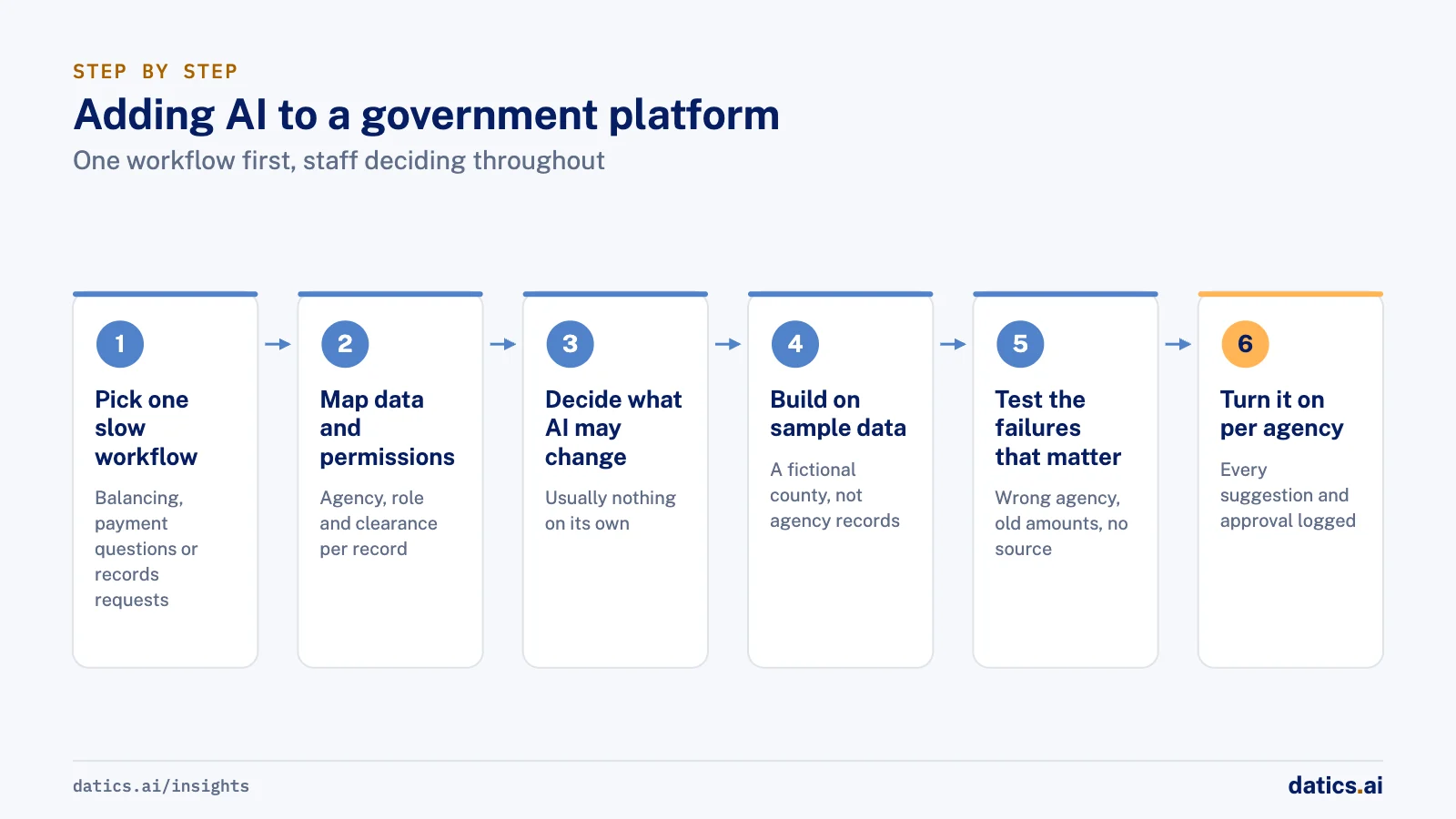
- 01
Pick one workflow where staff lose time today.
Batch balancing, payment questions or records requests are good first choices, because the cost of the delay is visible.
- 02
Map the data and the permissions first.
Write down which agency, role and clearance can see each record. The AI inherits these rules; it does not invent its own.
- 03
Decide what the AI may change.
In most government workflows the answer is nothing on its own. It reads, matches, explains and drafts; staff approve.
- 04
Build on sample data.
A fictional county's notices, payments and records are enough to prove the workflow without touching agency data.
- 05
Test against the failure that matters.
Another agency's records returned, an amount quoted from last year, an answer with no source. Agree the bar before the build.
- 06
Ship it as an option per agency.
Each agency turns the feature on when it is ready, and every suggestion and approval is logged.
If you sell software to agencies, our GovTech section shows each of these as a working module on a fictional county. For how approval steps fit into an AI workflow in general, see where human in the loop AI review should happen.
04What we see in production
We have built property tax collection for sheriffs' tax offices, where counter, mail, lockbox, mortgage files and an online portal all post to one notice, and every month closes with distribution checks. The lesson there applies to any AI added later: the accounting has to be right first, and every office keeps its own fees, letters and rules in its own settings.
We have built a self-hosted AI gateway that a live government document system calls for cited answers, with every original left in its system of record. Agencies accepted it because nothing left their control and every answer pointed to its page.
We have delivered a situational awareness system for a large public security organization as tested, versioned releases into its own data center, where we had no access. Suggested matches between alerts and incidents went up an approval chain before anything reached a map.
Across all three, the pattern held: agencies trust AI that shows its source and waits for a person.
Frequently asked questions
Do software companies need government approval to add AI?
The software company does not need a separate approval to build AI features. Its agency customers have their own rules and review processes, and they will ask how the feature handles data, sources and decisions. Designing for those questions from the start shortens every review.
Can government AI run without an outside AI service?
Yes. Models can run self-hosted in the software company's cloud account or on hardware the agency controls, with retrieval filtered by agency and clearance. That is often what decides whether an agency will turn the feature on.
How Datics helps
Building tax, payments, records or public safety software for agencies? See the AI modules we build for government software.
Related work
Case studies from our projects on the same subject.
Government payments software company
GovTech · Property tax collection platform
Tax offices collect from every channel and balance each month to the cent
Offices ran tax season on an old desktop system. Now one web back office takes every channel, disburses each dollar and closes the month.
NenoBrief by Neno Technologies
GovTech · AI gateway for a live DMS
Archive officers get cited answers inside their live document system, files never copied
Archive records could not reach an outside AI. Now the client's live document system calls our self-hosted gateway for cited answers.
Large public security organization
GovTech · Geospatial situational awareness platform
Security leaders trace each alert to its outcome, seeing only approved records
Alert, incident and response records sat apart across many teams. Now they are linked on one map and appear only after approval.
Related answers
Fintech and investment platforms
AI in fintech: what should it do, and what should it not?
AI in fintech should read documents, cite research and prepare deals and orders, while a person makes every regulated decision on money.
Umair MajeedReadHealthcare practices
Dental AI software: how dental software companies add AI
Dental AI software works best when vendors start with note drafts, call follow-up and front desk answers the dentist approves, and plan imaging AI separately.
Umair MajeedReadProperty management and field operations
AI for property management: where it pays off first
AI for property management pays off first in maintenance triage, turnover scheduling and tenant messages. Keep screening, payments and notices with people.
Umair MajeedReadYour customers already expect AI from your product.
Let us make it real inside the product you run today.