
AI evaluation
What should an AI audit of a SaaS feature test?
A demo proves the feature can work once. An AI audit proves it keeps working for every customer.
 Umair MajeedCo-founder and CEO, Datics AI6 min read
Short answer
An AI audit of a SaaS feature tests the AI you already built the way your customers will use it: on your own real cases, in staging, before a wider release. It grades seven areas, from answer quality and data separation between customers to cost per customer, and ends with a ranked fix list, not a pass or fail certificate.
On this page
01What an AI audit of a product feature is, and what it is not
Most product teams reach the same point. The assistant, the agent or the search feature works in the demo, a few customers have tried it, and now sales wants it switched on for everyone. The questions that come next are rarely about the model. They are about whether one customer could see another customer's data, what the feature does with a hostile instruction, and what it will cost when every account uses it.
An AI audit answers those questions with evidence. It is an engineering test of one feature as it runs today, built from cases your own team picks, with each result linked to the case behind it.
It is not a compliance audit. Management system standards such as ISO/IEC 42001 describe how an organization governs AI across the company, and risk frameworks such as the NIST AI Risk Management Framework describe how to map, measure and manage AI risk. Both are useful, and an audit of a feature gives them real evidence to point to. But a certificate does not tell you whether your support assistant leaks one tenant's tickets into another tenant's answers. Only a test on your product does.
If you have not built the feature yet, an audit is the wrong first step. Start with an AI readiness assessment instead, which looks at what the product needs before any AI is added.
02The seven areas an AI audit should test
We grade every feature in the same seven areas, so results can be compared from one release to the next. The first four decide whether the feature is safe to release. The last three decide whether it is good enough to sell.
| Area | What we test | What a failure looks like |
|---|---|---|
| Answer quality | Your cases, graded by your reviewer against the answer your team expects | Right in tone, wrong in fact, on the questions customers ask most |
| Grounding and citations | Whether each answer comes from, and points to, the record or document it used | A confident answer with no source, or a source that does not say it |
| Data separation | Questions from one test account written to reach another account's data | A record, file name or summary from the wrong customer |
| Misuse and prompt injection | Instructions hidden in messages and stored content, plus off-topic and unsafe requests | The feature follows text planted in a document instead of your rules |
| Accessibility of AI screens | Keyboard use, screen reader labels, contrast and focus on the AI parts, against WCAG 2.2 | A chat panel that a keyboard user cannot reach or leave |
| Cost per customer | Token use on your cases, projected to your volume and pricing | A feature that costs more per account than the plan it ships in |
| Response time | Time to the first word and to the full answer | Answers that arrive after the user has given up |
Two of these deserve more attention than they usually get.
Data separation fails quietly. In a multi-tenant product, the model never sees the boundary between customers unless retrieval, tools and logs enforce it. We cover how that boundary is built in tenant isolation. An audit tests it from the outside, with two test accounts and questions written on purpose to cross it.
Prompt injection is the first entry in the OWASP Top 10 for LLM Applications, and for good reason. Any feature that reads stored content, such as tickets, documents or emails, can be handed instructions by whoever wrote that content. The test is simple: plant an instruction in the data and see whether the feature obeys it.
03How to run an AI audit in two weeks
A useful audit is short and fixed in scope. Ours runs in two weeks on one feature, and the order matters more than the tooling.
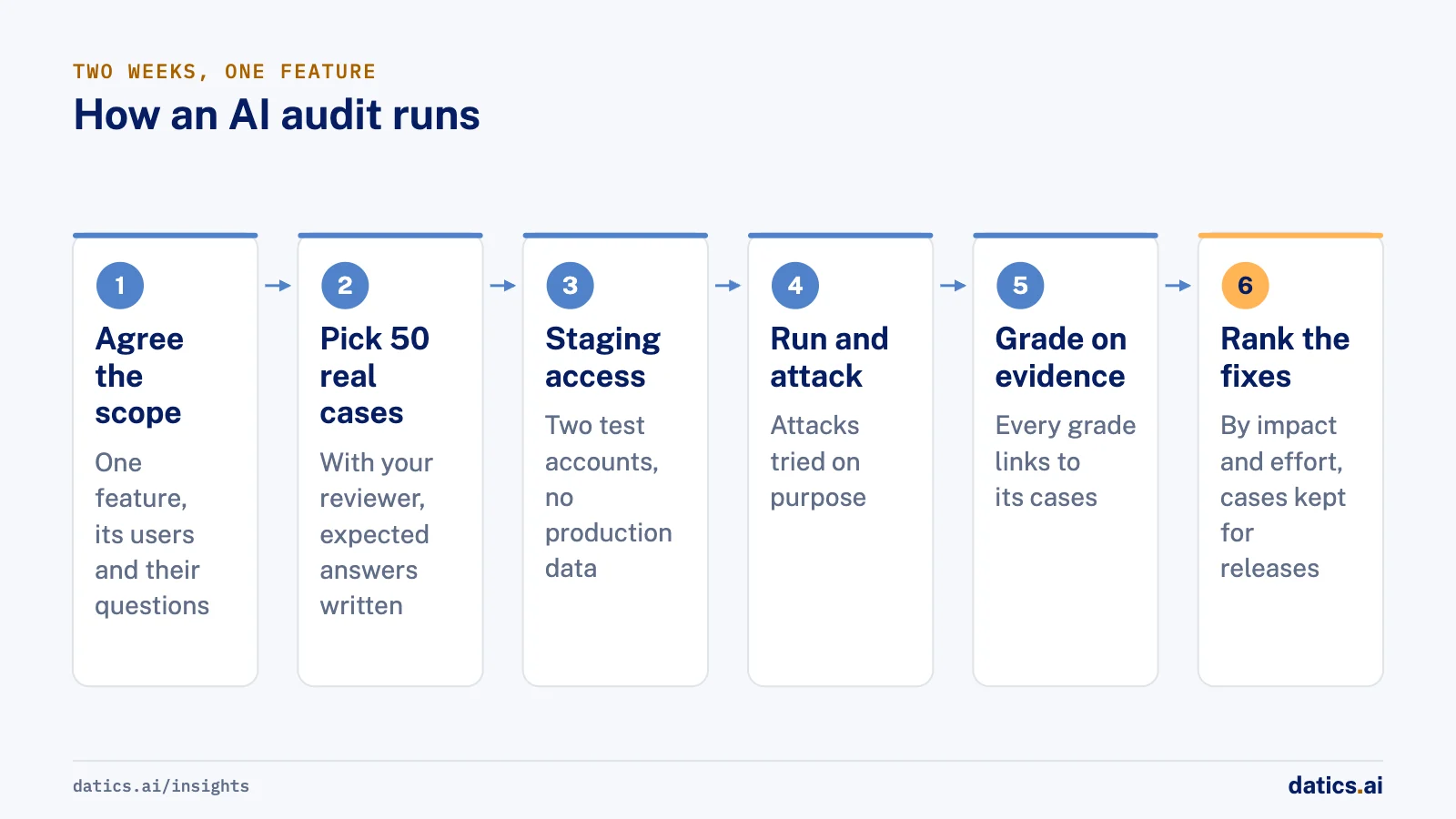
- 01
Agree the scope in a short call.
Name the one feature, who uses it and what customers ask it. One feature per audit keeps the grades meaningful.
- 02
Pick 50 real cases with your reviewer.
Take them from real questions, with personal details removed. Include the common ones, the hard ones and the ones that went wrong before. A reviewer who knows what a good answer looks like writes down the expected answer for each.
- 03
Get staging access with two test accounts.
No production data is needed. Two accounts are the minimum for testing data separation.
- 04
Run every case and try to break the feature.
Each case is run and graded, injection and cross-account attempts are made on purpose, and cost and response time are measured on the same runs.
- 05
Grade each area on evidence.
Every grade links to the cases behind it, so your team can see why something passed or failed instead of trusting a score.
- 06
Rank the fixes by impact and effort.
The output is an ordered list your team can start on the week it lands, with the 50 cases kept as a test set for every future release.
The test set is the part that keeps paying. A feature that is checked once drifts as prompts, models and data change. The same 50 cases run on every release turn a one-time audit into a regression test. We go deeper on building that test set in AI evaluation.
04What we see in production
The most common finding is not a dramatic failure. It is a feature that is right most of the time on easy questions and quietly wrong on the questions that matter most to customers. Teams test with the questions they thought of, and customers ask different ones. Real cases, picked with someone who handles customer questions every day, change the picture within a day.
On one inherited AI product, the founder asked us to verify the existing work before spending more. The review showed what worked, what was broken and what had to be fixed before launch, in writing. The budget then went into the launch blockers instead of a rebuild.
On a copilot answering questions over live financial data, we checked every answer against a direct database query. The limits traced back to one fix in the database, not to the model, and the next step was agreed with the people who own the reports.
On a sales assistant used across many dealerships, the audit compared it with competing tools and recommended a staged rollout to a few live locations first. The same audit set the next work: lead scoring and memory across visits.
Cost is the other surprise. Teams often know their monthly model bill but not their cost per customer, which is the number that decides whether the feature belongs in every plan or in a paid tier. We explain how to measure it in AI token cost.
05What to do with the results
An audit is only useful if it changes what ships. Three decisions usually follow.
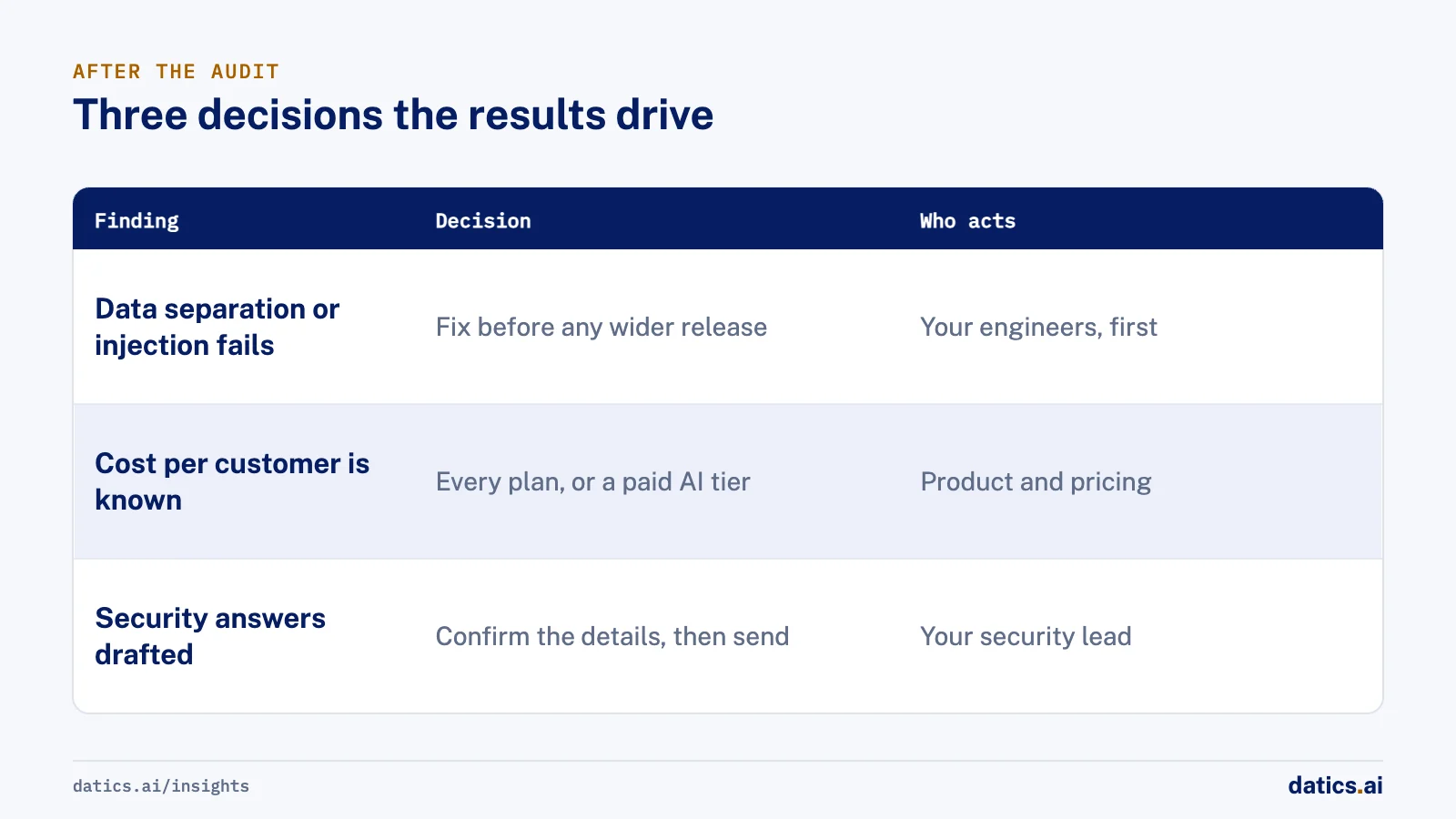
First, fix the release blockers. Anything in data separation or prompt injection that fails is fixed before a wider release, whatever the other grades say.
Second, decide how to sell the feature. With cost per customer in hand, you can choose to include it in every plan or to sell it as a paid AI tier, instead of guessing.
Third, answer the security questionnaires. Enterprise customers now ask how an AI feature handles their data, which model it calls and whether it trains on their content. Draft answers written from what was actually tested are far stronger than answers written from memory. They describe how the feature works; they are not compliance claims, and your team confirms the details.
Your own team can make every fix. The ranked list and the test cases belong to you. If you want help, our AI Scorecard is this audit as a fixed two-week engagement, with a fixed quote for the fixes.
Frequently asked questions
How long does an AI audit take?
For one feature, two weeks is enough: the first week to agree the scope, pick 50 real cases and get staging access, and the second to run, attack and grade every case. A larger scope, such as several features or several products, is better split into separate audits so that each one ends in a fix list a team can act on.
Does the AI feature need to be live?
No. It can be live with customers, in beta or still a prototype. The audit tests the feature in staging as it runs today, so the grades describe what customers would actually get if it were switched on for them. Testing before a wider release is usually the cheapest moment to find problems.
Do you need our production data?
No. The audit runs in staging with two test accounts. The 50 cases come from real questions that your reviewer picks, with personal details removed. Using staging also means the cross-account and prompt injection attempts never touch a real customer's data.
Is an AI audit the same as a compliance audit?
No. A compliance audit checks how an organization governs AI against a standard. An AI audit of a feature tests how that one feature behaves, on your own cases. The two work well together: the audit results give a governance program concrete evidence, and the draft security answers describe how the feature works for your team to confirm.
How Datics helps
Datics specializes in Brownfield AI: production AI inside software people already rely on. Already built AI? The AI Scorecard tests it on 50 of your own cases in two weeks, for $5,000, and ranks what to fix first. Once it is live, AI Care keeps it accurate for $1,500 a month per capability.
More on AI evaluation
AI evaluation
AI evaluation: build your test set before the first release
AI evaluation starts before launch: collect real cases from your product, define pass and fail for each one, and run the set on every prompt or model change.
Umair MajeedReadAI evaluation
AI model testing: test types, metrics and messy data
AI model testing for AI features in your product: the main test types, what each catches, and how to build a messy test set that becomes your regression suite.
 Rana Umar MajeedRead
AI evaluation
What should an AI readiness assessment cover?
An AI readiness assessment compares how your product works today with the workflow you need, flow by flow, and ends in a pilot scope and a do not break list.
Umair MajeedReadAI evaluation
How do you run LLM testing with real user prompts?
LLM testing for an AI assistant should use real user prompts and customer-run tests, because demos hide lost context, repeated answers and wrong filters.
Rana Umar MajeedReadAI evaluation
What LLM evaluation should a chat agent pass before launch?
LLM evaluation for a chat agent starts with written user journeys. See how we turn them into test cases, graders and release gates before launch.
Rana Umar MajeedReadAI evaluation
AI model evaluation: how do you choose an LLM to build on?
AI model evaluation starts with a scorecard: define the task, metrics and test set first, then run every candidate model through the same rerunnable test.
Rana Umar MajeedReadYour customers already expect AI from your product.
Let us make it real inside the product you run today.