
AI security and compliance
How does RAG security scope retrieval to user permissions?
The first retrieval decision is whose documents a question may search.
 Rana Umar MajeedCo-founder and CTO, Datics AI6 min read
Short answer
In a multi-tenant product, RAG security starts with one question: whose documents may this question search? Answer it before chunk size or embedding model. Partition knowledge by tenant and by the unit users think in, such as a property, a project or a course. Filter by tenant, collection and the user's permissions before ranking, not after. Apply the same scope to citations and counts, and fail closed when identity is unclear.
On this page
01Why permission scoping comes before relevance
Most RAG tutorials begin with chunking, embeddings and ranking. In a product with many customers, those are the second set of decisions. The first is scope.
A retrieval system that ranks well but searches too widely is worse than one that ranks poorly. It will find the most relevant passage in the whole index, and in a multi-tenant product that passage may belong to another customer. The model then writes a fluent answer from it, and nobody notices until a customer does.
The OWASP Top 10 for LLM applications lists vector and embedding weaknesses as a risk of its own, including unauthorized access and leakage between groups that share one vector store. Its recommended mitigations are permission-aware stores, datasets partitioned by access level and logs of retrieval activity. In other words, retrieval needs the same access rules your product already applies everywhere else.
02Decide the partitions
Scope usually has three levels. Map each one before you index anything.
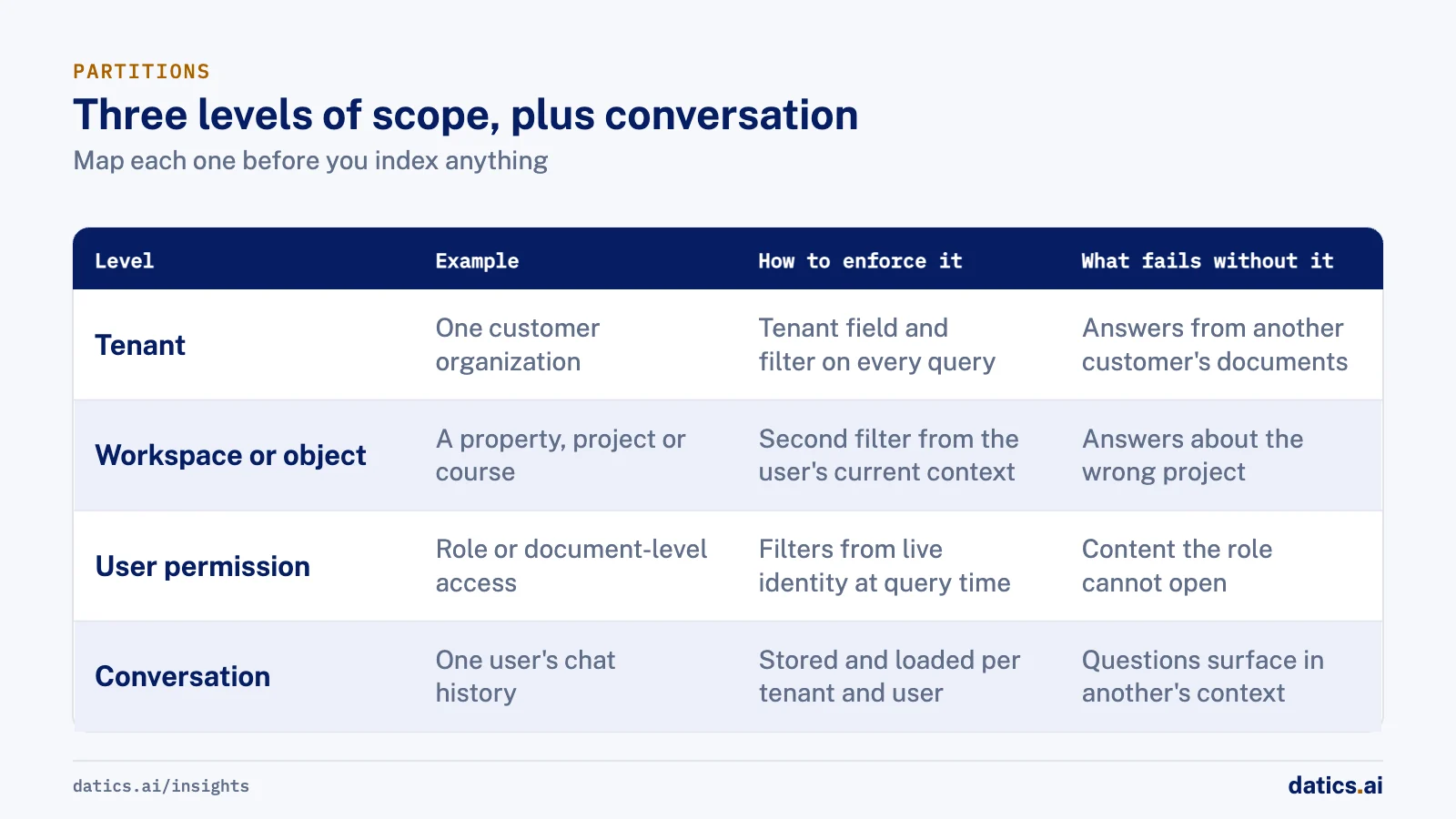
| Level | Example | How to enforce it | What fails without it |
|---|---|---|---|
| Tenant | One customer organization | A tenant field on every chunk and a filter on every query | Answers built from another customer's documents |
| Workspace or object | A property, project, course or collection | A second field and filter, chosen from the user's current context | Answers about the wrong property or project |
| User permission | Role, clearance or document-level access | Filters from the user's live identity at query time | Users see content their role cannot open in the product |
| Conversation | One user's chat history | History stored and loaded per tenant and per user | One user's questions surface in another's context |
The middle level is often missed. Users rarely think in tenants. They think in the property, project or course they are working on. Scoping retrieval to that object keeps answers inside it, and it also improves relevance, because the search space is smaller and more specific.
Vector databases support this directly. Qdrant's multitenancy guide, for example, recommends one collection with a tenant field in each point's payload, a tenant index on that field and a filter on every query, with separate collections only when a few tenants need strict isolation.
03RAG security: filter before ranking, and fail closed
Where the filter sits matters as much as whether it exists. These are the rules we follow.
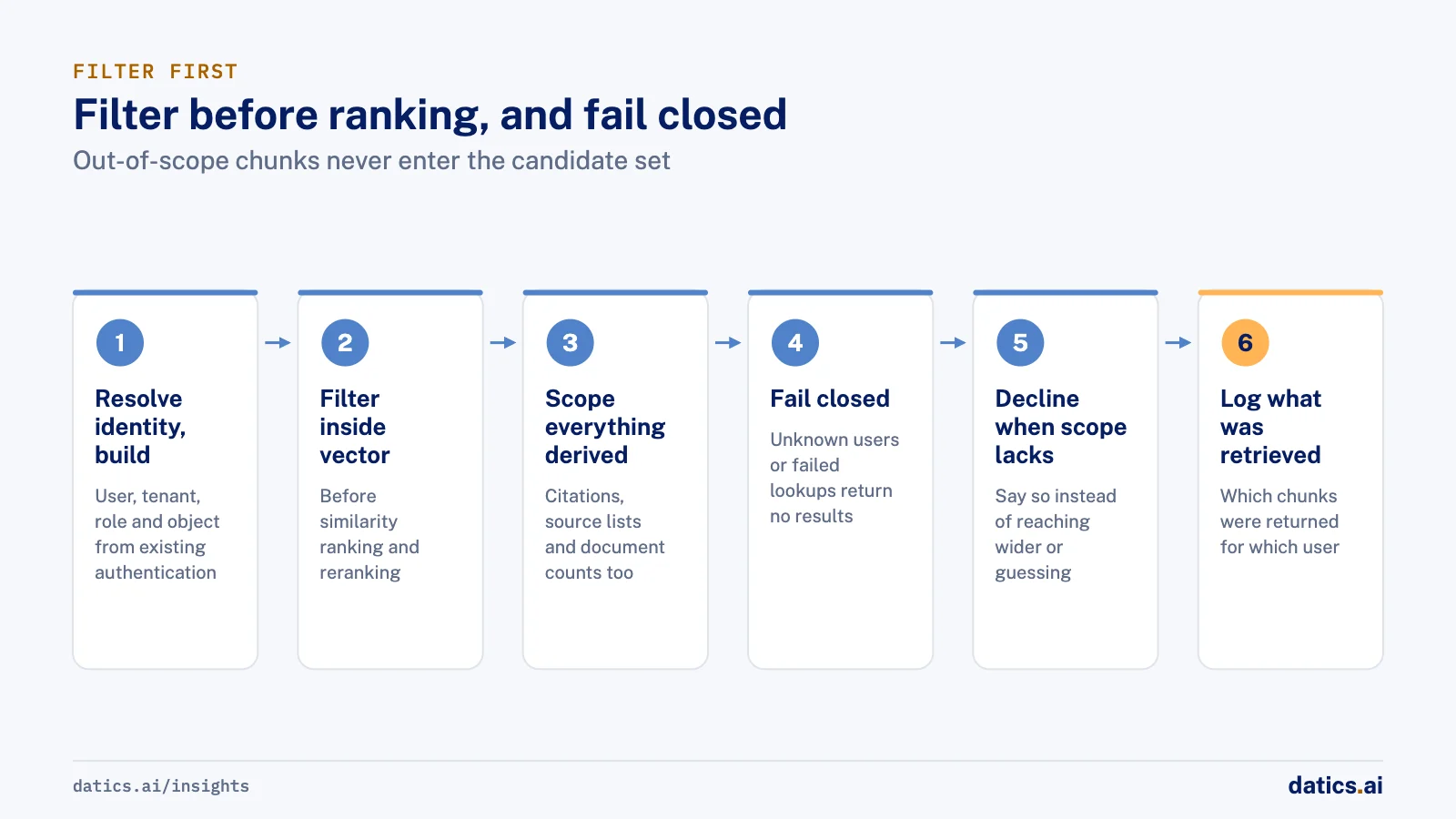
- 01
Resolve identity first.
Look up the user, tenant, role and current object from your existing authentication, not from anything the user typed.
- 02
Build the filter from that identity.
Tenant, object and permission conditions, every time.
- 03
Filter inside the vector search.
Apply the filter in the query itself, before similarity ranking and reranking, so out-of-scope chunks never enter the candidate set.
- 04
Apply the same scope to everything derived.
Citations, source lists, document counts and catalog answers such as how many documents mention a topic must respect the same filter.
- 05
Fail closed.
Unknown users, deactivated users and failed permission lookups return no results, not unfiltered results.
- 06
Decline when the scope has no answer.
If the permitted documents do not cover the question, the assistant says so instead of reaching wider or guessing.
- 07
Log what was retrieved.
Store which chunks were returned for which user, so access questions can be answered with facts.
Filtering after ranking is the common shortcut, and it fails in two ways. It can leak, if a bug skips the filter. And it hurts quality, because the top results may all be filtered out, leaving the model with nothing useful.
04Keep permissions in sync with the product
Permissions change. A user leaves a team, a document is restricted, a customer offboards. If the index holds a copy of permissions taken at indexing time, it drifts from the product.
Keep the source of truth in the product. Store stable fields on chunks, such as tenant, object and clearance level, and resolve the user's rights at query time from the live system. When a document is withdrawn or restricted, remove or update its chunks through the same pipeline that indexed them. Where possible, leave originals in the system of record and index only authorized extracted text and metadata.
Test the scope like any other security control. Before launch, build a small set of test users in different tenants and roles, plant documents each one must not see, and ask questions designed to reach them. Run the same set after every change to indexing, filters or prompts. A single failure is a release blocker, not a quality issue to fix later.
05Retrieval is not the only path
In products with agents, retrieval is one of several ways data reaches the model. Tools are another. The same scoping applies: the agent should act under the user's own identity and only through tools allowed for that user's role. A permission-aware index paired with an agent that can call any endpoint is not a secure system. We cover the wider pattern in adding AI agents to an existing SaaS product without rebuilding it and the student data case in AI for K-12 software without touching student data.
06What we see in production
For a short-term rental operations platform, we added an AI operations assistant inside the client's live product, used by owners, cleaner managers and cleaners. Knowledge is partitioned per property, so retrieval over property documents stays inside the property being asked about. The assistant acts only through the client's own APIs under the user's existing identity, with tools allowlisted per role and per channel: cleaners can act only on their own jobs.
In shared property channels, a decision step decides whether the AI should answer at all. Guards stop tool names, IDs and internal fields from appearing in replies, voice calls re-check the user's role on a fresh profile, and production runs with its own vector store and identity setup, separate from development.
For a document-management software company serving government archives, we built a self-hosted, cited knowledge workspace and an AI gateway the client's own system calls. Retrieval is filtered by tenant, collection and clearance before reranking and generation, and the same scope applies to sources, citations, counts and catalog answers. Unknown or deactivated users and failed lookups fail closed.
Conversations stay separate per tenant and per user, answers must cite the passage they came from, and the assistant declines when the documents do not cover a question. Originals stay in the systems of record; the index holds authorized extracted text and metadata. The client's own tests confirmed the system stopped inventing names when documents lack the answer. Per-user identity for the gateway's AI mode is the next step on the backlog, which is a reminder that permission work is never one release.
Roles carry into the writing tools of that workspace too. It has four roles and an admin for each organization, approval is split so a reviewer reads the source before deciding, and only terms an organization has approved, never pending or rejected ones, enter the registry that retrieval shares.
Frequently asked questions
Should each tenant get its own vector collection?
Usually not. Qdrant's multitenancy guide recommends one collection with a tenant field in each point's payload, a tenant index on that field and a filter on every query. Separate collections make sense only when a few tenants need strict isolation. Either way, every query must carry the tenant filter, built from the user's identity, not from anything the user typed.
Why filter before ranking instead of after?
Filtering after ranking fails in two ways. It can leak, if a bug skips the filter, and it hurts quality, because the top results may all be filtered out and leave the model with nothing useful. Applying the filter inside the vector search keeps out-of-scope chunks from ever entering the candidate set.
How do you keep the index in sync when permissions change?
Keep the source of truth in the product. Store stable fields on chunks, such as tenant, object and clearance level, and resolve the user's rights at query time from the live system. When a document is withdrawn or restricted, remove or update its chunks through the same pipeline that indexed them.
How do you test that retrieval respects permissions?
Build a small set of test users in different tenants and roles, plant documents each one must not see, and ask questions designed to reach them. Run the same set after every change to indexing, filters or prompts. Treat a single failure as a release blocker, not a quality issue to fix later.
How Datics helps
Datics specializes in brownfield AI: bringing production AI into the product you already operate, without forcing a rebuild.
Related work
Case studies from our projects on the same subject.
CleanHaus
Real Estate & Hospitality · Turnover operations SaaS
Hosts and cleaners manage rental turnovers in chat, within each person's permissions
Owners, managers and cleaners all talk in one property chat. Now an AI there acts for each of them, only within that person's role.
NenoDoc Lexicon by Neno Technologies
Government, Legal & Defense · Archive knowledge workspace
Archive indexers fix grammar and style without a name, date or figure changing
AI rewrites can quietly alter names and numbers. Ours edits only flagged spans, and approved terms are locked before the model sees them.
Transcripts U.S.
Government, Legal & Defense · Legal transcript marketplace
Court reporting agencies publish transcript metadata without the file ever leaving their browser
Agencies once uploaded full transcripts to the marketplace; now title page details are read in their own browser, and they confirm what is published.
More on AI security and compliance
AI security and compliance
AI security for SaaS: protect data and pass security reviews
A practical map of AI security for established SaaS: threats, data governance, permissions, audit trails and how to answer enterprise security reviews.
 Umair MajeedRead
AI security and compliance
How do you stop AI data leakage through search metadata?
Stop AI data leakage in search by treating metadata as sensitive: classify records, automate high stakes rules, keep people on unclear cases, and audit.
Rana Umar MajeedReadAI security and compliance
LLM security: why treat model output as untrusted input?
A core LLM security rule: treat every model response like input from an unknown user. Parse it, validate it against business rules, then let it through.
Rana Umar MajeedReadAI security and compliance
Which AI disclaimers does a product need?
An AI disclaimer works when it is designed into the feature: say it is AI, that it can be wrong, what happens to data, and where its numbers come from.
Umair MajeedReadAI security and compliance
What enterprise AI security questions do buyers ask?
Enterprise AI security reviews ask where data and models run, who reaches production, what the AI may do alone and how it is logged. Here is how to prepare.
Umair MajeedReadAI security and compliance
How do you enforce tenant isolation beyond database rows?
Tenant isolation beyond database rows means boundaries per field and per role, in caches, files, payments and jobs, so no tenant sees what another owns.
Rana Umar MajeedReadYour customers already expect AI from your product.
Let us make it real without rebuilding what already works.