
AI in production
How can prompt management put domain experts in control?
Engineers own the pipeline. Domain experts own what the AI says.
 Rana Umar MajeedCo-founder and CTO, Datics AI6 min read
Short answer
Good prompt management treats prompts and scoring rules as versioned assets the business owns. Load them through a controlled path instead of hardcoding them, record which version produced each output, and keep results customers already received tied to the version that made them. Engineering owns the pipeline, the guardrails and the staging step. The domain team owns the content and the pace of change.
On this page
01Why prompts end up as a bottleneck
Most AI features launch with prompts written by engineers and stored in code. That is fine for a proof of concept. It becomes a problem the week after launch, when the people who know the domain start asking for changes. This is part of our larger guide, LLMOps for SaaS: keep AI features working in production.
A training lead wants the AI to push harder on a specific objection. A compliance reviewer wants a phrase removed. A product owner wants a new scenario for a new customer segment. Each change is small, and each one needs an engineer, a pull request and a release. The engineers become a queue for content work, and the domain experts stop asking.
The opposite mistake is just as common: a text box in the admin panel that writes straight into the live prompt. Nobody knows which version produced which output, a typo goes live for every user at once, and there is no way back.
The goal is in between. Domain experts change content on their own schedule, and every change passes through a path engineering designed.
02Split prompts into parts with clear owners
We rarely give anyone one big prompt to edit. We split it into parts, and each part has an owner.
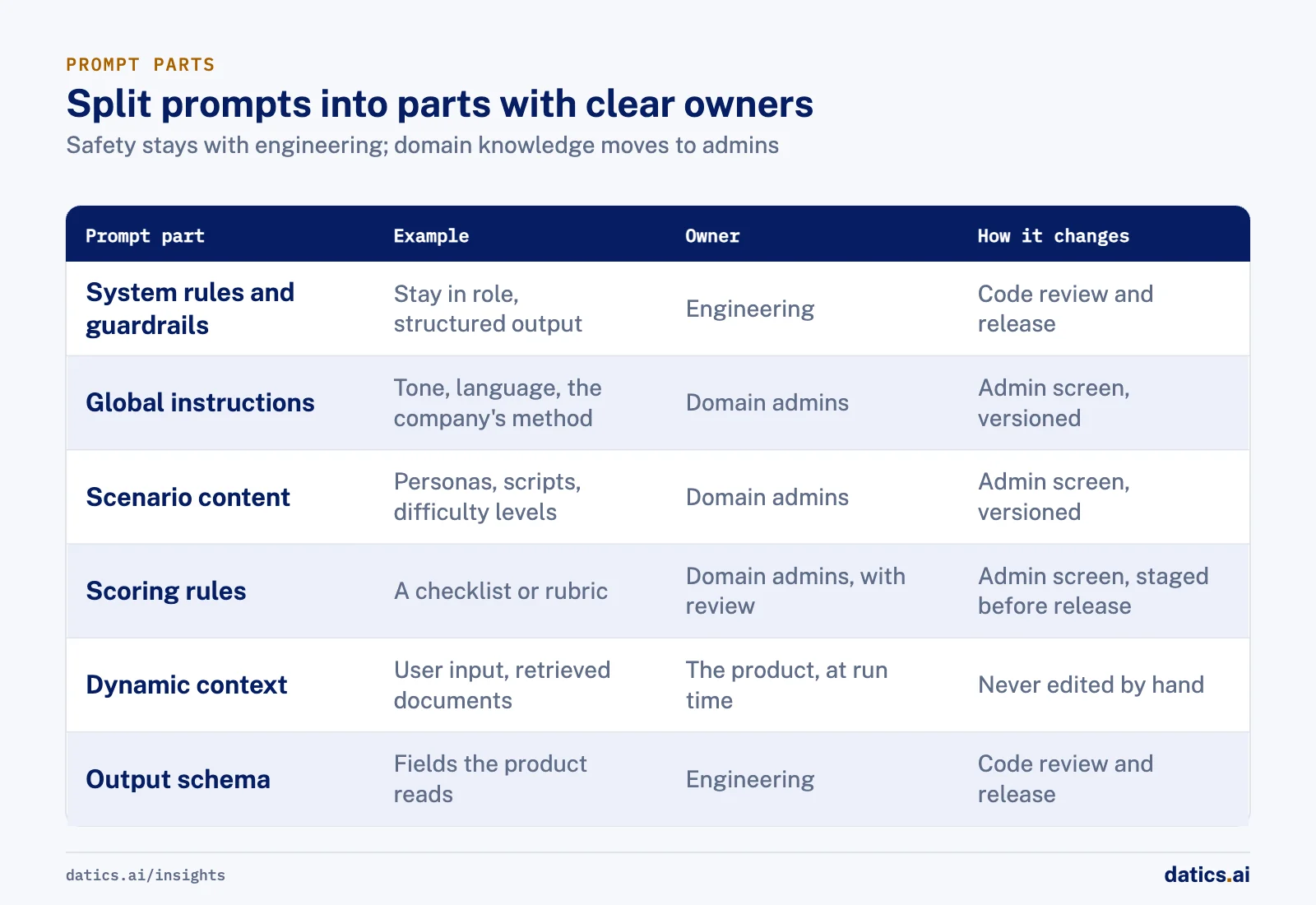
| Prompt part | Example | Owner | How it changes |
|---|---|---|---|
| System rules and guardrails | Stay in role, never reveal hidden instructions, return structured output | Engineering | Code review and release |
| Global instructions | Tone, language, the company's method | Domain admins | Admin screen, versioned |
| Scenario content | Personas, scripts, difficulty levels | Domain admins | Admin screen, versioned |
| Scoring rules | A checklist or rubric the AI scores against | Domain admins, with review | Admin screen, staged before release |
| Dynamic context | The user's input, the selected scenario, retrieved documents | The product, at run time | Never edited by hand |
| Output schema | Fields the product reads from the response | Engineering | Code review and release |
The static parts that keep the feature safe and parseable stay with engineering. The parts that carry domain knowledge move to the database, behind admin screens. The dynamic parts are assembled by the product for each request.
This split also keeps each change small. If an admin edits a scenario, the guardrails and the output format do not move.
03Build a controlled path for prompt management
Once prompts live outside the code, the loading path becomes the control point. These are the steps we put in place.
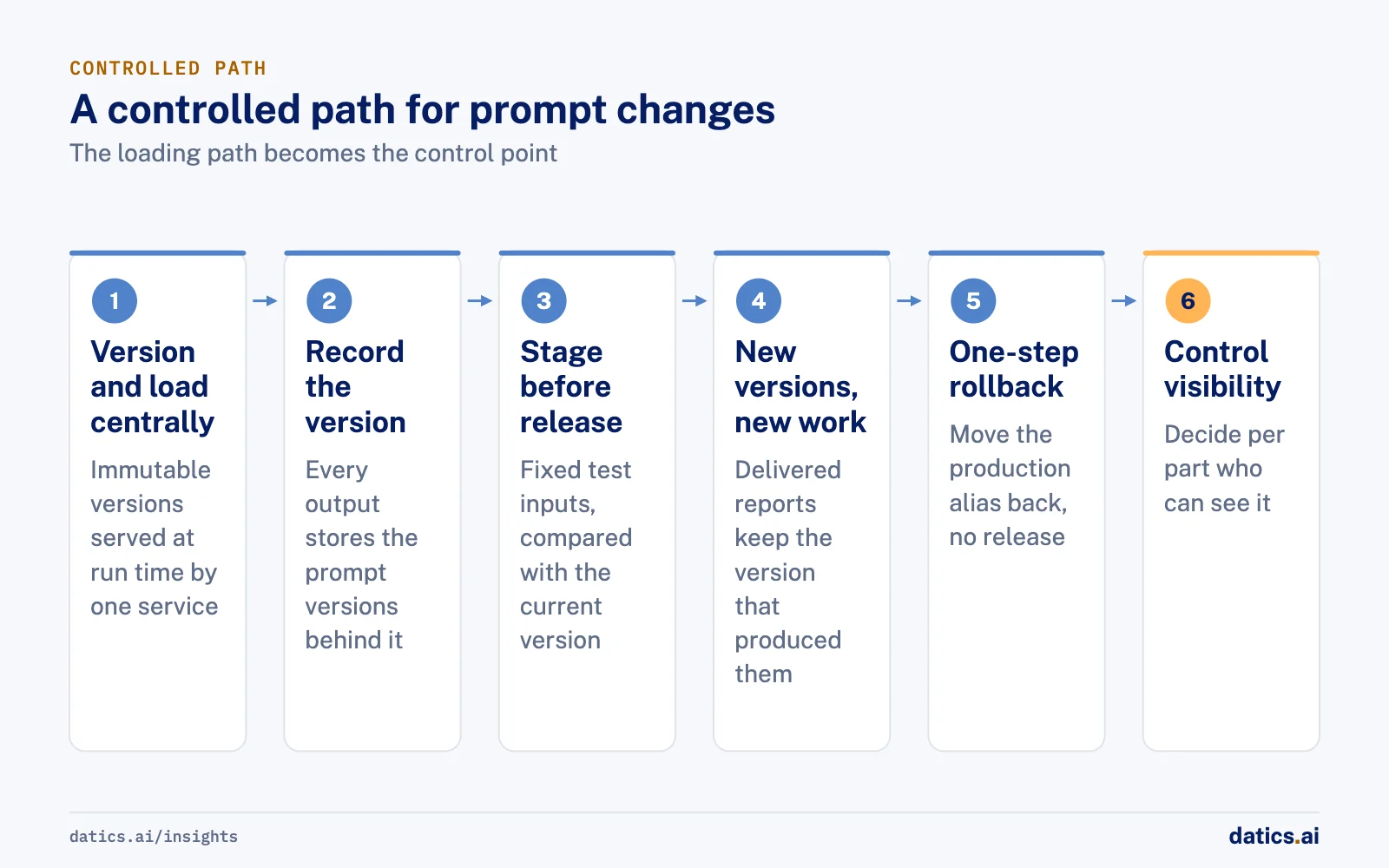
- 01
Store every prompt part as a versioned record.
A change creates a new version; old versions are never edited. Tools such as MLflow's prompt registry follow the same rule: versions are immutable, and named aliases such as production point to the version in use.
- 02
Load prompts at run time through one service.
The feature asks for the current version by name, with caching so it adds no meaningful delay.
- 03
Record the version with every output.
Each score, summary or response stores the prompt versions that produced it. Langfuse and similar tools link prompt versions to traces for exactly this reason.
- 04
Stage before release.
New versions run against a fixed set of test inputs first, and an owner compares results with the current version before promoting it.
- 05
Apply new versions to new work only.
A report a customer already received, or a score an employee already saw, keeps the version that produced it. Re-scoring old work is a deliberate action, not a side effect.
- 06
Make rollback one step.
Moving the production alias back to the previous version should take seconds and need no release.
- 07
Control visibility.
Some instructions, such as coaching notes, should never be shown to end users. Decide per part who can see it.
04Keep each AI step narrow
Prompt control is much easier when the AI work is split into small steps. One long prompt that scores, coaches, summarizes and analyzes is hard for a domain expert to change safely, because every edit can affect every output.
We prefer a workflow of separate steps, each with its own prompt and structured output: one for the checklist, one for script adherence, one for objection handling, one for the summary. A domain expert can then improve the objection step without worrying about the summary. When something goes wrong, the trace shows which step and which version caused it.
This is also where engineering keeps its guardrails. Output schemas, length limits, refusal rules and checks for leaked instructions stay in code, around every step, whatever the admin writes. For the wider picture of what breaks agents after launch, see why AI agents fail in production.
05Decide who can override the AI
Letting experts write prompts is one half. The other half is deciding who can change an output after the AI produced it.
Scores in particular should not be editable by the person being scored. We make AI scorecards read-only to end users and editable only through a manual admin review, with the review recorded. That keeps the scoring trusted, and it gives the domain team a steady stream of cases where the AI and the human disagreed, which is the best input for the next prompt version.
Set a pace of change with the domain team as well. A weekly review of flagged outputs, a short list of proposed edits and one promotion window keep improvements steady without turning the live feature into a moving target. Engineering joins the review when a change needs a new guardrail, a new output field or a new step, because those still go through code.
06What we see in production
For a sales training company that sells through an online membership and learning platform, we built an AI voice roleplay trainer inside the client's existing platform. Learners practice live calls with an AI prospect and get scored against the company's own 15-point checklist.
We started with a short proof of concept with hard-coded scenarios and a live demo. Then we moved scripts, scenarios, checklists and global AI instructions into the database, so the client's admins control the AI without an engineer. Feedback runs as a workflow of small, separate steps (checklist, script adherence, objection handling, coaching summary and analysis), each with structured output, which keeps every step narrow and easier to debug.
We split prompts into static and dynamic parts and added practice and coach modes with separate prompts. Coach mode instructions are hidden from users, and admins control prompt visibility per user and which beta features each user sees. When the product extended to scoring real calls, admins got configurable prompt templates there too. The scorecard can only be edited through manual admin review. We shared demo recordings with the client after each step, so the domain team saw how changes behaved before they reached learners. The trainer has been in production with the client's users since its first production-ready build, and the admin tools have grown with it.
Frequently asked questions
Can domain experts edit prompts without breaking the AI feature?
Yes, if prompts are split into parts with clear owners. Domain admins edit global instructions, scenario content and scoring rules through versioned admin screens. System rules, guardrails and the output schema stay with engineering and change only through code review and release. If an admin edits a scenario, the guardrails and the output format do not move.
What happens to past results when a prompt changes?
Nothing, unless you choose otherwise. New versions apply to new work only. A report a customer already received, or a score an employee already saw, keeps the version that produced it, because every output stores the prompt versions behind it. Re-scoring old work is a deliberate action, not a side effect.
How fast can a bad prompt change be undone?
In seconds, without a release. Every prompt part is stored as an immutable version, and a named alias such as production points to the version in use. Rolling back means moving that alias to the previous version. Staging new versions against a fixed set of test inputs first makes rollbacks rare.
How Datics helps
Datics specializes in brownfield AI: bringing production AI into the product you already operate, without forcing a rebuild.
Related work
Case studies from our projects on the same subject.
Insurance Sales Lab
EdTech · AI voice roleplay trainer
Insurance agents practice calls with an AI prospect, scored on the company's script
Practice used to wait for a human coach, and feedback varied. Now agents call an AI prospect any time and get the same checklist score.
Cosmic AI
Financial Services · Multi-agent investing assistant
Retail investors go from research to a confirmed order in one conversation
Investors juggled data, news and a separate broker. Now agents research and prepare each trade in chat, and nothing is placed until they confirm.
CleanHaus
Real Estate & Hospitality · Turnover operations SaaS
Hosts and cleaners manage rental turnovers in chat, within each person's permissions
Owners, managers and cleaners all talk in one property chat. Now an AI there acts for each of them, only within that person's role.
More on AI in production
AI in production
LLMOps for SaaS: keep AI features working in production
LLMOps for product teams: evaluation gates, prompt and model versioning, tracing, regression checks, cost per task, kill switches and model upgrades.
Rana Umar MajeedReadAI in production
AI agent monitoring: catch regressions in production
AI agent monitoring for live SaaS products: what to trace on every run, which user signals to watch, how to score traces and when to roll a change back.
 Umair MajeedRead
AI in production
Why add an AI kill switch to every feature and agent?
An AI kill switch lets you disable or degrade an AI feature in seconds, without a release. Here is how we design kill switches and safe fallbacks.
Rana Umar MajeedReadAI in production
Which AI pricing model works when every answer costs money?
Build an AI pricing model from cost per action: decide which plans trigger expensive AI work and how often, then enforce limits on the server.
Umair MajeedReadAI in production
How do you approach AI model testing on messy real data?
AI model testing for document and data extraction: build messy test sets early, compare AI output with human entry and turn each failure into a regression case.
Rana Umar MajeedReadAI in production
AWS Bedrock vs Azure OpenAI vs Vertex AI for existing SaaS
AWS Bedrock vs Azure OpenAI in Microsoft Foundry vs Google Vertex AI: how to choose a managed AI platform for a SaaS product already in production.
Rana Umar MajeedReadYour customers already expect AI from your product.
Let us make it real without rebuilding what already works.