
AI in production
What is AI observability for agents in production?
When an agent gets something wrong, the final output tells you that it failed. Only the trace tells you where.
 Rana Umar MajeedCo-founder and CTO, Datics AI7 min read
Short answer
AI observability means recording every step an AI agent takes in production, not only its final answer: each model call, tool call, retrieved record, routing decision and approval, linked in one trace per request. With that trace, an engineer can see which step went wrong when an agent produces a wrong result, and the evaluation team can score the same runs. Without it, debugging an agent is guesswork.
On this page
01Why ordinary monitoring is not enough for agents
Traditional application monitoring answers questions like: is the service up, how slow is it, how many requests failed. Those questions still matter for AI features, but they miss the failures that hurt most. An agent can return a fast, well formatted, completely wrong answer. Every dashboard stays green.
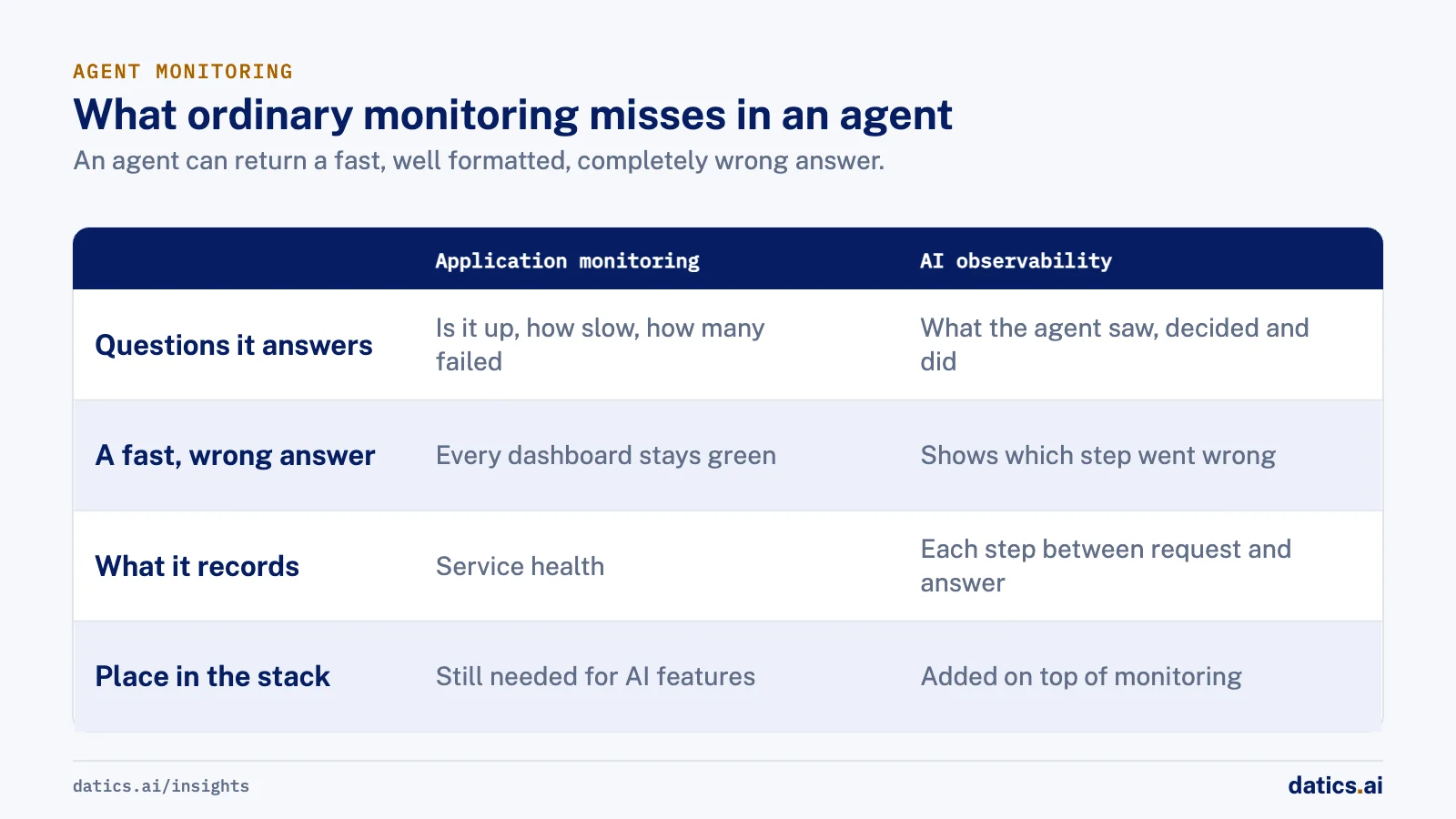
Agents fail in ways that only show up when you look at the steps in between:
- The router sent the request to the wrong specialist agent.
- A tool returned stale or empty data, and the model filled the gap with something plausible.
- The model chose the right tool with the wrong arguments.
- A generated query joined the wrong tables and produced believable numbers.
- A retry loop ran three times and doubled the cost without anyone noticing.
Each of these produces an output that looks normal. To catch them, you need a record of what the agent saw, what it decided and what it did at each step. That is what AI observability adds on top of the monitoring you already run.
02What a useful agent trace contains
We design traces so that an engineer who was not involved in building the agent can open one and understand what happened. In practice that means each request produces one trace, and inside it every meaningful step is its own span with its inputs, outputs and timing.
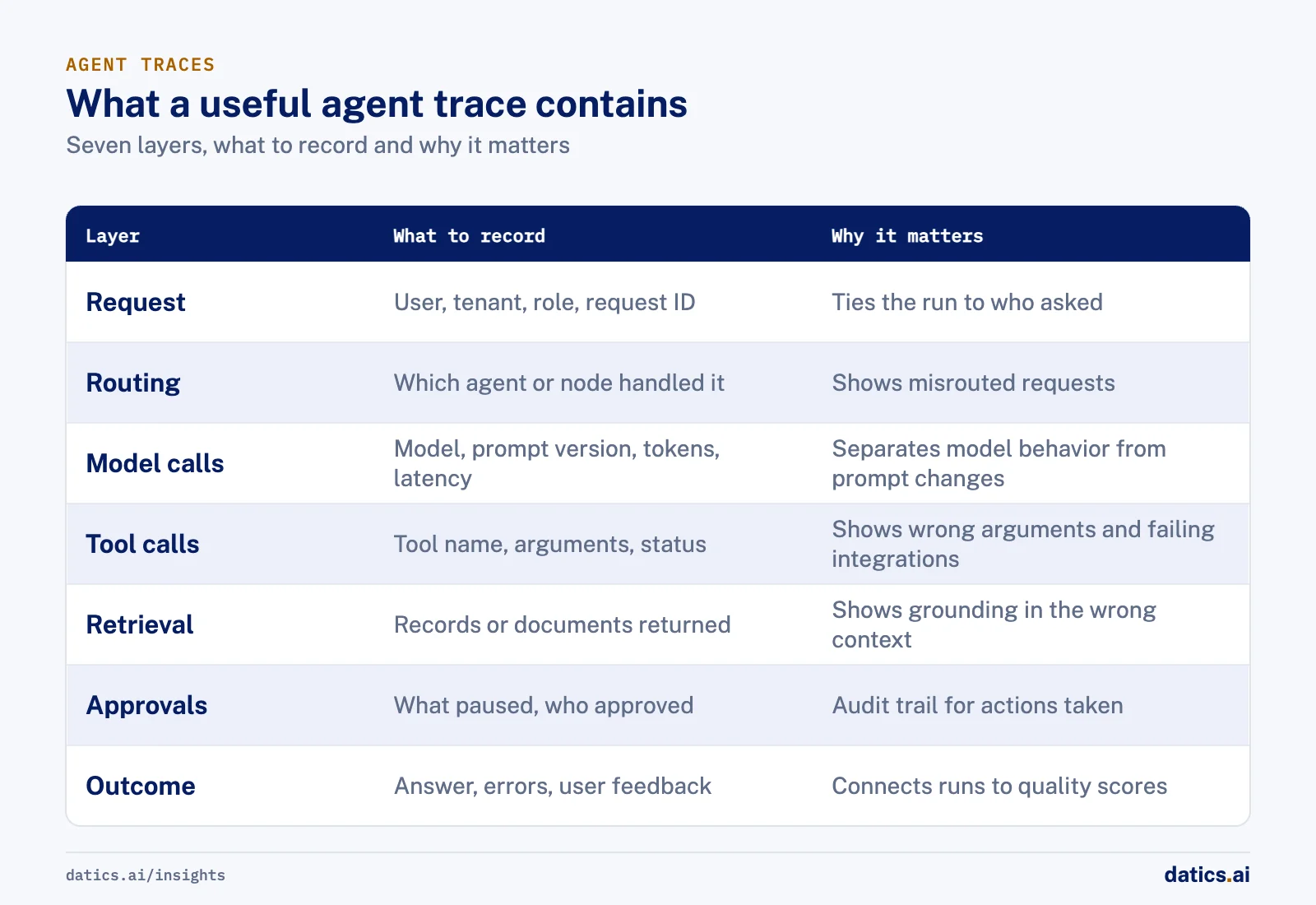
| Layer | What to record | Why it matters |
|---|---|---|
| Request | User, tenant, role, channel, request ID | Ties the run to who asked and what they were allowed to see |
| Routing | Which agent or graph node handled it, and why | Shows misrouted requests at a glance |
| Model calls | Model name, prompt version, token counts, latency | Separates model behavior from prompt changes and cost spikes |
| Tool calls | Tool name, arguments, response status, duration | Shows wrong arguments and failing integrations |
| Retrieval | Which records or documents were returned | Shows when the answer was grounded in the wrong context |
| Approvals | What was paused, who approved or rejected | Gives an audit trail for actions taken on a user's behalf |
| Outcome | Final answer, errors, repairs, user feedback | Connects the run to quality scores and complaints |
OpenTelemetry now has a dedicated set of semantic conventions for generative AI, covering spans and metrics for model clients and related operations. Using a shared standard has a practical benefit: the same trace can flow through your web tier, your API and your agent code, and land in whichever backend your team prefers. Tools built for LLM tracing, such as Langfuse, then capture the prompt, the response, token use, timing and the tool and retrieval steps in between, and keep the relationships between them so a run can be replayed and reviewed.
One caution: traces of AI runs can contain personal data, because prompts and tool results often do. Decide early what you capture, what you redact and who can open a trace. We treat trace access with the same care as database access.
03How we set up tracing for an agent in a live product
We add observability before the agent reaches users, not after the first incident. The order we follow:
- 01
Give every request one ID that crosses every tier.
The browser, the API and the agent runtime all attach the same trace context, so one user action is one trace.
- 02
Make every graph node and tool call a span.
In a LangGraph agent, each node is a natural span boundary. Tool calls get their own spans with arguments and response status.
- 03
Record versions, not just values.
Prompt version, model name and tool registry version go on every run, so a quality change can be tied to the release that caused it.
- 04
Send agent runs to a tool the evaluation team also uses.
Engineering and evaluation should look at the same evidence. If they use separate data, they argue about whose numbers are right.
- 05
Connect feedback to traces.
A thumbs down from a user, or a bug report, should link to the exact run so the root cause can be found from the record.
- 06
Set a redaction rule before anyone shares a log.
Customer data and tokens are removed before a trace leaves the team.
Once this is in place, a bug report stops being a vague complaint. It becomes a specific run, with a specific step that went wrong.
04What we see in production
On an AI builder that lets organizations turn their own databases into internal apps and dashboards, our team set up OpenTelemetry tracing across the Next.js frontend, the FastAPI backend and every LangGraph node, and sent agent runs to Langfuse. The product is in development and not yet used by customers, but the reason for building tracing early was clear. An agent that writes queries over unknown schemas can silently join the wrong tables and return plausible but wrong numbers. When that happens, the team needs to see which step went wrong: table selection, join choice, query generation or the repair loop.
The tracing sits next to other checks that also leave evidence. Every generated query is checked with EXPLAIN before any sample run, so planning errors are caught without reading data, and errors feed a repair loop. Joins the agent has to guess pause for human approval, and a rejected join sends the build back to table selection. An evals harness runs golden prompts through the real build agent in throwaway databases and scores build success, query success, answer accuracy against reference SQL, PII use, repairs and fallbacks. Because evals and production runs share the same tracing, a failing eval and a failing user request can be read the same way.
On a field operations platform for short-term rental cleaning, where our AI assistant runs inside the client's existing product across web, mobile, SMS, Slack and voice, we trace agent behavior in LangSmith and CloudWatch, with logs grouped by subsystem. The aim is that bugs are diagnosed from logs, not guesswork. In a July 2026 QA review based on those logs, 6 of 7 reported bugs were confirmed, each with a root cause traced to exact tool calls, and those findings fed the fixes that followed. A runbook requires customer data and tokens to be redacted before logs are shared.
05Common mistakes with AI observability
A few patterns come up again and again:
- Logging only the final answer. It tells you what went wrong but not where.
- Separate traces per service. If the frontend, API and agent each produce their own logs with no shared ID, rebuilding one user request takes hours.
- No version tags. Without prompt and model versions on each run, you cannot tell whether a drop in quality came from a prompt edit, a model change or new data.
- Tracing without evaluation. Traces show what happened. Evals tell you whether it was right. You need both, on the same runs.
- Capturing everything forever. Full prompts and tool results can hold sensitive data. Set retention and access rules.
Observability also helps with cost. When token counts and tool durations sit on every span, it becomes easy to spot the node that loops or the tool that returns far more data than the model needs. Our article on how to reduce AI infrastructure cost in production goes deeper on that side. And for the wider list of reasons agents break after launch, see why AI agents fail in production.
06A short checklist before an agent goes live
Before we let an agent act for real users, we check that the team can answer these questions from the tooling alone:
- For any request, which agent, node and tools handled it?
- Which prompt and model version produced this answer?
- What data did the agent retrieve, and was the user allowed to see it?
- Which actions were paused for approval, and who decided?
- How much did this run cost in tokens, and how long did each step take?
- Which runs did users flag, and what do those runs have in common?
If any of these needs a developer to read code or rerun the request by hand, the observability is not finished yet.
Frequently asked questions
Do we need a special tool for AI observability?
Not a separate stack. OpenTelemetry has semantic conventions for generative AI, so the same trace can flow through your web tier, API and agent code and land in the backend your team prefers. Tools built for LLM tracing, such as Langfuse, then capture prompts, responses, token use, timing and the tool and retrieval steps in between.
How do we handle personal data in agent traces?
Traces can contain personal data, because prompts and tool results often do. Decide early what you capture, what you redact and who can open a trace, and treat trace access with the same care as database access. Set a redaction rule before anyone shares a log, plus retention and access rules for full prompts.
When should tracing be added?
Before the agent reaches users, not after the first incident. Give every request one ID across every tier, make every graph node and tool call a span, and record prompt and model versions on every run. Then a bug report becomes a specific run, with a specific step that went wrong.
How does observability relate to evaluation?
Traces show what happened. Evals tell you whether it was right. You need both, on the same runs, so send agent runs to a tool the evaluation team also uses. When evals and production runs share the same tracing, a failing eval and a failing user request can be read the same way.
How Datics helps
Datics specializes in brownfield AI: bringing production AI into the product you already operate, without forcing a rebuild.
Related work
Case studies from our projects on the same subject.
SovrenAI
B2B Software · Enterprise Builder, an AI internal app builder
Internal apps built on company data, with a person confirming every guessed join
An agent writing queries over unknown schemas can join the wrong tables; here every guessed join waits for a person to approve it.
Cosmic AI
Financial Services · Multi-agent investing assistant
Retail investors go from research to a confirmed order in one conversation
Investors juggled data, news and a separate broker. Now agents research and prepare each trade in chat, and nothing is placed until they confirm.
CleanHaus
Real Estate & Hospitality · Turnover operations SaaS
Hosts and cleaners manage rental turnovers in chat, within each person's permissions
Owners, managers and cleaners all talk in one property chat. Now an AI there acts for each of them, only within that person's role.
More on AI in production
AI in production
LLMOps for SaaS: keep AI features working in production
LLMOps for product teams: evaluation gates, prompt and model versioning, tracing, regression checks, cost per task, kill switches and model upgrades.
Rana Umar MajeedReadAI in production
AI agent monitoring: catch regressions in production
AI agent monitoring for live SaaS products: what to trace on every run, which user signals to watch, how to score traces and when to roll a change back.
 Umair MajeedRead
AI in production
Why add an AI kill switch to every feature and agent?
An AI kill switch lets you disable or degrade an AI feature in seconds, without a release. Here is how we design kill switches and safe fallbacks.
Rana Umar MajeedReadAI in production
How can prompt management put domain experts in control?
Prompt management lets domain teams refine AI prompts and scoring rules after launch, while engineering keeps the pipeline, guardrails and staging step.
Rana Umar MajeedReadAI in production
Which AI pricing model works when every answer costs money?
Build an AI pricing model from cost per action: decide which plans trigger expensive AI work and how often, then enforce limits on the server.
Umair MajeedReadAI in production
How do you approach AI model testing on messy real data?
AI model testing for document and data extraction: build messy test sets early, compare AI output with human entry and turn each failure into a regression case.
Rana Umar MajeedReadYour customers already expect AI from your product.
Let us make it real without rebuilding what already works.