
AI security and compliance
How does AI data security work with production data?
The safest AI integration is the one where your regulated core does not know the AI exists, except through an API it already trusts.
 Rana Umar MajeedCo-founder and CTO, Datics AI6 min read
Short answer
You give AI safe access to production data by never giving it direct access at all. Good AI data security keeps the existing application and database as the system of record, runs the AI in its own environment, and lets it read and write only through narrow APIs that your product already controls. The AI suggests, the product validates, and a person approves anything that matters.
On this page
01Start from the boundary, not the model
When a security reviewer asks how your AI touches production data, they are really asking three things. What can it read? What can it change? And how would you know if it did something wrong?
Most teams answer those questions after the AI feature works. That is backwards. The answers shape the architecture, so we decide them first. In a mature SaaS product, the existing application already encodes years of rules: who can see which records, which fields are validated, which changes need approval. Those rules are your best security asset. An AI that bypasses them, even with good intentions, throws that asset away.
So the design question becomes: how do we put AI next to the product, not inside its database?
02The AI data security pattern we use
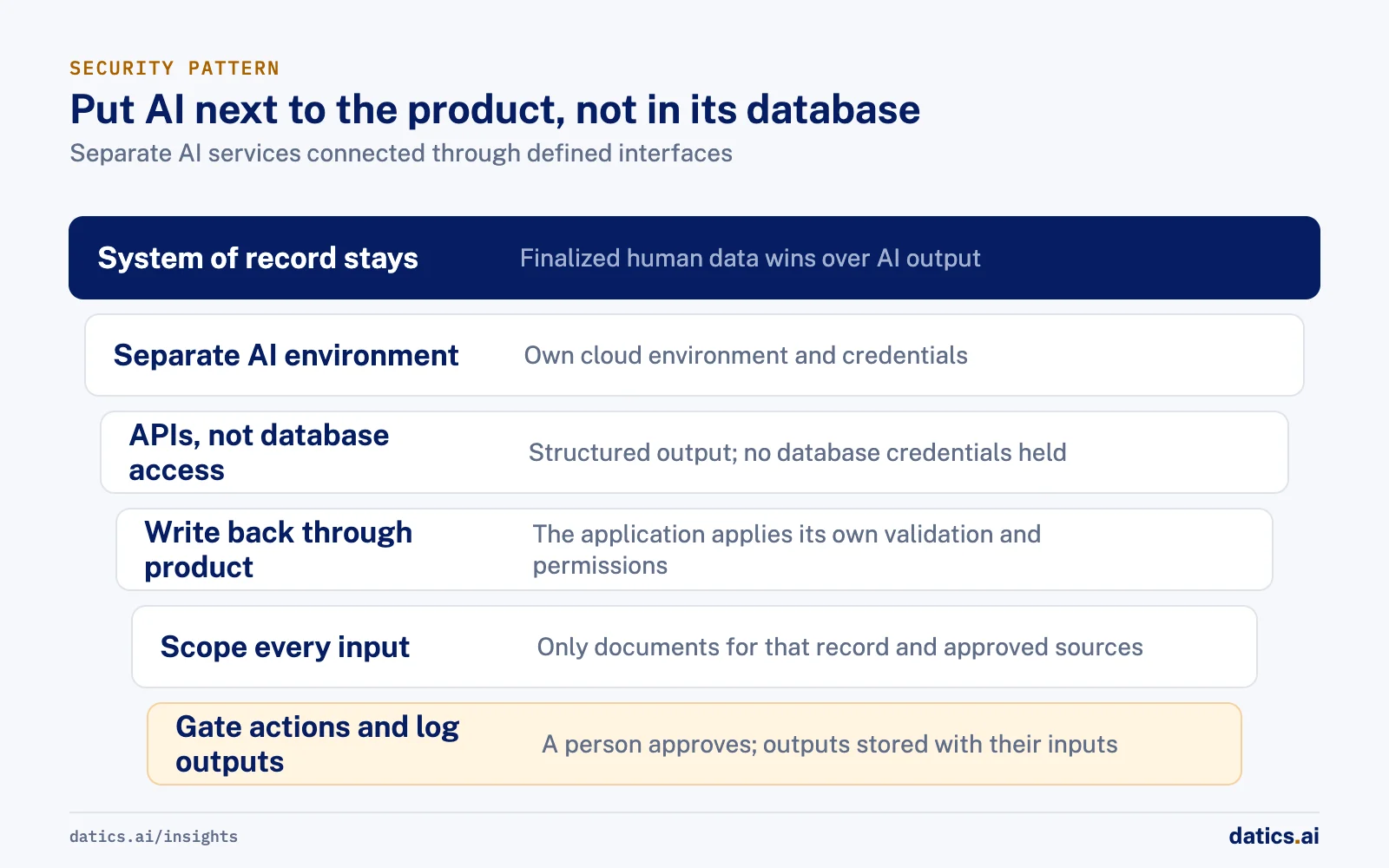
We separate the AI into its own services and connect them to the product through a small number of defined interfaces. In practice that looks like this:
- 01
Keep the system of record where it is.
The existing application and database stay the source of truth. Human-entered data, once finalized, wins over anything the AI produced.
- 02
Run AI in a separate environment.
The AI services run in their own cloud environment, with their own credentials, so a problem there cannot reach the core database directly.
- 03
Connect through APIs, not database access.
The AI receives the documents or records it needs through an API call, and returns structured output. It never holds database credentials.
- 04
Write back through the product side.
Extracted fields go to existing columns only through the client application's own code, which applies its own validation and permissions.
- 05
Scope every input.
The AI reads only the documents uploaded for a specific record and a small set of approved knowledge sources. Nothing else is in reach.
- 06
Gate every consequential action.
The AI can draft, extract, flag and recommend. A person approves, publishes or rejects.
- 07
Log what the AI produced.
Every output that influences a decision is stored with the inputs it came from, so a reviewer can trace it later.
This is not a new idea. It is least privilege, applied to a new kind of caller. The OWASP guidance on excessive agency says the same thing in plain terms: give the model only the functions it strictly needs, run them in the user's context, and enforce authorization in the downstream system rather than trusting the model to decide what is allowed.
03What each layer protects against
Security reviews go faster when you can show what each control is for. This is the table we bring into those conversations.
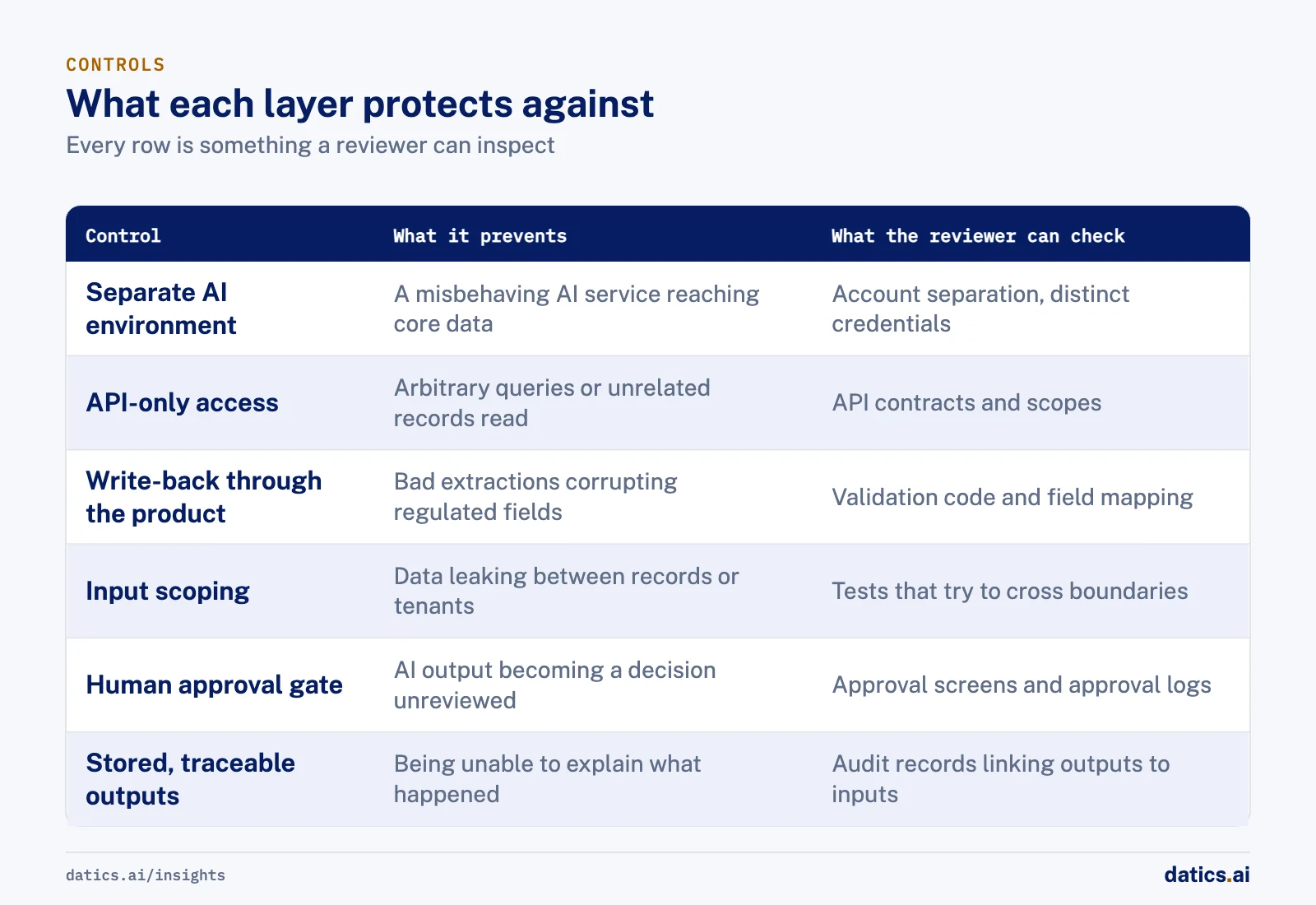
| Control | What it prevents | What the reviewer can check |
|---|---|---|
| Separate AI environment | A compromised or misbehaving AI service reaching core data | Network and account separation, distinct credentials |
| API-only access | The model issuing arbitrary queries or reading unrelated records | API contracts, scopes, absence of database credentials in AI services |
| Write-back through the product | Bad extractions corrupting regulated fields | Validation code in the existing application, field mapping |
| Input scoping | Data from one record or tenant leaking into another answer | Scoping logic per request, tests that try to cross boundaries |
| Human approval gate | AI output becoming a decision without review | Approval screens, who can approve, logs of approvals |
| Stored, traceable outputs | Being unable to explain why something happened | Audit records linking each output to its inputs |
Each row is something a security reviewer can inspect without trusting a description of model behavior. That is the point. You are not asking anyone to trust the model. You are showing them the walls around it.
04Trade-offs worth discussing with your team
This pattern has costs, and it is better to name them early.
More integration work on the product side. If the AI cannot write to the database, someone has to map its output to the right fields in the existing code. That work belongs to the team that owns the product, and it takes time. It is also the work that keeps the data clean.
Latency and round trips. API boundaries add calls. For document extraction or deal preparation, a few extra seconds rarely matter. For chat inside a busy screen, design for it.
Two versions of the truth, on purpose. When AI extracts data that a human also enters, you can store both and show them side by side. That is safer than overwriting, but your interface needs to make clear which one is final.
Hosting decisions later. Running the AI in a separate environment makes it simple to move later, for example into the client's own cloud account. That is a benefit, but plan the credentials and deployment scripts so the move is a configuration change, not a rewrite.
For a related look at where AI workloads should live, see when an AI workload should move between clouds.
05What we see in production
We built a set of AI agents for an established, regulated private investment platform in financial services. The product was a live web application on a mature stack with a relational database that held issuers, investors, deals, signed agreements and identity documents. That application and database were the regulated core, and they had to stay untouched.
The client wanted AI to read pitch decks, memos and financials, build deal records, analyze markets and risk, and help investors and issuers move faster, while staying audit ready. We kept the existing product as the system of record and built the AI as separate services around it, running in their own cloud environment. The AI connected through APIs, not direct database access. Extracted fields were written to existing database columns only through the client's side of the integration, so the product's own logic decided what landed where.
Each step of the deal lifecycle got its own agent with a narrow job. Uploaded documents became purpose-limited knowledge sources: the AI read only what had been uploaded for that deal. We stored the AI-generated deal next to the human-entered one and showed them side by side, with a pre-publish gate that needs human confirmation. Risk outputs were structured flags only, traceable to their inputs and stored for audit. The AI never approved a deal, an identity check or any regulated step. It produced structured outputs and recommendations, and an admin or placement officer decided.
That separation paid off in a way we expected but did not have to plan around. When the client later asked about hosting the AI services in its own cloud account, the question was about cost and deployment, not about untangling AI code from the regulated core. Because the boundary was an API from the first day, moving the AI was a hosting decision.
06Questions to answer before your security review
If you are preparing for a security review of an AI feature, write short answers to these before the meeting:
- Which environment does the AI run in, and what credentials does it hold?
- Which APIs does it call, and what can each one read or change?
- How does the product validate anything the AI sends back?
- What is the AI allowed to read for a single request, and how is that enforced?
- Which actions need a human, and who is allowed to approve them?
- Where are AI outputs stored, and how long are they kept?
- What happens if the AI service is down or returns nonsense?
If any answer is "the model is instructed not to," treat that as a gap. Instructions in a prompt are not a security control. OWASP is explicit that system prompt restrictions can be bypassed and should not be the only defense.
Frequently asked questions
Should an AI service ever hold database credentials?
No. The AI receives the documents or records it needs through an API call and returns structured output. Writes go back through the product's own code, which applies its existing validation and permissions, so the application and database stay the system of record.
Is a system prompt restriction a security control?
No. Instructions in a prompt are not a security control, and OWASP is explicit that system prompt restrictions can be bypassed. If your answer to a reviewer's question is that the model is instructed not to do something, treat it as a gap and enforce the rule in the product instead.
What does a security reviewer want to see?
Controls they can inspect without trusting a description of model behavior: a separate AI environment with distinct credentials, API-only access, write-back through the product, input scoping per request, a human approval gate and stored outputs linked to their inputs. You are not asking them to trust the model, only showing the walls around it.
Does a separate AI environment make hosting changes easier?
Yes. When the boundary is an API from the first day, moving the AI, for example into the client's own cloud account, becomes a hosting decision rather than a rewrite. Plan the credentials and deployment scripts early so the move is a configuration change.
How Datics helps
Datics specializes in brownfield AI: bringing production AI into the product you already operate, without forcing a rebuild.
Related work
Case studies from our projects on the same subject.
Regulated investment platform
Financial Services · Private investment marketplace
Pitch decks become drafted deals, and issuers approve each field before publishing
Issuers retyped decks and financials into long deal forms. Now AI suggests each field, and the issuer applies, edits or rejects it.
Transcripts U.S.
Government, Legal & Defense · Legal transcript marketplace
Court reporting agencies publish transcript metadata without the file ever leaving their browser
Agencies once uploaded full transcripts to the marketplace; now title page details are read in their own browser, and they confirm what is published.
TrailBlaze Innovations
Healthcare & Wellness · AI meal planning chat
Dieters get meal plans with every calorie computed from food data, not guessed
Chat assistants make up nutrition numbers. Here code computes every calorie from food data, and the model only phrases the plan.
More on AI security and compliance
AI security and compliance
AI security for SaaS: protect data and pass security reviews
A practical map of AI security for established SaaS: threats, data governance, permissions, audit trails and how to answer enterprise security reviews.
 Umair MajeedRead
AI security and compliance
How do you stop AI data leakage through search metadata?
Stop AI data leakage in search by treating metadata as sensitive: classify records, automate high stakes rules, keep people on unclear cases, and audit.
Rana Umar MajeedReadAI security and compliance
LLM security: why treat model output as untrusted input?
A core LLM security rule: treat every model response like input from an unknown user. Parse it, validate it against business rules, then let it through.
Rana Umar MajeedReadAI security and compliance
Which AI disclaimers does a product need?
An AI disclaimer works when it is designed into the feature: say it is AI, that it can be wrong, what happens to data, and where its numbers come from.
Umair MajeedReadAI security and compliance
What enterprise AI security questions do buyers ask?
Enterprise AI security reviews ask where data and models run, who reaches production, what the AI may do alone and how it is logged. Here is how to prepare.
Umair MajeedReadAI security and compliance
How do you enforce tenant isolation beyond database rows?
Tenant isolation beyond database rows means boundaries per field and per role, in caches, files, payments and jobs, so no tenant sees what another owns.
Rana Umar MajeedReadYour customers already expect AI from your product.
Let us make it real without rebuilding what already works.