
Brownfield AI
What makes good AI user experience for non-technical users?
Knowing who the users were set the boundary more than any model limit did.
 Bilal HassanAI Product Designer and UI/UX Manager, Datics AI7 min read
Short answer
Good AI user experience for non-technical users starts with who the users are, not with what the model can do. Give recommendations rather than automatic actions, and show the AI's work next to the person's own. Put a clear confirmation step before anything is saved or published, and let a person make every decision that carries risk. Plain language and visible sources matter more than clever features.
On this page
01Start from the user, not the model
When product teams plan an AI feature, the first conversation is usually about the model: how accurate it is, what it can read, how much it can automate. For a product with a less technical user base, that is the wrong first conversation. This is part of our larger guide, AI integration for SaaS: add AI without a rebuild.
Many of the users on a regulated investment platform we worked on were older investors and issuers. They knew their deals well. They did not want to learn how an agent works, and they should not have to. That one fact decided the design more than any limit of the model: every agent gives recommendations, and a person always makes the call. Even a perfect model should not approve a deal for a user who cannot see why it was approved.
Before we design anything, we answer five questions with the product team:
- 01
Who is the least technical person who will use this feature, and what do they do today without it?
- 02
What happens if that person accepts a wrong suggestion without checking it?
- 03
Which decisions carry legal, financial or safety weight, and who is accountable for them today?
- 04
What words do users already use for their own work, so the feature can speak the same way?
- 05
Where do users look for proof that something worked, such as a saved record, a status or a confirmation message?
The answers become the boundary. They tell you where AI may act, where it may only suggest, and where it must stay out.
02Recommend, then let people decide
On that investment platform, issuers and the operations team used to copy deal data by hand from pitch decks, memos and financials into long deal forms. We built an issuer agent that reads the uploaded documents and fills the deal fields. The tempting design is to save those values straight into the deal. We did not.
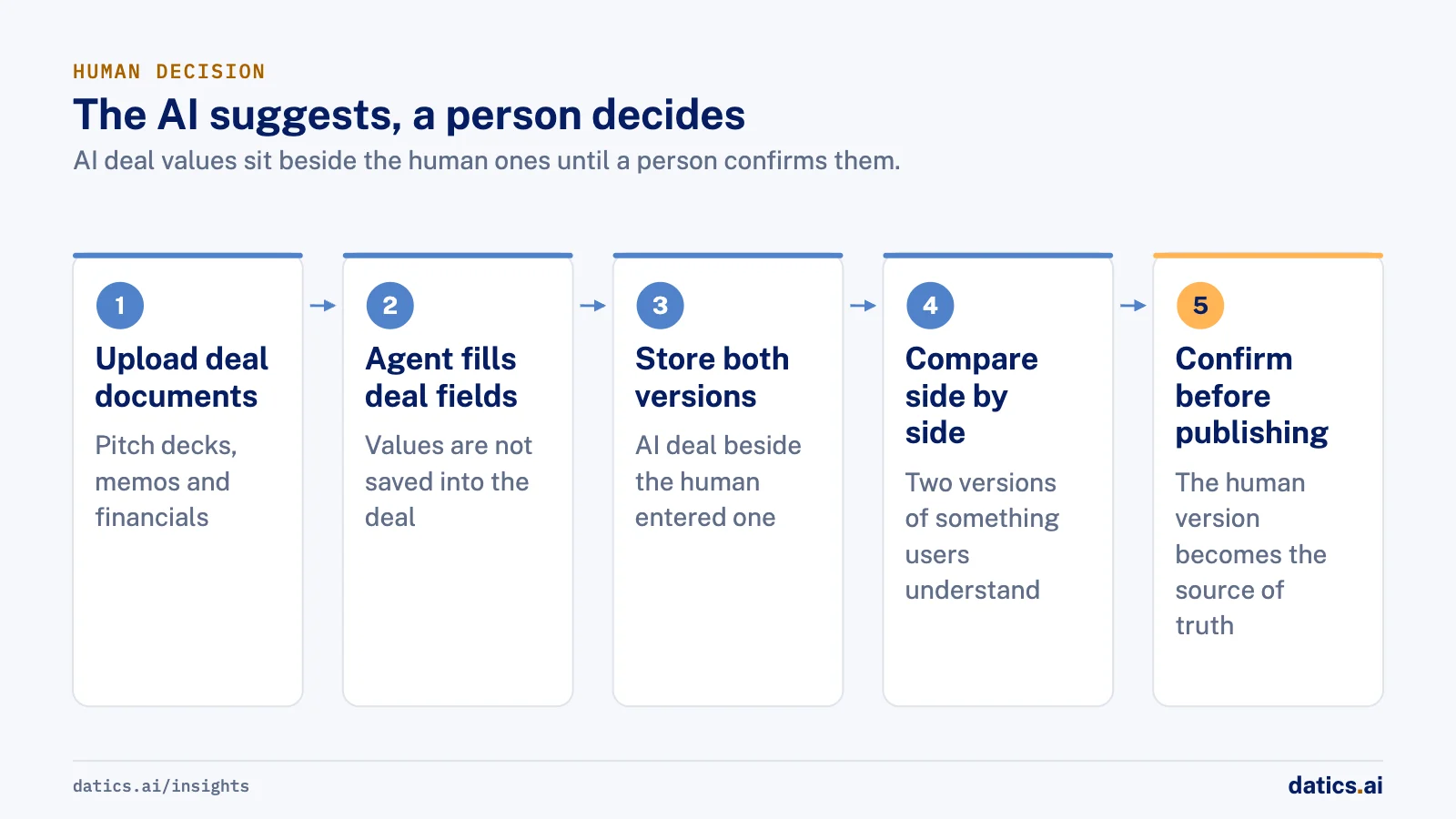
Instead, the AI-generated deal is stored next to the human-entered one and the two are shown side by side, with a pre-publish gate that needs human confirmation. Once a person finalizes the data, the human version is the source of truth. A non-technical user does not have to trust the model. They compare two versions of something they understand and choose.
The same idea works for creative and analytical tools. On a governed internal-app builder we are engineering for a founder-led AI company, users turn their own company data into internal dashboards and apps. The edit agent works through select-and-edit and approval cards: the user points at the part they want changed, and the change is shown before it is applied. When the build agent is not sure how two tables join, it does not guess. It pauses and asks for approval, and a rejected join sends the build back to table selection. The user answers a plain question about their data instead of reading a query.
If you are adding agents like these to a product that already has users, our guide to adding AI agents to an existing SaaS product without rebuilding it covers the architecture side.
03AI user experience choices that build trust
Most of the work is choosing the humble option at each point where the AI touches the user. This table summarizes the patterns we use most.
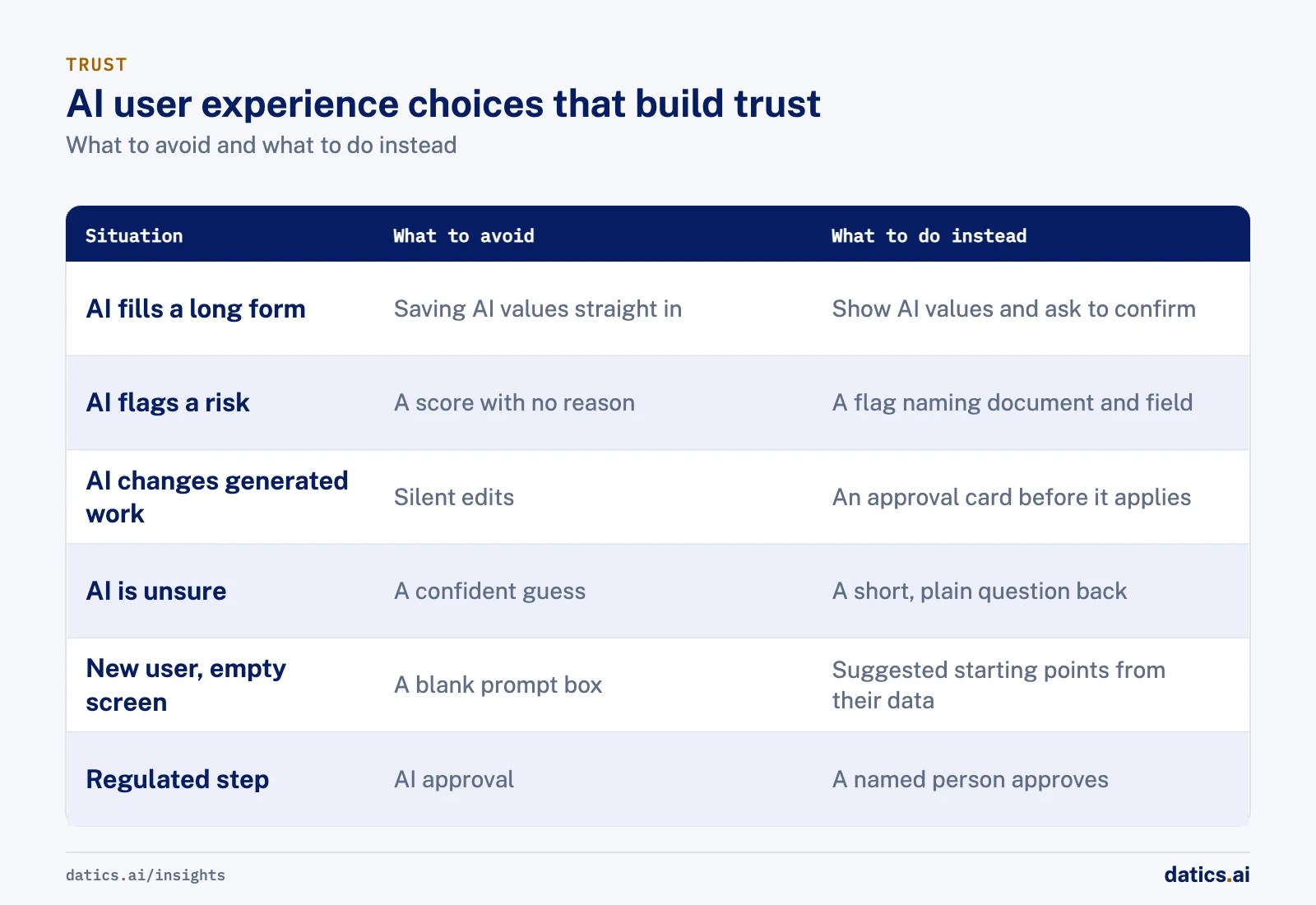
| Situation | What to avoid | What to do instead |
|---|---|---|
| AI fills a long form | Saving AI values straight into the record | Show AI values beside the human ones and ask for confirmation |
| AI flags a risk | A score with no reason | A structured flag that names the document and field it came from |
| AI changes generated work | Silent edits | An approval card that shows the change before it applies |
| AI is unsure | A confident guess | A short, plain question back to the user |
| New user, empty screen | A blank prompt box | A few suggested starting points drawn from their own data |
| Regulated step | AI approval | AI prepares the material and a named person approves |
The empty screen deserves a note. Non-technical users often do not know what to ask for. In the app builder, the product suggests three to five starter apps for each connected data source, worked out from catalog metadata that excludes personal data. There is a rule-based fallback if the model is unavailable. A good suggestion teaches the user what the feature is for faster than any help article.
04Make the reasoning visible in plain language
On the investment platform, risk outputs are structured flags only. Each one is traceable to its inputs and kept for audit. For a non-technical reviewer, a flag that says which document and which field triggered it is something they can check in a minute. A free-text paragraph of model reasoning is something they will either ignore or trust blindly, and both are bad outcomes.
Google's People and AI Research guidebook makes the same case in its chapter on explainability and trust. It says to help users calibrate their trust rather than maximize it, match the depth of explanation to the stakes, and state the product's capabilities and limitations early. Microsoft Research's Guidelines for Human-AI Interaction, tested with design practitioners against many AI products, organize their advice around the moments that matter. Those moments are at first use, during regular use, when the AI is wrong, and over time. For non-technical users, the moment when the AI is wrong is the one to design first.
A few practical rules follow:
- Use the user's terms in every label and message, not the model's or the engineer's.
- Show where an answer came from, such as the uploaded document or the data source, next to the answer itself.
- Show confidence only when it helps a decision, and prefer simple levels over percentages.
- Make undo or reject as easy as accept.
05Keep the hard boundaries in the product
Some lines should never depend on a user noticing a mistake. On the investment platform, AI never approves a deal, a KYC check or tokenization. It produces structured outputs and recommendations, and an admin or a human placement officer decides. Token lifecycle states cannot be skipped, and templates stay under admin control. These rules live in the platform, not in a prompt.
In the app builder, a security scan runs before any app is published and blocks publishing on serious issues: leaked secrets, unsafe SQL, unsafe content or columns holding personal data. Users who are not engineers cannot judge whether a generated query is safe, so the product does not ask them to. It checks for them and explains what it found.
The principle is simple. The less technical your users are, the more of the safety work the product has to carry on their behalf.
06What we see in production
On the regulated investment platform, a financial services marketplace for private placements, we built the AI as services around the existing .NET application. The client's own team built and integrated the front end. That split taught us to design the review step into the data itself. Each AI output had to carry what the front end needed to show it beside the human version and to hold it behind the confirmation gate. If the review step is not in the API contract, a separate front-end team will not invent it.
The agent design also grew a great deal during the work, from the handful of agents first scoped to many more, each with a narrow job in the deal lifecycle. Narrow agents turned out to be easier to explain to users, because each one does one recognizable thing, such as reading a pitch deck or preparing an investor report.
On the app builder, which is still in development and not yet in customers' hands, the governance features came first in the plan rather than last. They were the append-only audit log, join approval, query validation and publishing scans. We see that order pay off whenever a product will be used by people who cannot inspect what the AI produced.
07A short checklist before release
- A person confirms before AI output becomes a saved record.
- Every AI suggestion shows its source in terms the user recognizes.
- Regulated or risky steps cannot be completed by the AI under any prompt.
- Rejecting a suggestion is one click and leaves the user's work intact.
- New users see suggestions drawn from their own data, not an empty box.
Frequently asked questions
Should AI save values straight into a record for non-technical users?
No. Show the AI values beside the human ones and ask for confirmation before anything is saved. On a regulated investment platform, the AI-generated deal is stored next to the human-entered one, behind a pre-publish gate. Once a person finalizes the data, the human version is the source of truth, so users compare and choose instead of trusting the model.
How should an AI feature explain its reasoning to non-technical users?
Use structured flags in the user's own terms, not free-text paragraphs of model reasoning. A flag that names the document and field that triggered it is something a reviewer can check in a minute. Show where each answer came from next to the answer, and show confidence only when it helps a decision, with simple levels rather than percentages.
What should an AI feature do when it is unsure?
Ask a short, plain question back to the user instead of making a confident guess. In a governed internal-app builder, when the build agent is not sure how two tables join, it pauses and asks for approval. A rejected join sends the build back to table selection. The user answers a question about their own data instead of reading a query.
What should new users see on an empty screen?
A few suggested starting points drawn from their own data, not a blank prompt box. Non-technical users often do not know what to ask for. In the app builder, the product suggests three to five starter apps for each connected data source. A good suggestion teaches the user what the feature is for faster than any help article.
How Datics helps
Datics specializes in brownfield AI: bringing production AI into the product you already operate, without forcing a rebuild.
Related work
Case studies from our projects on the same subject.
Regulated investment platform
Financial Services · Private investment marketplace
Pitch decks become drafted deals, and issuers approve each field before publishing
Issuers retyped decks and financials into long deal forms. Now AI suggests each field, and the issuer applies, edits or rejects it.
SovrenAI
B2B Software · Enterprise Builder, an AI internal app builder
Internal apps built on company data, with a person confirming every guessed join
An agent writing queries over unknown schemas can join the wrong tables; here every guessed join waits for a person to approve it.
Where Do You Nom
Healthcare & Wellness · Food search and recommendations
Restaurant dishes linked to their recipes, so nutrition comes from ingredient data
Branded dish names linked to nothing, so no dish showed nutrition. Now each menu item reaches its recipe and ingredients.
More on Brownfield AI
Brownfield AI
AI integration for SaaS: add AI without a rebuild
AI integration for an existing SaaS product: keep your core as the system of record, reuse your APIs and auth, and ship one AI workflow without a rebuild.
 Umair MajeedRead
Brownfield AI
Is vibe coding enough for mature SaaS?
Vibe coding in SaaS is fast for prototypes. Mature products need server-side permissions, regression tests, evaluation and review before AI code ships.
Umair MajeedReadBrownfield AI
Entity matching: how do you map supplier data to a catalog?
Entity matching for product data works when you agree on mapping rules first, normalize before you compare, and route uncertain matches to people.
 Rana Umar MajeedRead
Brownfield AI
AI data integration: connect AI without a new platform
AI data integration without a migration: leave customer data where it lives, give AI governed paths to it, and index only what retrieval really needs.
Umair MajeedReadBrownfield AI
Brownfield vs greenfield: retrofit AI or start fresh?
Brownfield vs greenfield for AI: what a mature SaaS platform has that an AI startup lacks, where legacy code slows it down, and how to move just as fast.
Umair MajeedReadBrownfield AI
AI product strategy: embed AI or launch a separate product?
An AI product strategy for an established SaaS: when to build AI into the product you have, when a separate AI product makes sense, and how to decide.
Umair MajeedReadYour customers already expect AI from your product.
Let us make it real without rebuilding what already works.