
Workplace learning
Course completions won't renew your contracts. Proven skills will.
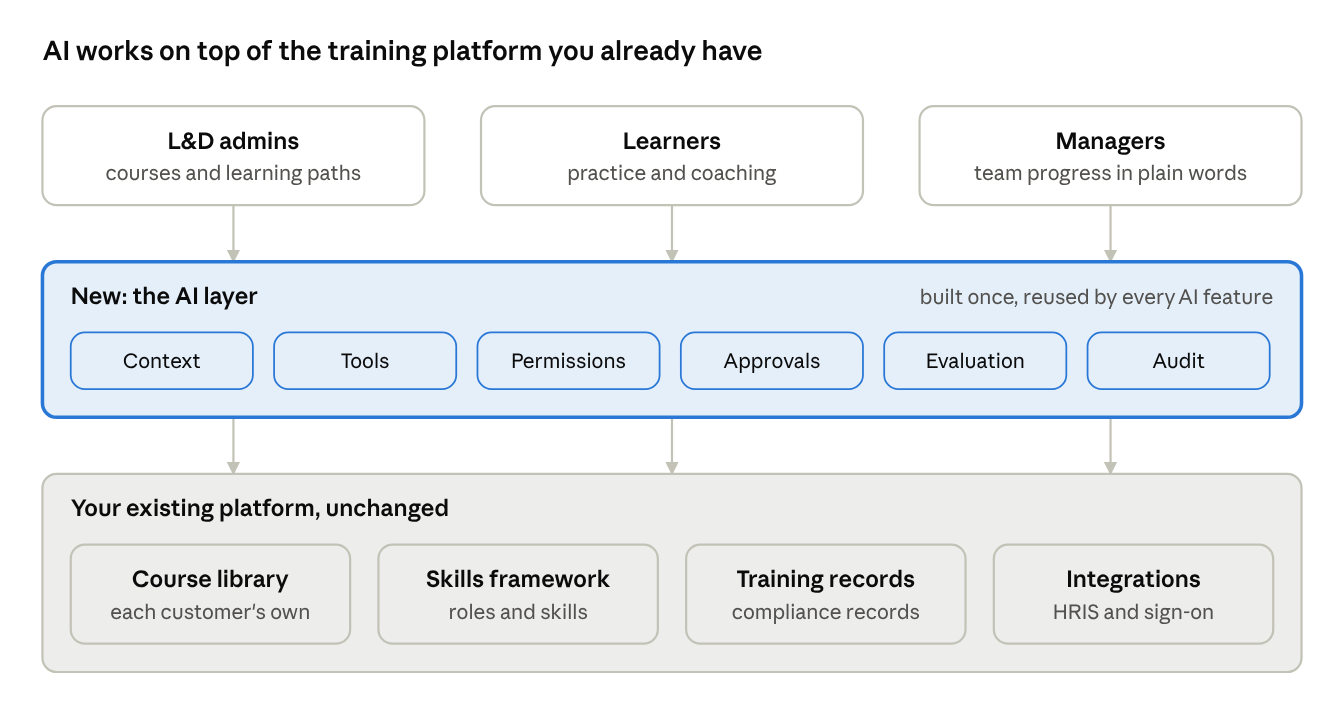
You add AI to an established corporate training platform by building on what it already holds: each customer's course library, their roles and skills framework, their completion records and their HR integrations. The AI drafts courses from the customer's own material, maps learning to skills and explains progress to managers. Admins approve what goes live. The platform does not need to be rebuilt.
Faster courses for admins. Proof of skills for buyers.
Why corporate training platforms feel the pressure
The people who buy your platform are under pressure of their own. HR and L&D leaders are asked to show what training changed, not how many courses were finished. A completion report answers the second question. It rarely answers the first.
At the same time, general AI tools let anyone turn a policy document into a course in minutes. If your platform still asks admins to build every module by hand, the work moves outside your product, and so does the reason to renew.
The usual responses both carry risk. A chatbot on the side of the product cannot see a customer's courses, roles or records. A rebuild puts years of integrations, compliance records and enterprise contracts at risk.
That knowledge is the advantage. The job is to let AI use it safely.
A general AI tool can write a course. Only your platform knows who took it, what role they hold and what they can now do.
The four places AI helps a training platform first
The best first uses remove slow, manual work your customers' admins already do in your product. Each one builds on data the platform already holds.
- 01
Course and quiz drafting from the customer's own material
An admin uploads a policy, a process document or product notes. The AI drafts a short course, a quiz and a summary from that material only. The admin edits, approves and assigns it.
- 02
Skills mapping for courses and roles
The AI tags each course and question to the customer's skills framework. It then suggests a learning path for a role, such as a new team lead. An admin or manager approves the path before anyone is assigned.
- 03
Practice and coaching for learners
After a module, a learner can practise a scenario, such as a customer call or a safety check, and get feedback drawn from the course. Nothing is recorded as a pass or fail. It is practice, not assessment.
- 04
Plain-language reports for managers and L&D
A manager asks "which of my team is behind on required training?" or "what skills did the sales team build this quarter?" The AI answers from the platform's own records, scoped to what that manager may see.
Where to start: admins first, records last
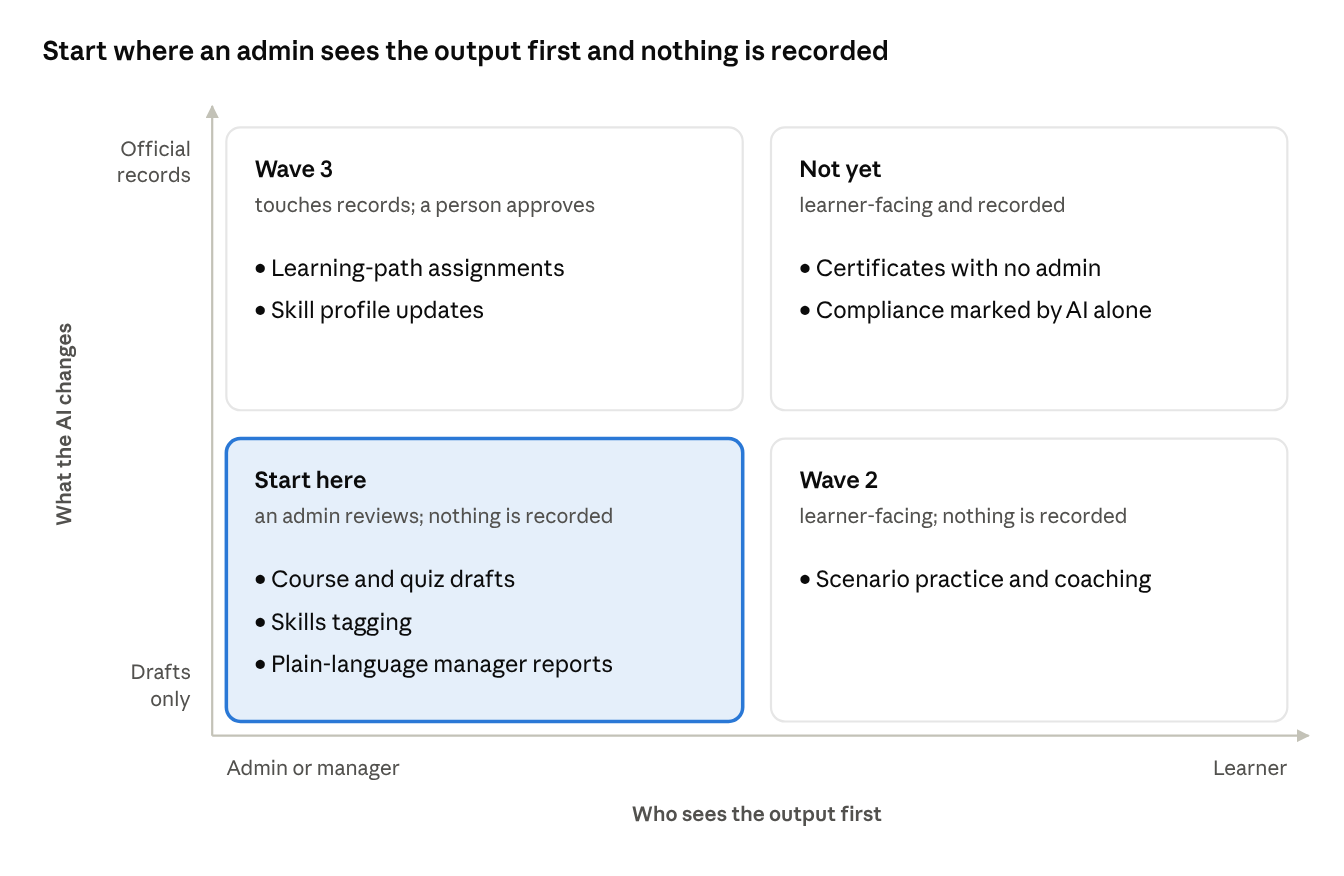
Two questions decide the order. Who sees the AI's output first: an admin or manager, or a learner? And does it only draft something, or does it change an official record such as a completion or a certificate?
Start in the lower left, where an admin checks every draft and nothing is recorded. Move right and up only when the first wave has earned the trust.
What the AI needs from the platform you already have
AI that works for enterprise customers is mostly the system around the model. In a training platform, most of that system already exists:
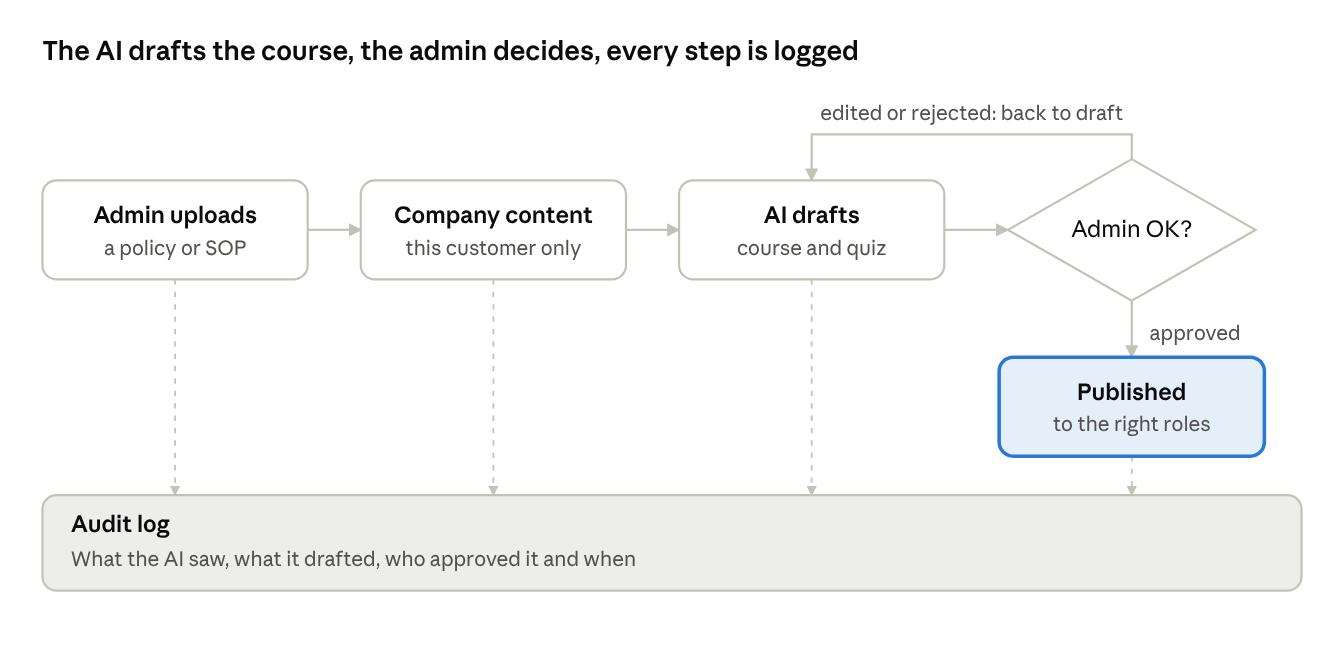
The work is to connect the AI to these pieces, not to rebuild them. Here is how that looks for course drafting.
The AI never publishes anything on its own. An edited or rejected draft goes back, and every step lands in the audit log.
- Context: the customer's own documents, courses, roles and skills framework.
- Tools: your own APIs to create a course, build a quiz or assign a learning path.
- Permissions: the roles you already enforce for admins, managers and learners.
- Approvals: an admin step before anything is published or assigned.
- Evaluation: checks that a draft matches the source document and the customer's tone.
- Audit: a record of every draft, approval and change.
Controls workplace learning buyers will ask about
An enterprise buyer's security review will reach your AI features quickly. These controls belong in the first release:
Good engineering makes these answers easy to enforce and easy to prove. It does not replace your customer's own legal and security review.
- Each customer's content stays theirs. Their policies, documents and courses are used only for their own company and never appear for another customer.
- Your roles apply. A manager sees their own team. An admin works within their own company. A learner sees their own progress.
- People approve what goes live. New courses, learning paths and anything assigned to employees wait for an admin.
- Compliance records stay human-owned. The AI never marks a mandatory course complete or grants a certificate on its own. Auditors need to know a person stands behind each record.
- Employee data rules shape the design. Privacy laws such as GDPR for EU employees decide what data the AI may use and where it may be processed.
- Every action is traceable. The log shows what the AI saw, what it drafted, who approved it and when.
Ship it in three waves
A rebuild asks enterprise customers to trust a year of work at once. Waves ask them to trust one feature at a time.
Measure each wave on the customer's work, not on AI usage. Useful measures are the time to publish a course, the share of drafts admins keep with light edits, and how often admins reject the AI's work. If a measure does not improve, the wave stays small until it does.
- 01
Admin and manager tools
Start with course drafting, skills tagging and plain-language reports for a few customers, behind a feature flag. Admins and managers see everything first.
- 02
Learner practice
Add scenario practice and coaching for one course area, using what wave one showed about quality and tone.
- 03
Actions that touch records
Only then let the AI propose learning-path assignments or skill updates, and still only after an admin or manager approves.
"Our AI turns your policy into a draft course, and your admin approves it" is easier for a buyer to say yes to than a broad promise.
How Datics helps
We run a 30-minute product review of your training platform, then an AI-Native Sprint that names the first capabilities, the unlock work behind them and the first wave into production, inside the platform your customers already use.
Related answers
EdTech
Teachers already use AI. Bring it inside your learning platform without a rebuild.
You add AI to an established learning platform by building on what it already has: your content library, your classes and rosters, your gradebook and your integrations. The AI drafts lessons, quizzes and feedback from that material. Teachers approve the work before any student sees it. Nothing about the platform has to be rebuilt.
Read the answerBrownfield AI
How to add AI agents to an existing SaaS product without rebuilding it
A practical route to shipping AI agents inside an established B2B SaaS product: use the existing permission model, integration layer and business logic instead of rebuilding around the model.
Read the answerYour customers already expect AI from your product.
Let us make it real without rebuilding what already works.